
 Worksheets
EMPOWERMENT TECHNOLOGIES - QUIZ 5
Total questions: 10
Worksheet time: 10mins
When integrating images and external material into a Microsoft Word document, which tab on the ribbon would you typically use to access the relevant tools and options?
Home
Insert
Page Layout
References
Which component of Microsoft PowerPoint allows the animation-like effects that happen when you move from one slide to the next during a presentation.
Transition
Animation
Design
Format Pane
In Microsoft Excel, what is the purpose of a "formula" in a cell?
To format the appearance of the cell's contents.
To apply conditional formatting to the cell.
To perform calculations using values from other cells.
To insert images and shapes into the cell.
You are creating a PowerPoint presentation to showcase the transformation of a company's logo from its original design to its current version. Which PowerPoint feature would you use to create a smooth transition between the two logo images?
Slide Master
Slide Sorter
Morph Transition
Animation Painter
You have a dataset in Microsoft Excel containing sales figures for different products over several months. To determine the product with the highest total sales, which formula would you use in a separate cell?
=SUM()
=AVERAGE()
=MAX()
=COUNT()
You are analyzing financial data in an Excel spreadsheet and need to determine whether expenses have increased by more than 10% compared to the previous year. Which formula would you use to calculate the percentage increase and then evaluate whether it meets the specified condition?
=SUM()
=AVERAGE()
=IF()
=COUNT()
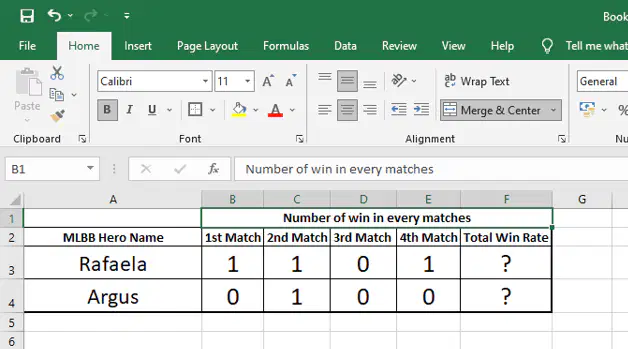
Based on the image shown, enter the formula to determine the total win rate of the hero Rafaela, what formula will you use?
=((B3+C3+D3+E3)/4)*100
=AVERAGE(B3:E3)*100
Both formula from the choices
No formula is applicable
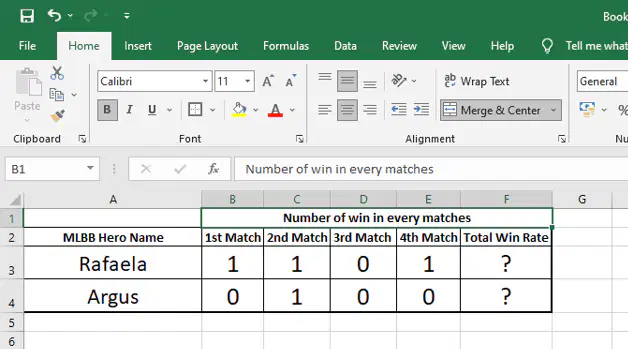
If the last column was change from "Total Win Rate" into "Total Wins in All Matches", what will be the new formula for the Hero Argus?
=SUM(B3+C3+D3+E3)
=(B3+C3+D3+E3)
All formula from the choices
No formula is applicable
You are building a budget spreadsheet in Excel for tracking monthly expenses. You want to calculate the total expenses for each month by summing up individual expense items. Which formula would you use to achieve this calculation?
=AVERAGE()
=COUNT()
=SUM()
=MAX()
In Microsoft Excel, which formula would you use to add up the values in cells A1 through A5?
=AVERAGE(A1:A5)
=COUNT(A1:A5)
=SUM(A1:A5)
=MAX(A1:A5)

