
 Worksheets
Practice Questions onGraphical Packages Quiz
Total questions: 10
Worksheet time: 5mins
What are graphical packages used for?
Graphical packages are used for creating and editing text documents.
Graphical packages are used for writing computer programs.
Graphical packages are used for organizing files and folders.
Graphical packages are used for creating and manipulating graphical elements.

What is the purpose of an introduction to graphical packages?
To explore different types of graphical packages
To provide an overview and understanding of how to use graphical packages for creating visualizations and graphics in computer programs.
To learn about the history of graphical packages
To understand the mathematical principles behind graphical packages

What are some common features of graphical packages?
Ability to create and manipulate text, support for various file formats, tools for editing and enhancing images, ability to apply filters and effects
Ability to create and manipulate graphical objects, support for various file formats, tools for editing and enhancing images, ability to apply filters and effects
Ability to create and manipulate audio, support for various file formats, tools for editing and enhancing images, ability to apply filters and effects
Ability to create and manipulate video, support for various file formats, tools for editing and enhancing images, ability to apply filters and effects

How can graphical packages enhance user interfaces?
Graphical packages have no impact on user interfaces.
Graphical packages enhance user interfaces by providing visual elements and improving usability.
Graphical packages make user interfaces more complicated.
Graphical packages only improve the aesthetics of user interfaces.

What are some examples of graphical packages?
Adobe Photoshop, CorelDRAW, GIMP, Inkscape
Microsoft Paint, Microsoft PowerPoint, Microsoft Excel
Google Chrome, Mozilla Firefox, Safari
Microsoft Word, Excel, PowerPoint

How can graphical packages be used to create interactive applications?
By using text-based commands to create and manipulate graphical elements.
By providing a set of tools and functions for creating and manipulating graphical elements, as well as event handling mechanisms for user interaction.
By using mathematical equations to create and manipulate graphical elements.
By using audio files to create and manipulate graphical elements.

How many nibbles are in 8 bytes?
14
16
32
64
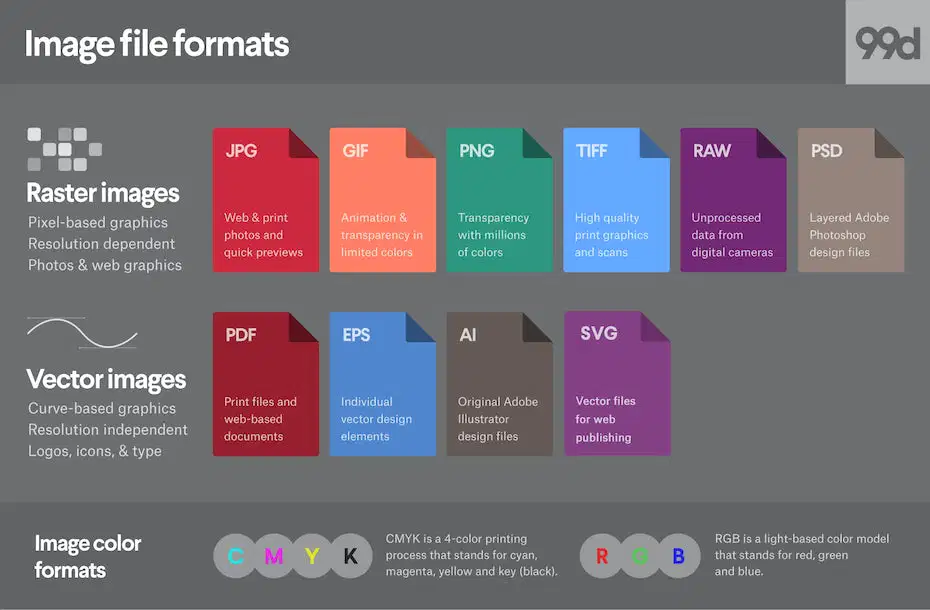
Which of the following is a common image format used in graphical packages?
.jgp
.mp4
.mp3
.pptx
Which tool in graphical packages allows you to select and move objects?
The magic wand
The paintbrush
The selection tool
The eraser
Which graphical package is commonly used for creating logos and vector designs?
Microsoft Excel
Microsoft Word
Adobe Illustrator
Microsoft PowerPoint

