
Font size
 Worksheets
Google Sheet Chapter 4
Total questions: 15
Worksheet time: 10mins
In a spreadsheet table, the formula "=IF(A1>5, B1+C1, D1-E1)" is an example of:
If-Then-Else function
Nested If function
Countlf function
Averagelf function
In a spreadsheet table, the formula "=IF(A1>10, "High", IF(A1>5, "Medium", "Low"))" is an example of:
If-Then-Else function
Nested If function
Countlf function
Averagelf function
In a spreadsheet table, the formula "=IF(A2>10, "Yes", "No")" will output "Yes" if the value in cell A2 is:
Greater than 10
Less than 10
Equal to 10
Any value
In a spreadsheet table, which function allows you to evaluate multiple conditions in a single formula?
If-Then-Else
Nested If
Countlf
Averagelf
In a spreadsheet table, the function "=COUNTIF(A1:A10, ">5")" will count the number of cells in range A1 to A10 that are:
Equal to 5
Less than 5
Greater than 5
Any value
In a spreadsheet table, the function " =COUNTIF(A1:A10, "<>0") " will count the number of cells that is not equal to zero in cell:
A1 and A10
A1 or A10
A1 to A10
In a spreadsheet table, the formula " =IF(A1>10, B1, IF(A1>5, C1, D1)) " will output the content of C1 if A1 equals
11.
4.
6.
5.
In a spreadsheet table, the function "=COUNTIF(A1:A5, ">=50")" will output 2 if the content of A1 to A5 are
50,49,48,47,46
51,50,49,48,47
52,51,50,49,48
53,52,51,50,49
In a spreadsheet table, the formula " =IF(OR(A1="Apple", A1="Banana"), "Fruit", "Not a Fruit") " will output "Fruit" if A1 =
Pineapple
Apple
Banana
Avocado
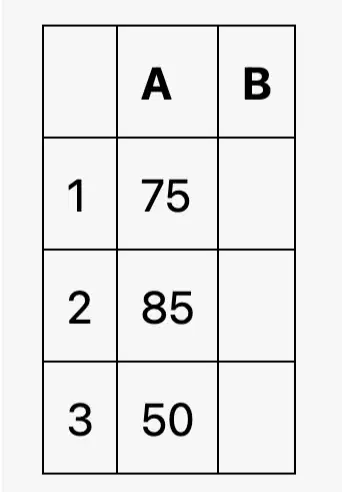
Which formula would you use to display "Pass" in the corresponding cell if the value in cell B2 is greater than or equal to 60?
=IF(B2<60, "Pass", "Fail")
=IF(A3>=60, "Pass", "Fail")
=IF(A2>=60, "Pass", "Fail")
=IF(B1>=60, "Pass", "Fail")
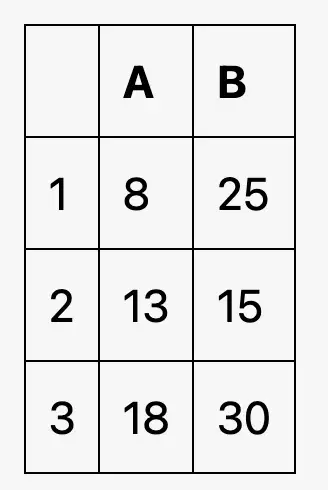
Which formula would you use to count the number of cells in column B that are greater than 20?
=COUNTIF(B2:B3, ">20")
=COUNTIF(B1:B3, ">20")
=COUNTIF(B1:B3, "<20")
=COUNTIF(A1:A3, ">20")
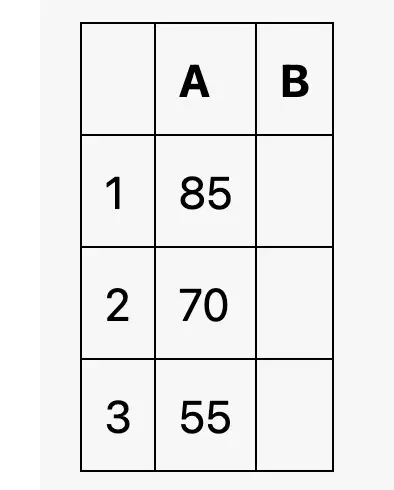
Which formula would you use to display "High" in the corresponding cell if the value in cell A1 is greater than 80, "Medium" if it is between 60 and 80 (inclusive), and "Low" otherwise?
=IF(A3>80, "High", IF(A2>=60, "Medium", "Low"))
=IF(A1>80, "High", IF(A2>=60, "Medium", "Low"))
=IF(A1>80, "High", IF(A1>=60, "Medium", "Low"))
=IF(A2>80, "High", IF(A3>60, "Medium", "Low"))
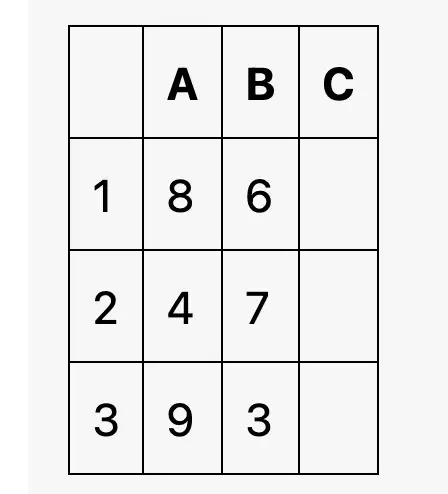
Which formula would you use to display "Yes" in the corresponding cell if both the values in cell A1 and B1 are greater than 5?
=IF(A3>5 OR B3>5, "Yes", "No")
=IF(A1>5 OR B1>5, "Yes", "No")
=IF(A2>5 AND B2>5, "Yes", "No")
=IF(A1>5 AND B1>5, "Yes", "No")
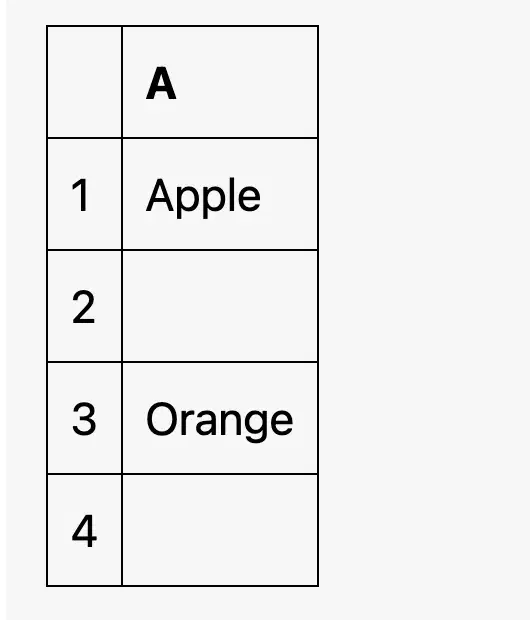
Which formula would you use to count the number of cells in column A that are not empty?
=COUNTIF(A1:A4, "<>")
=COUNTIF(A1:A4, "")
=COUNTIF(A1:A4, " ")
=COUNTIF(A2:A4, "<>")
In a spreadsheet table, which function allows you to perform different calculations based on a specified condition?
If-Then-Else
Nested If
Countlf
Sumlf

