
 Worksheets
ภาษาอังกฤษอินเทอร์เน็ต
Total questions: 40
Worksheet time: 30mins
Which one is correct about the internet?
It is connected to a computer by a wire, which you move it with your hand.
It is an object sent up into space to travel around the earth.
It is a computer system that allows people to connect with computers around the world.
It is a small computer network which connects other networks and computers all over the world.
Which one is not a web search engine?
BBC
Bing
Yahoo
What is the meaning of the word “double-click”?
to press a button on a computer mouse twice quickly
to search information on the internet
to remove something that has been stored on a computer
to send message from one computer to another
What is the search engine?
It will search for content related to your word search.
It will help access websites, web pages or read information on the internet.
It is a computer program that helps you look for information from the internet.
A and C are correct.
Which abbreviation is not correct?
UI ---User Interface
GUI ---Graphical User Interface
URL--- Uniform Resource Location
JPEG --- Joint Photographic Experts Group
A way of showing information on a computer screen by using icons, pictures rather than only text is called________________________.
user interface
text
graphics
graphical user interface
The way in which you see the information from a computer screen is called________________.
e
user interface
text
graphics
graphical user interface

What is the name of a picture given?
toolbar
taskbar
scroll bar
menu bar
What is 404 error?
The URL was misspelled.
The server could not find what was requested.
The web page has been deleted or moved.
All are correct.
What will happen if you click ‘Save As’ on a computer?
It’s used to save an already saved document with a recent name.
It’s not save an already saved document with a recent name.
It’s not save an already saved document with a new name.
It’s used to save an already saved document with a new name.
What kind of information does Wikipedia represent?
news
dictionary
encyclopedia
e-commerce
I do a _____ by keyword, so that the search engine will look for that keyword.
enter
search
type
click
What is the meaning of infographic?
A visual representation of information or data, e.g. as a chart or diagram
A collection of imagery, charts, and minimal text that gives an easy-to-understand overview of
a topic.
A graphic visual representations of information, data, or knowledge intended to present
information quickly and clearly
All are correct.
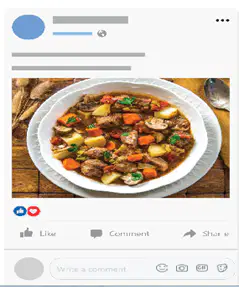
What will you comment this photo on Facebook?
So beautiful!
Look delicious!
Love it!
Awesome!

What is the meaning of emotion face symbol?
cry
sad
surprised
happy
C U 2NITE is__________________________.
See you tonight.
See you two nights.
See you at tonight.
See you soon.
Which one is not dictionary online website?

What is the URL of the online dictionary above?
Which one is the ‘Italic’ font style?
Pamela
Pamela
Pamela
Pamela
Which one is not a social media?
Line
TikTok
CNN

Look at the pictures. What is the name of each one?
title bar
menu bar
toolbar
taskbar

Look at the pictures. What is the name of each one?
menu bar
taskbar
toolbar
scroll bar

Look at the pictures. What is the name of each one?
taskbar
scroll bar
taskbar
menu bar

Look at the pictures. What is the name of each one?
scroll bar
menu bar
title bar
toolbar
Click “File” in the ___.
title bar
menu bar
scroll bar
toolbar
A ___ shows the name of the file that is open at that time.
toolbar
menu bar
scroll bar
title bar
A ___ is usually seen at across the bottom of a computer screen.
toolbar
taskbar
title bar
menu bar
This document is in PDF ___
escape
format
enter
key in
Which of the following is not the purpose of a dialog box on a computer screen?
to ask the computer users to give information.
to show which documents or programs are open.
to give information about what a computer user is doing.
to ask the computer users to choose what they want to do next.
Between ‘Save’ and ‘Save As’, which one is used to save an already saved document
or anything (which you want to save) with a new name?
Save
Save As
Don't save
Cancel
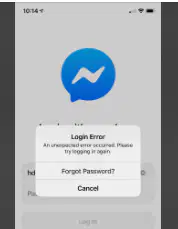
What does this error message indicate?
แบตเตอรี่ใกล้หมด ควรรีบเติมพลังงาน
สะกดที่อยู่เว็บไซต์หรือเว็บเพจไม่ถูกต้อง
ไม่พบเซิร์ฟเวอร์
ชื่อผู้ใช้งานหรือรหัสผู้ใช้งานกรอกไม่ถูกต้อง
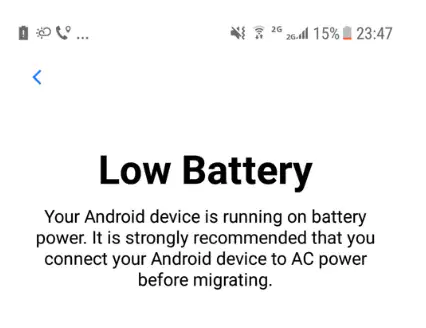
Look at the following error messages. What do these messages tell you about?
ชื่อผู้ใช้งานหรือรหัสผู้ใช้งานที่ถูกกรอกไม่ถูกต้อง
สะกดที่อยู่เว็บไซต์หรือเว็บเพจไม่ถูกต้อง
แบตเตอรี่ใกล้หมด ควรรีบเติมพลังงาน
"ไม่พบหน้าแสดง” หรือ “ไม่พบเซิร์ฟเวอร์"
What do you call a message that appears on your computer screen when you have
made a mistake?
enter / key in
Error message
dialogue box
programs
Match the words with their meanings
low battery
without delay
sleep
does not have much power left in it
change
Suchada likes to ................ the Internet to search for information.
surf
search
online
visit
For more information, .............. our website.
chat
the Internet
online
visit

What is the name of the browser in the picture?
Mozilla Firefox
Google Chrome
Microsoft Internet Explorer
Safari
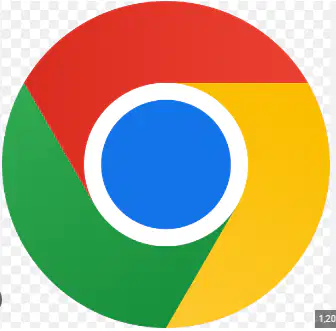
What is the name of the browser in the picture?
Mozilla Firefox
Safari
Opera
Google Chrome

What is the name of the browser in the picture?
Google Chrome
Microsoft Internet Explorer
Safari
Mozilla Firefox

Opera
Google Chrome
Mozilla Firefox
Microsoft Internet Explorer

