
 Worksheets
Eduphoria Aware testing quirks
Total questions: 25
Worksheet time: 35mins
What is the software we use to test the students on the 6-weeks exam?
Flocabulary
Aleks
Eduphoria
TExGUIDES
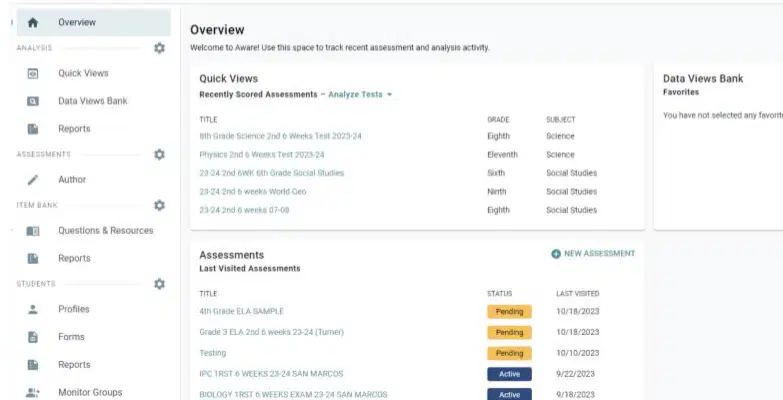
What 3 categories show up in the Overview screen of Aware?
Author, Reports, Assessments
Quick Views, Assessments, Data Views Bank
Data Views Bank, Reports, Profiles
Assessments, Profiles, Quick Views

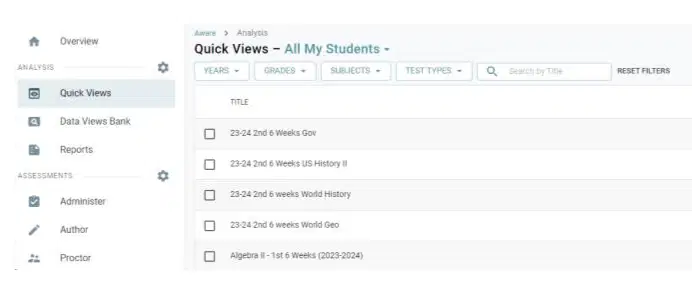
(a) allows you to analyze tests. You can sort by year, grade, and test type. When this is selected choose the report you want to view. (b) are the premade Eduphoria reports.
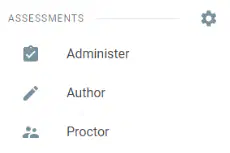
The tool symbol will allow you to edit your (a) NEVER delete your entire team, or ALL your team (b) will be deleted. (c) is where the tests are turned on for the students. (d) is where tests are made and edited. (e) is how you turn on a test as another teacher.
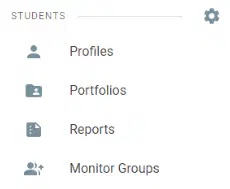
(a) is an easy way to look up a student and see their schedule and teacher of record. (b) is a way you can create groups of students you need to watch.
Circle where you would click to sort the tests by the subject.
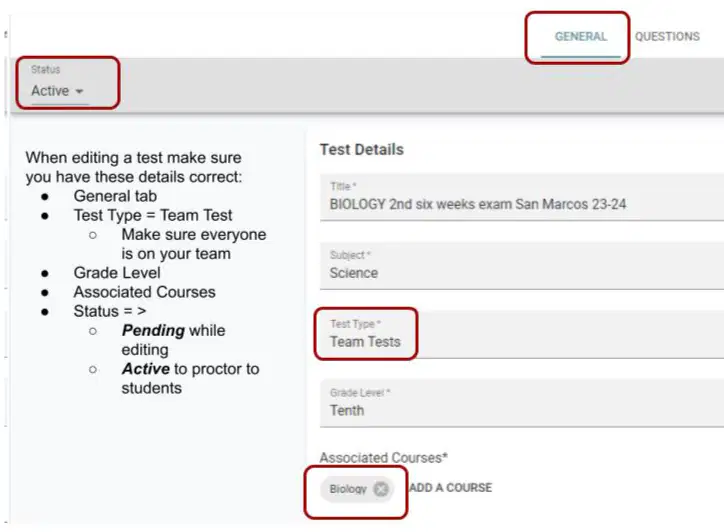
Author is used to create a test. When Authoring a test under the (a) Tab make sure you have chosen: Title, Subject, (b) for the test type, Grade Level, and Associate Courses. Status will be Pending while building the test and (c) when the test is complete. The test MUST be active to allow students to see the test.
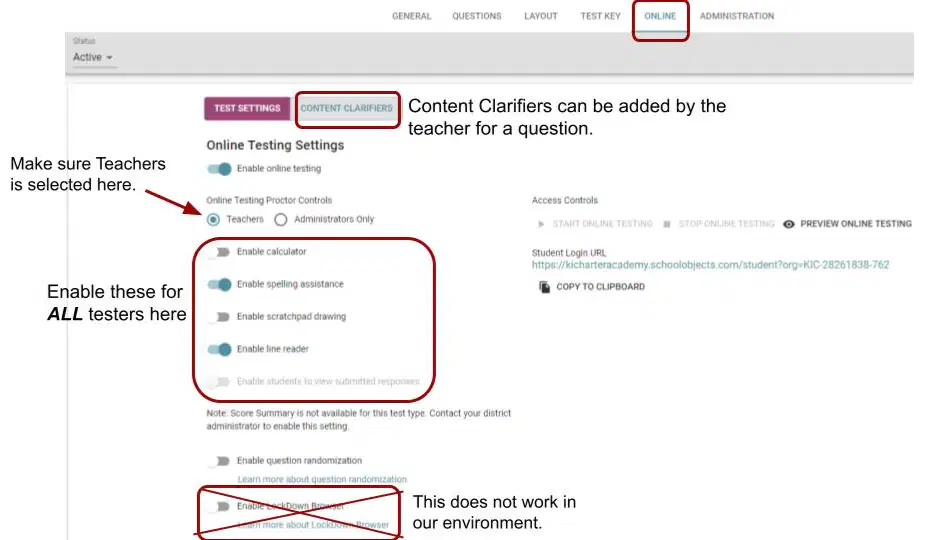
When building a test there are some things you need to do on the ONLINE tab. Under Test Settings make sure (a) is chosen for Online Testing Proctor Controls. Enable calculators, spelling assistance, line reader and more here will make them active for (b) students. The LockDown browser does (c) function properly. Do NOT use it. Content Clarifiers is a tab. If teachers add (d) to a question they will appear here.
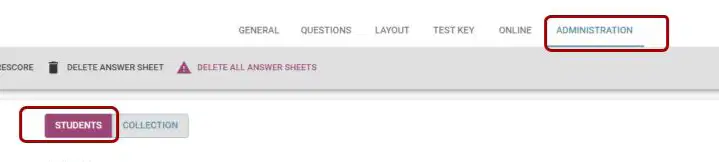
Under the ______Tab you will choose which students can see this test.
General
Layout
Online
Administration

The best option to choose students is (a) The next best option is (b) The other 3 options do not work properly according to Eduphoria. IF you choose selected teachers for printing (c) students with that teacher will see the test.
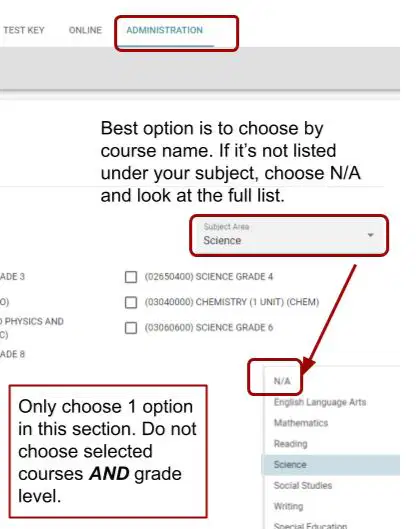
Continuing on Administration tab and Students, if you do not see your course listed change that subject to (a) and look under our entire list. You can choose multiple teachers or multiple courses, but only choose (b) type of filtering on this whole page.
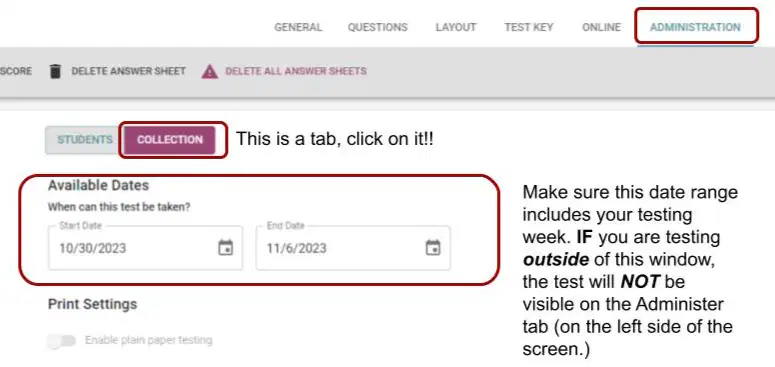
In the Administration tab, COLLECTION is a tab. Click on it!! This is where you choose which dates your test is available. If you are testing on a date outside this range you _____ see the test in the Administer section.
Will
Will NOT
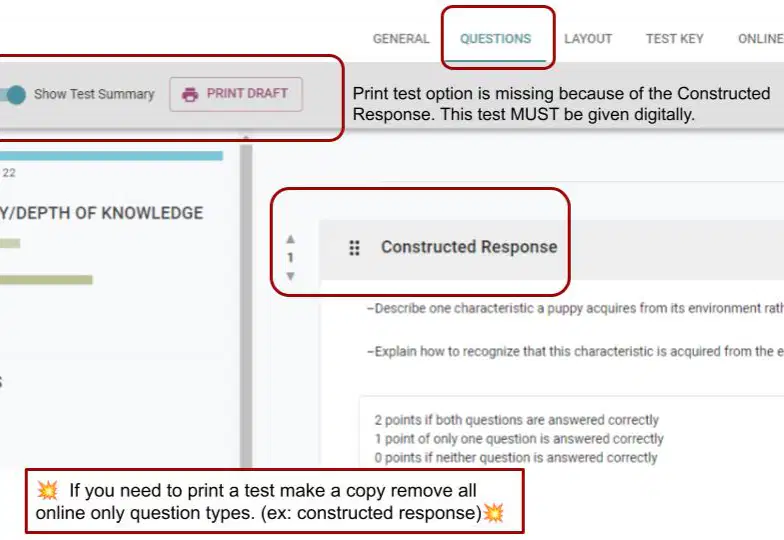
You can (a) a student copy under Questions, if the test is printable. A test will (b) be printable if it has any (c) questions. To make a test printable on the day of testing, make a copy and change all constructed response questions to (d)
Circle the word under Assessments in the left column that takes you to the page where you can turn on tests for the students.
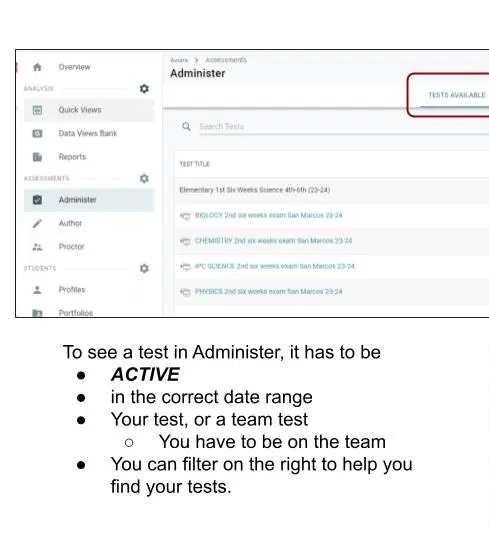
In order for a test to be viewable in the Administer tab, it has to be (a) and have the (b) date range. If you are giving a Team test, you have to be on the (c)

The (a) section on the right can help you find your tests. To make a test active click on the computer & mouse. It then turns into a green (b) The keypad icon is what you click to (c) or grade constructed responses for students. Student grades will (d) show until all answers are graded, including constructed responses.
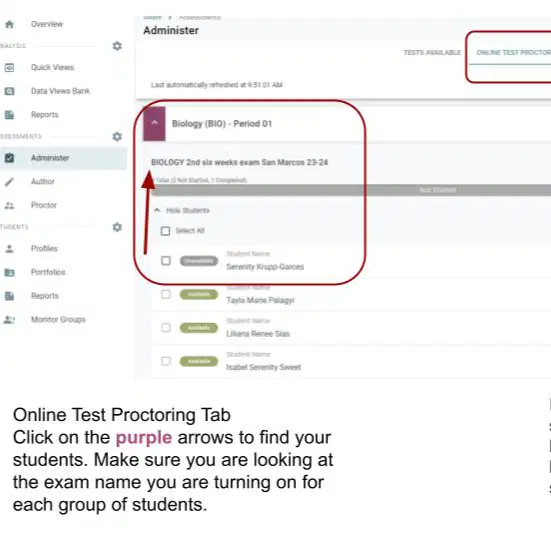
Once the test has a green check on the Test Available Tab, you then use the (a) tab to turn on the tests. Click the (b) arrows to see students under the subject / grade / period. Make sure you double check the test name above (c) names when turning on tests. Check students and then (d) to turn on the test. Do this for each period / each grade level for each (e)
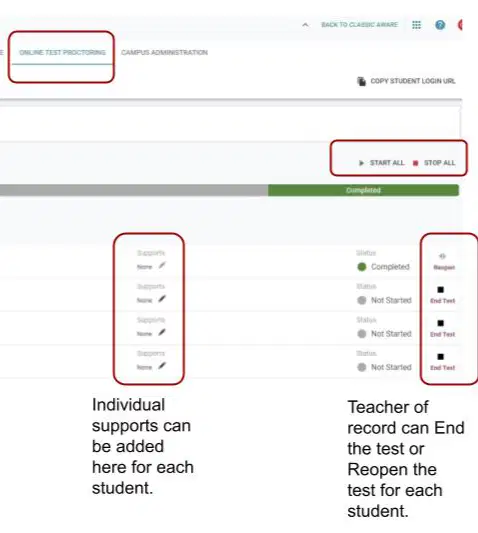
Student (a) can be added here if you are the teacher of record. Tests can be forced end test or if closed too early, (b) for the students. These two features can (c) be done if you are using the Proctor feature to turn on a test as another teacher.

If you are not the teacher of record, you can use (a) to emulate the teacher of record and (b) the tests for your students.
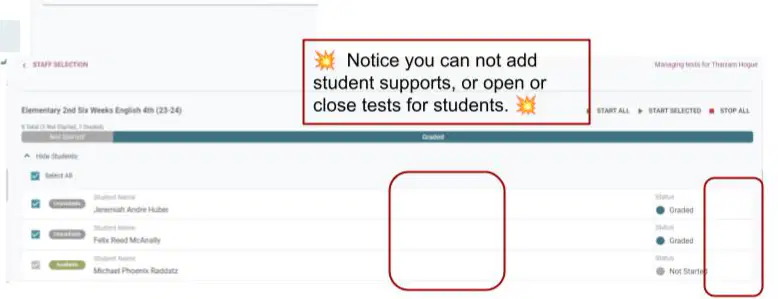
If using Proctor to start a test as another teacher, what features are not available to you?
supports, reopen, end test
status (complete / not started)
Student Name
Available / Unavailable

When using Proctor (or if your students change teachers near test time) the quickest way to find their teacher of record is to use student (a) To find the student use Search in the upper (b) and type one name for the student (pick the unique one). Open the student profile and you will find (c) on the first page. The teachers on this list are teachers of record for this (d) today.
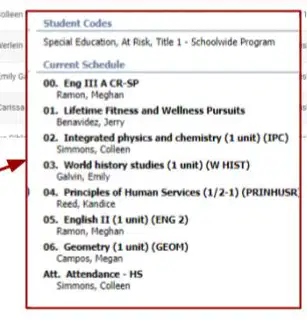
What math class and teacher does this student have on their schedule?
Algebra / Campos
Geometry / Stephens
Geometry / Campos
Algebra / Moreno
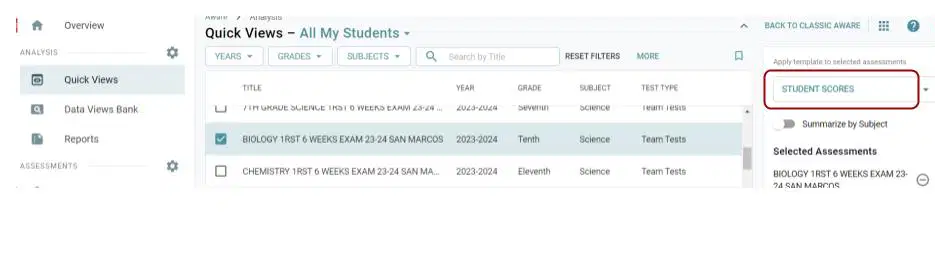
When using Quick Views, on the right, it gives you the option of seeing 4 default reports. What are they?
Data Dig Export 1, Student Scores, Student Individual Responses, Default
Student Reporting Category Breakdown, Data Dig Export 2, Student Individual Responses, Student Scores
Student Scores, Student Reporting Category Breakdown, Student Learning Standard Breakdown, Student Individual Responses
Student Individual Responses, Student Scores, Default, Student Learning Standard Breakdown
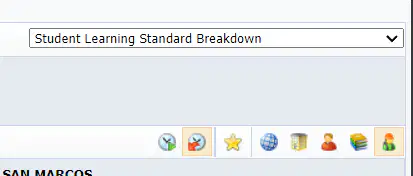
No matter which option you choose for reporting, the buttons are important. The teacher with the (a) shirt, gives you the teacher summary. (All teachers who gave this test.) The far right button (student with a (b) shirt) gives you all your individual students. The button with the green mark is where the students are (c) . They will be listed under the teacher they are listed with today in Eduphoria. The 2nd button with the (d) arrow lists the students under the teacher they were with on test day. If you hover over any of the buttons they will remind you what they are.
The quirks I pointed out in this are the items that were issues this testing time. If there is a question you have or something that you had issues with please let me know so I can share with all. My goal is that everyone will become Eduphoria testing experts. Thank you for all you do!!!

