
 Worksheets
Computer Systems Quiz
Total questions: 60
Worksheet time: 20mins

What does PERIPHERAL mean?
The extras you have inside your computer.
The extra hardware you can connect to your computer to make computing easier.
When you look out of the corners of your eyes.
What is meant by hardware?
A part of a computer system that has no physical or invisible form
A collection of electronic data stored and regulated by a computer in the form of a program that can execute a command
Collection of physical components that make up a computer device
Something not important on a computer

Examples of hardware are:
Mouse
Monitor
CPU
All of these
Alternatively referred to as main memory, primary memory, or system memory, it is a hardware device that allows information to be stored and retrieved on a computer. It is a volatile memory
CPU
Hard Disk Drive
Random Access Memory
Optical Disk Drives
Which is NOT an example of a peripheral device?
Monitor
Keyboard
Motherboard
Printer
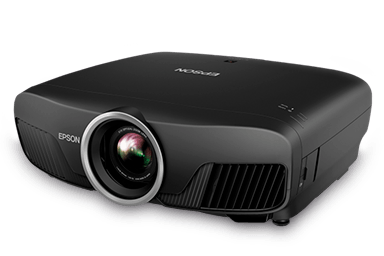
What type of device is this? (Projector)
Input
Output
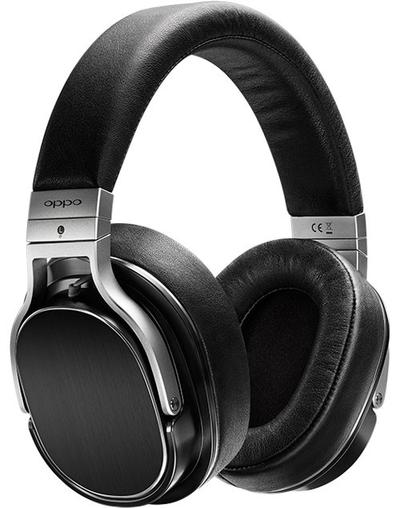
What type of device is this? (Headphones)
Input
Output
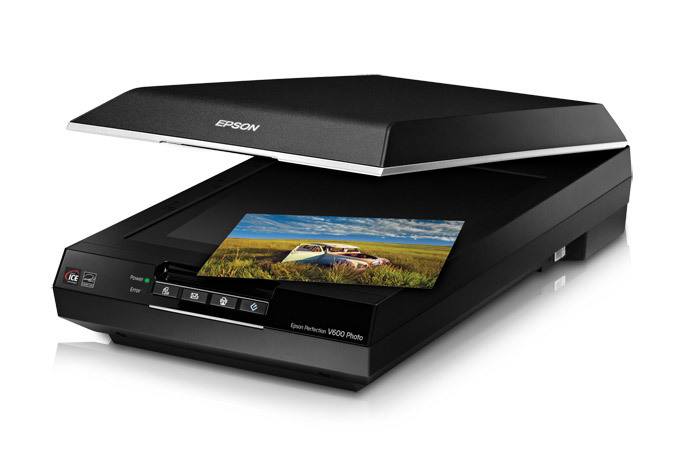
What type of device is this? (Scanner)
Input
Output

What type of device is this? (Printer)
Input
Output

What type of device is this? (Smartphone screen)
Input
Output
Input and Output

Which of these holds information without processing or changing it?
Input
Output
Storage
Computer
Why does a computer need secondary storage?
To reduce the amount of virtual memory it needs
To store data, files and software for future use
To make it run faster
To store data that the processor needs
What type of Software is needed to control the computer’s hardware?
Programming Software
Systems Software
Application Software
Bespoke Software
The following is not a type of Systems Software
Applications
Utility Programs
Operating Systems
Device Drivers
When a hard drive becomes fragmented; reading and writing files becomes…
Faster
Slower
No different
Harder
A fragmented disk takes longer to read from and write to.
True
False
Defragmentation will aim to…..?
Make more space on the hard drive
Move files further apart from each other
Move files closer together
Move free space closer together
Stores open programs and operating system data currently in use; can read/write data; volatile
Which type of software helps to maintain the computer system?
Operating system
Application software
Utility software
Device drivers
What is the purpose of operating systems?
Manage computer resources, provide user interface, enable software execution
Perform specific tasks for users
Support and maintain the computer system
Protect the computer system from viruses, malware, and unauthorized access
Which of the following is an example of an operating system?
Word processing software
Windows
Image processing software
Integrated Development Environments (IDE)
What does application software do?
Manage computer resources, provide user interface, enable software execution
Perform specific tasks for users
Support and maintain the computer system
Protect the computer system from viruses, malware, and unauthorized access
Which of the following is an example of word processing software?
Windows
macOS
Linux
Microsoft Word
Which of the following is an example of system software?
Device drivers
Web browsers
Spreadsheet software
Presentation software
What does an operating system manage?
Installation, execution, and removal of software applications
Hardware devices connected to the computer
Resources of the CPU and memory
All of the above
What is the purpose of word processing software?
Creating, editing, and formatting text documents
Editing, enhancing, and manipulating images
Organizing, analyzing, and calculating numerical data
Creating and delivering multimedia presentations
What is the purpose of image processing software?
Creating, editing, and formatting text documents
Editing, enhancing, and manipulating images
Organizing, analyzing, and calculating numerical data
Creating and delivering multimedia presentations
What is the purpose of spreadsheet software?
Creating, editing, and formatting text documents
Editing, enhancing, and manipulating images
Organizing, analyzing, and calculating numerical data
Creating and delivering multimedia presentations
What is the purpose of presentation software?
Creating, editing, and formatting text documents
Editing, enhancing, and manipulating images
Organizing, analyzing, and calculating numerical data
Creating and delivering multimedia presentations
What is the purpose of database software?
Creating, editing, and formatting text documents
Editing, enhancing, and manipulating images
Organizing, analyzing, and calculating numerical data
Organizing and managing large collections of data
What is the purpose of web browsers?
Creating, editing, and formatting text documents
Editing, enhancing, and manipulating images
Organizing, analyzing, and calculating numerical data
Accessing and browsing websites on the internet
What is the purpose of Integrated Development Environments (IDE)?
Creating, editing, and formatting text documents
Editing, enhancing, and manipulating images
Organizing, analyzing, and calculating numerical data
Writing, testing, and debugging computer programs
What is the purpose of computer security software?
Manage computer resources, provide user interface, enable software execution
Perform specific tasks for users
Support and maintain the computer system
Protect the computer system from viruses, malware, and unauthorized access
Which of the following is NOT an Operating System
Android
Word
iOS
Windows
Which is NOT a utility program?
word processor
Compression software
Back-up
Disk organisation

