
NEW
Font size
 Worksheets
Google Drive Quiz
Total questions: 25
Worksheet time: 25mins

Natalia was exploring her new laptop and noticed a grid of dots icon, often called the "waffle." What will she find when she clicks on it?
Google Boxes
Google Vending
Google Apps
Google Phone
Aiden uses Google Drive to store his _________ on Google's servers, or "in the cloud."
answers
thoughts
files
school supplies
What is a folder?
A small, portable flash memory card that plugs into a computer's USB port
A digital place where you save and organize individual files
A rigid storage device fixed permanently within the computer case
A high-density compact disk for storing large amounts of data
Which of the following actions can you perform on a file in Google Drive?
Rename the file
Share the file with others
Move the file to a different folder
All of the above
What is file management?
Supervising a group of folders
Organizing your files and folders in a system that can be easily found
A rigid storage device fixed permanently within the computer case
A high-density compact disk for storing large amounts of data
Which of the following file types can be stored in Google Drive?
Google Docs
Music files
PDF documents
All of the above
What is a file extension?
The three or four characters to the right of the period in a file name
A small, portable flash memory card that plugs into a computer's USB port
A high-density compact disk for storing large amounts of data
A rigid storage device fixed permanently within the computer case
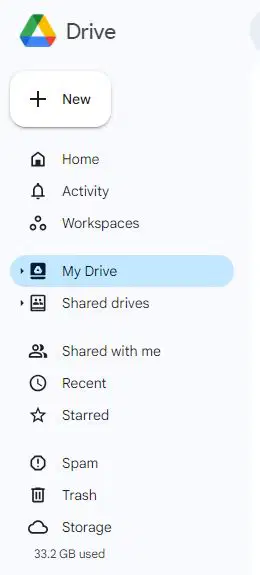
What is the first thing you need to do to create a new folder?
Click "Trash"
Click "My Drive"
Click "Home"
Click "New"
True or False: You can not have folders within a folder.
True
False
Sam and Jackie are working on a school project and need to keep, organize, and work on their files efficiently. What are the advantages of using Drive for their project?
files stored in the cloud
can store almost all file types
can be used collaboratively
All of these and more
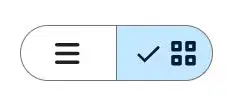
Asher is organizing files in Google Drive. What is the purpose of these buttons?
They are for editing images in Google Photos.
They are for changing the layout in Google Drive.
They are for composing messages in Google Chat.
They are for adjusting volume in Google Music.

What is this button for?
It's for getting more buttons or tools.
It is for changing the font size.
It is for creating bulleted lists.
It is for inserting images.
Which of the following is NOT a feature of Google Drive?
File version history
Automatic virus scanning
Built-in video editing
Real-time collaboration
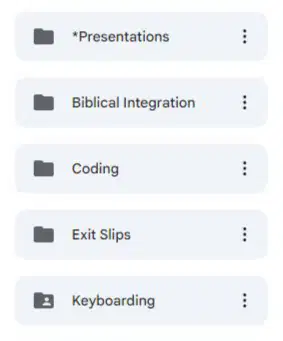
While organizing her digital workspace, Fiona is categorizing these items. What are they?
Files
Drives
Folders
Boxes
Which of these is NOT a way Braelyn could organize her project files in Google Drive?
Color coding folders
Creating nested folders
Tagging with keywords
Sorting by date
Hope just started working on her school project on the computer. Once she creates a file, she must _________ it.
share
hide
save
name
Luke saved his project files to Drive and wants to know if he can open them on a different computer or his smartphone.
Yes!
No.
Nau is organizing his files/folders in his Drive. What action does he perform using the mouse to move folders or files?
SHIFT + ALT
Swip n' Swap
Drag and Drop
CTRL + D
Lauren is organizing her digital files and wants to ensure they are safe and accessible from anywhere. Which of the following is a feature of Google Drive that would help her?
Automatic file backup
Video conferencing
Social media integration
Online shopping
Tommy is organizing his computer files and decides to move some old documents to the Trash. Will these files be permanently deleted immediately?
True
False
Gabby and Laityn are having a debate. They want to know how long a document stays in the "Trash" before being permanently deleted. Can you help them settle this?
15 days
1 week
30 days
Indefinitely
Where should Hudson create this year's individual subject folders?
From the "my drive" page
Within her current grade level folder
In her "Old files" folder
She doesn't need individual class folders
Which is NOT a good way to organize your Google Drive?
Finding a good filing system and sticking to it.
Creating folders and subfolders
Adding color to your folders
Name your folders Folder1, Folder2, Folder3, and so on
Keyboard shortcut for Select ALL
CTRL + B
CTRL + C
CTRL + A
CTRL + D
How do you quickly find a specific file in Google Drive?
By creating a new folder
By browsing through all folders manually
By deleting unnecessary files
By using the search bar at the top

