
 Worksheets
9.2 Homework 3
Total questions: 19
Worksheet time: 25mins
Label the product life cycle diagram in order.
Maintenance
Design a Solution
Develop the Product
Testing & Evaluation
(a) is the physical parts of the computer and (b) is the programs that run on a computer.
Label the Fetch-Decode-Execute Diagram with appropriate descriptions.
Completes the instruction
Collects an instruction from memory
Understands the instruction
Label this computer system diagram.
Storage
Input
Output
Process
Memory
Label these storage devices.
CD
SD Card
Cassette Tape
Hard Disk Drive
Label these storage devices
Blu-ray Disc
Solid State Drive
USB Flash Drive
Floppy Disk
When you shift a binary number to the left you will...
Multiply
Divide
When you shift a binary number to the right you...
Multiply
Divide
Complete a 2 place right shift on the binary number:
1 1 0 1 0 1 1 1
(a)
Divide this binary number by 2:
1 1 0 1 0 1 1 0
(a)
Match the logic gate to the image.

AND

OR

NOT

NAND

NOR
The (a) is the main memory that stores currently used data and instructions. When this is full the (b) can be used, which is on the (c) . Any instructions that need to be accessed quickly can be stored in the (d) which is in the (e) .
RAM is (a) meaning that when the device is turned off the data is (b)
A USB Memory Stick is (c) meaning that when the device is taken out of the computer the data is (d)

What is the term for how many samples are taken per second?
Sample Rate
Sample Resolution
Binary
File Size

How many tracks are in this project?
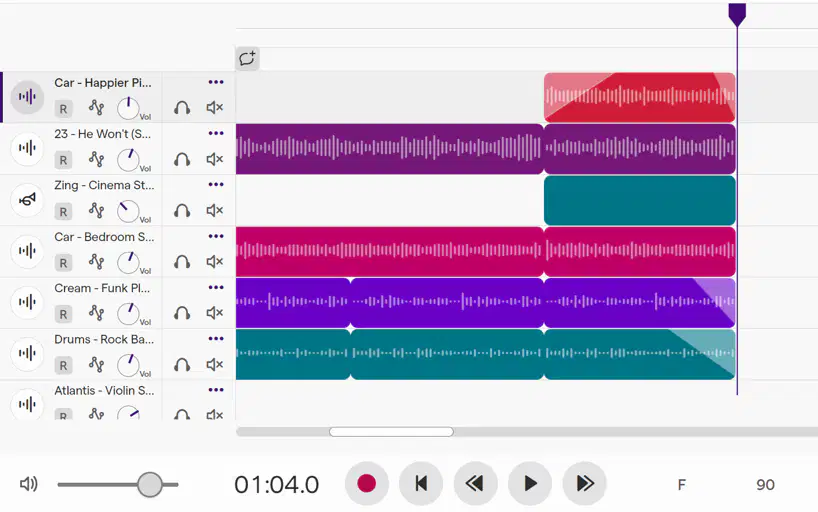
How many minutes and seconds does this piece go for?
1 hour 4 minutes
90 seconds
1 minute 4 seconds
14 minutes
Match the following types of software:
Programs designed to help optimise, maintain and protect the computer system.
Utility Software
Programs that a user chooses to have to perform a specific task, they will be different on every device.
Application Software
Controls the general operation and provides a way for users to interact with the computer system.
Operating System
Hard Drive
CD
DVD
Blu-Ray
Solid State Drive
USB Memory Stick
Cassette Tape
Floppy Disk
SD Card

