
 Worksheets
9.2 Homework 4
Total questions: 46
Worksheet time: 55mins

Which Social Engineering Threat?
Trying to get you to put your personal details into a fake website via an email or text.
Phishing
Gaining access to a secure room by following a member in.
Tailgating
Lying to convince you to give them your personal details, such as a phone call.
Pretexting
Looking over someone's shoulder to see their personal data as it is entered
Shouldering
Directing people way from a
genuine website to a fake one to steal data
Pharming
(a) engineering involves techniques used by (b) (‘ (c) ’) to (d) people into providing personal or confidential (e) .

Trying to get you to put your personal details into a fake website via an email or text.
(a)
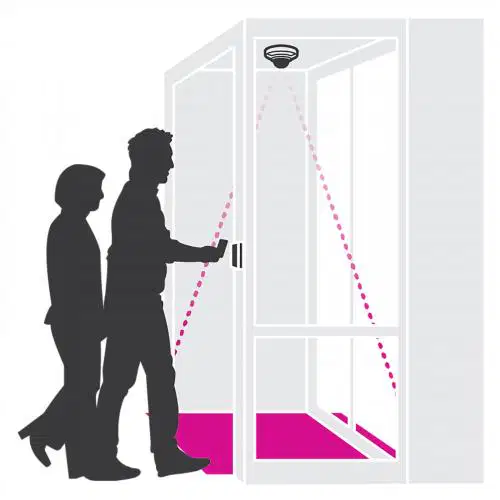
Gaining access to a secure room by following a member in.
(a)

Lying to convince you to give them your personal details, such as a phone call
(a)

Looking over someone's shoulder to see their personal data as it is entered.
(a)

They may promise goods to help convince people to part with personal data. Click here to claim the latest 'iPhone'
(a)

Directing people way from a genuine website to a fake one to steal data.
(a)
Malware (malicious software) is software that is designed to gain access to your computer with malicious intent.
False
True
Worms (Pick 3) ......
replicate themselves
do not attach themselves to files as a virus does.
spread through the network and use the system’s resources.
attach themselves to files as a virus does.
Ransomware (Pick 3) ....
form of virus
self-replicating
form of worm
prevents the user from being able to access the data
What is Malware?
Programs that can attack only computers.
Programs that can attack computers, tablets, phones and other digital devices.
Programs that can protect computers, tablets, phones and other digital devices.
Programs that can protect only computers.
How can we prevent Malware attacks? (Select 2)
Install Anti-Virus
Make sure we have strong passwords
Run regular scans
Don't access personal info with public Wi-FI
I pretend that I will be useful and safe when really I will try and attack your device.
What Am I?
(a)
I undertake an automated process and can take control of a computer system.
What Am I?
Worm
Virus
Bot
Hacker
Cyber security is ...
The practice of protecting systems, networks, and programs from digital attacks.
Any activity designed to protect the usability and integrity of a network and its data by managing access to the network.
LAN stands for .....
Lower area network
Local area network
Local area net
last ace note
The W in WAN stands for..
Welsh
West
Wide
Word
The P in PAN stands for...
Personal
Pin
Program
Point
The smallest network is a ..
LAN
PAN
WAN
The network in a school or office is usually a ..
LAN
PAN
WAN
A network of cash machines is connected in a .
LAN
WAN
PAN
A Wide Area Network can connect Local Area Networks together.
True
False
Which three of these is a benefit of having a network?
You can share files easily.
Easy to manage compared to a single device
You can share a printer, this saves money!
It is easy to back up all the data as it is stored on the server.
Label the product life cycle diagram in order.
Maintenance
Design a Solution
Develop the Product
Testing & Evaluation
(a) is the physical parts of the computer and (b) is the programs that run on a computer.
Label the Fetch-Decode-Execute Diagram with appropriate descriptions.
Completes the instruction
Collects an instruction from memory
Understands the instruction
Label this computer system diagram.
Storage
Input
Output
Process
Memory
Label these storage devices.
CD
SD Card
Cassette Tape
Hard Disk Drive
Label these storage devices
Blu-ray Disc
Solid State Drive
USB Flash Drive
Floppy Disk
When you shift a binary number to the left you will...
Multiply
Divide
When you shift a binary number to the right you...
Multiply
Divide
Complete a 2 place right shift on the binary number:
1 1 0 1 0 1 1 1
(a)
Divide this binary number by 2:
1 1 0 1 0 1 1 0
(a)
Match the logic gate to the image.

AND

OR

NOT

NAND

NOR
The (a) is the main memory that stores currently used data and instructions. When this is full the (b) can be used, which is on the (c) . Any instructions that need to be accessed quickly can be stored in the (d) which is in the (e) .
RAM is (a) meaning that when the device is turned off the data is (b)
A USB Memory Stick is (c) meaning that when the device is taken out of the computer the data is (d)

What is the term for how many samples are taken per second?
Sample Rate
Sample Resolution
Binary
File Size

How many tracks are in this project?
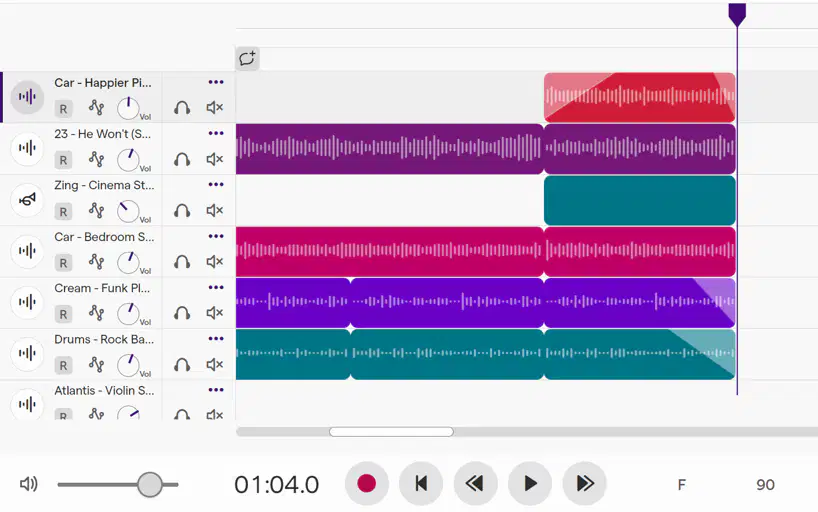
How many minutes and seconds does this piece go for?
1 hour 4 minutes
90 seconds
1 minute 4 seconds
14 minutes
Match the following types of software:
Programs designed to help optimise, maintain and protect the computer system.
Utility Software
Programs that a user chooses to have to perform a specific task, they will be different on every device.
Application Software
Controls the general operation and provides a way for users to interact with the computer system.
Operating System
Hard Drive
CD
DVD
Blu-Ray
Solid State Drive
USB Memory Stick
Cassette Tape
Floppy Disk
SD Card

