
NEW
Font size
 Worksheets
Scratch 3 Quiz
Total questions: 25
Worksheet time: 13mins
What is Scratch 3 used for?
Building furniture
Writing essays and reports
Creating interactive stories, games, and animations
Cooking recipes
How can you create sprites in Scratch 3?
By recording a video and converting it into a sprite
By choosing from the library of sprites or importing your own images.
By writing code from scratch
By downloading from the internet
Which blocks are commonly used in Scratch 3?
motion, looks, sound, events, control, sensing, operators, and variables
letters, numbers, symbols
colors, shapes, sizes
animals, plants, minerals
How can you animate sprites in Scratch 3?
By using the 'move' block
By using the 'say' block
By using the 'change costume' block or the 'next costume' block
By using the 'pen down' block
What is the process of adding sound in Scratch 3?
Using the 'Motion' blocks in the 'Motion' category
Using the 'Pen' blocks in the 'Pen' category
Using the 'Sound' blocks in the 'Sound' category
Using the 'Color' blocks in the 'Color' category
What type of games can you create in Scratch 3?
Only racing games
Only cooking games
Only puzzle games
Various types of games
What is the purpose of using costumes in Scratch 3?
To add new functionalities to the program
To improve the sound quality of the project
To make the coding process faster
To change the appearance of a sprite or create animations
How can you make a sprite move in Scratch 3?
By using the 'Motion' blocks and specifying the direction and distance for the movement.
By using the 'Looks' blocks
By changing the background color
By clicking on the sprite
What are the different event blocks in Scratch 3?
When Start Button Clicked, When Mouse Hovered, When Music Played
When Sprite Clicked, When Space Key Pressed, When Key Pressed, When Sprite Clicked, When Backdrop Switches, When I Receive Message, When Stage Is Clicked
When Mouse Clicked, When Key Pressed, When Sound Played
When Flag Clicked, When Sprite Touched, When Background Changes
How can you share your projects in Scratch 3?
By sending an email to Scratch support
By printing out the code and sharing it in person
By posting it on a social media platform
By clicking on the 'Share' button in the Scratch 3 project editor.
How can you add background music to a Scratch 3 project?
By using the 'Sound' blocks in the 'Sound' category
By using the 'Motion' blocks in the 'Motion' category
By using the 'Looks' blocks
By using the 'Pen' blocks in the 'Pen' category
What is the purpose of using variables in Scratch 3?
To change the appearance of a sprite or create animations
To store and manipulate data in the program
To improve the sound quality of the project
To add new functionalities to the program
How can you make a sprite disappear in Scratch 3?
By using the 'Motion' blocks and specifying the direction and distance for the movement.
By using the 'Looks' blocks and changing the size or visibility of the sprite
By changing the background color
By clicking on the sprite
What is the purpose of using loops in Scratch 3?
To change the appearance of a sprite or create animations
To store and manipulate data in the program
To repeat a set of blocks multiple times
To add new functionalities to the program
How can you create a custom block in Scratch 3?
By using the 'Motion' blocks and specifying the direction and distance for the movement.
By using the 'Looks' blocks
By creating a set of blocks and defining it as a custom block
By changing the background color
What is the purpose of using broadcast and receive in Scratch 3?
To change the appearance of a sprite or create animations
To store and manipulate data in the program
To improve the sound quality of the project
To allow different sprites to communicate and trigger actions
What is the process of adding sound in Scratch 3?
Using the 'Motion' blocks in the 'Motion' category
Using the 'Pen' blocks in the 'Pen' category
Using the 'Sound' blocks in the 'Sound' category
Using the 'Color' blocks in the 'Color' category
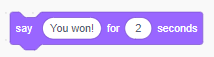
Which group of blocks include the "Say" block?
Sound
Looks
Control
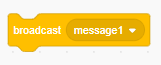
Which group of blocks include the "Broadcast" block?
Events
Motion
Control

This block is also known as
a
Movement sentence
Conditional statement
Then statement

What is the variable in this code?
Edge
Random position
Score
A completed program in scratch.
Scratch
volume
project

