
 Worksheets
Questions you will encounter
Total questions: 23
Worksheet time: 12mins
Which image requires a model release?


Adjusts the baseline of the text along a graphic shape:
Text Wrap
Type on a Path
Area Type
Point Type
Useful when an object or graphic is place in front of a body of text:
Text Wrap
Type on a Path
Area Type
Point Type
Text that automatically flows when the text frame is adjusted:
Text Wrap
Type on a Path
Area Type
Point Type
For a high resolution printed image how many pixels will be on a 5 x 7 inch page?
3000 x 4200 pixels
1500 x 2100 pixels
5000 x 7000 pixels
500 x 700 pixels
You can "export" an Illustrator file in many ways.
Which one of the following is not available through "export".
.png
.jpg
.svg
.psd
You can "Save" an Illustrator file in many ways.
Which one of the following is not available through "Save As".
.ai
.svg
.eps
.jpg
Which is an example of focal point?


Which is an example Radial Symmetry?

Which is an example texture?


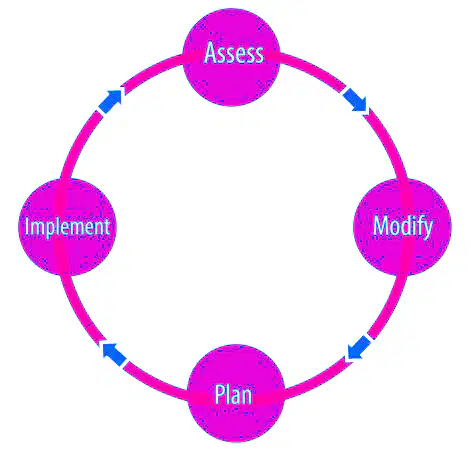
The design loop of Plan > Implement > Assess > <Modify is called:
Scope Creep
Project Scope
Change Assessment
Wireframe Structure
When you import a Photoshop file into Illustrator but want to keep the text editable when you import it you click on:
Import Layers
Flatten Layers to a Single Image
Convert Layers to Objects
Distort Layers
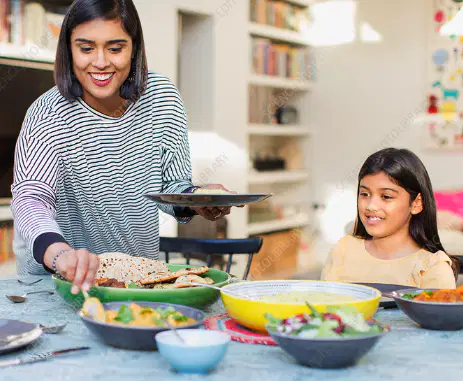
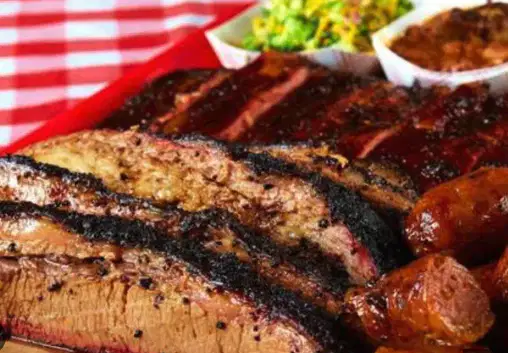
You are designing an ad for a fine dining restaurant and need an image to go on the top of the page.
Which image would be most appropriate for your target audience?


If I asked you to change the Raster Effects to medium which would be the one you select?
Medium Pixelation
Medium 50%
Density
Medium 50%
Opacity
Medium (150ppi)
UI design refers to graphical user interfaces.
Where graphic designers create static visual content, user interface (UI) designers create interactive visual content. All of the following are examples of UI except:
apps
websites
brochures
electronic devices that users interact with
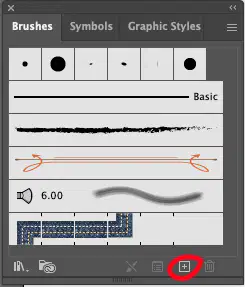
The box, with a plus sign, circled in red at the bottom of the Brushes panel if often used to do what:
Create a new layer
Create a new scatter brush
Create a new ink layer
Create a copy of the brush selected
If you double click on the layer the layer option panel will open. To reduce the opacity of the entire layer we would click and change the following:
Click on ghosting:
Set to 50%
Click on mirror:
Set to 50%
Click on dim images to:
Set at 50%
Click on the layer:
Set at 50%
There are several ways to merge or flatten grouped layers. Which is not one of them?
Group > Select All >
Merge Down
Merge Selected
Flatten Artwork
Collect in New Layer
If I double click on this tool the Rotate Panel will open
and allow me to change the rotation angle of an object.


On the tool bar there are 3 small dots at the bottom. What happens if you click on those dots?
A drop down menu opens for layers
A drop down menu opens for colors
The hidden tools appear
The tool bar closes.
What is not true about gradients?
The quickest way to remove a color from the gradient slider is to click on it and drag if off the slider
The standard gradient is a linear gradient
You can change from a linear to a radial gradient in the gradient panel
A gradient will not have a stroke color
Tool that switches from anchor point types to curves and angles


To convert an image into a Guide you to go:
View > Guides > Object
View > Make Guides from Ruler
View > Guides > Make Guides
View > Guides > Clear Guides

