
Font size
 Worksheets
DIRECT DISTRUBUTION ORDERING BILL (PURCHASING AND LOGISTIC)
Total questions: 30
Worksheet time: 23mins
The supplier trade agreement will only take effect when the status is REVIEWED
TRUE
FALSE
Arrange the process of DIRECT DISTRIBUTION ORDERING BILL (DIRECT DELIVERY) in order.
1. For box stickers, Select Print preview the choose OFFLINE CASECODE. Then PRINT
2. Save it as PDF, then send it to the supplier.
3. For Printing PO, select Print Preview then choose the PO format for Direct Delivery
4. After checking save this as PRE-REVIEWED, then send it to the supplier
5. Adding goods to P.O
6. Fill up all the information needed.
7. Search “DIRECT DISTRIBUTION ORDERING BILL”
1542367
1234567
3217456
7654321
In creating license number, what website will you use based on the manual?
Arrange the process of receiving item using mobile scanner.
1. USE RF
2. LOGIN YOUR ACCOUNT
3. RECEIVE BY CASE CODE (INTERFACE 1)
4. DON’T FORGET TO LOG OUT
5. COMPLETE RECEIVED CASE CODE
1,2,3,4,5
3,4,5,2,1
1,2,3,5,4
5,4,3,2,1
Case code has been created and printed but not yet scanned.
WH RECEIVED
ITEM RECEIVED
BRANCH RECEIVED
REVIEWED
In creating direct delivery, what are the 3 basic information you have to fill up?
PORTER, DRIVER, LICENSE NUMBER
SUPPLIER, RECEIVER, DATE
BRANCH, PO NUMBER, RECEIVER
SUPPLIER, DRIVER, DATE
When adding goods to PO, 3 dots (ellipsis) means?
use to add multiple items
use to add all items
delete items
use to add single items
In this section you add the quantity of the order per BOX, example: 1*5*12
(a)
Before sending the PO no. to the Head/Supervisor, you have to save it as?
(a)
When the PO has Barcode in its upper right side of the paper it simply means that the PO was?
direct distribution
direct order
direct PO
direct delivery
In printing PO, when it doesn't have the barcode it simply means?
direct distribution
direct order
direct PO
direct delivery
In warehouse receiving flowchart, this 3 actions must be done by Receiving officer 3 when accepting receipt copy.
1. sign to log book
2. receive the RR
3. scan the delivery
1. monitor RR
2. encode supplier DR in RR
3. print RR
1. print case code
2. stick to the box
3. print RR and DR
1. separate PO
2. receive the RR
3. Sign to log book

When the case code are scanned and received including all the items in the box, the state will change as?
(a)
In warehouse receiving flowchart, after separating PO and Supplier DR, what's the next step to do?
Sign to log book
Print case code
Stamp all white supplier DR
Accept receipt copy
When the Delivery receipt needs to modify it should return to?
Warehouse
Receiver
Branch
Supplier
The code that contains default values for a number of field in the PO item.
Goods code
Case code
Barcode
Supplier code
The unique identifier number assigned to a purchase item.
ID number
Item number
PO number
Order number
In changing actual purchase price it always be?
Increase
Decrease
Increase and Decrease
None of the above

When will you use this application?
Receiving
Sending
Loading
Trucking

When will you use this application?
Receiving
Sending
Odering
Trucking

The case code scanned by the trucking officer and ready to deliver to the branch.
Received
Delivery
Item received
Branch received
A (a) can provide information relevant to identify the product or, product tracking
Arrange the process of trucking using mobile scanner.
I. use "load by case code"
II. ready to scan some boxes
III. scan license generated code
IV. click "check difference" (to see what batch boxes you didn't receive yet)
V. click "finish loading"
I,II,III,IV,V
II,I,IV,III,V
I,III,II,IV,V
V,I,II,IV,III
Arrange the process of creating case code in order.
1. Check the state in case code
2. Search the PO number and open it
3. Select "case code" to create case code
4. Search direct distribution ordering bill
5. After creating case code, you may now start printing
1,5,4,3,2
4,2,3,1,5
5,3,4,2,1
3,2,1,4,5

When the state is WH RECEIVED, it means that the delivery was?
Unsuccessful
Return to warehouse
Completed
Finish
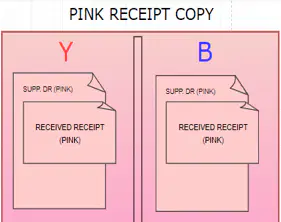
When separating receipt, the pink copy was given to?
Supplier
Accounting
Trucking
Driver
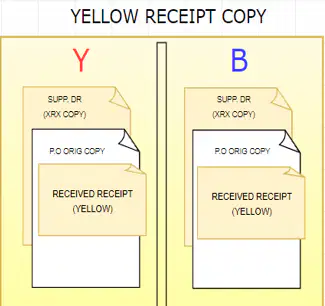
When separating receipt, the yellow copy was given to?
Supplier
Accounting
Trucking
Driver
When receiving DR from the Supplier, you should check this information if written in the PO.
Box Qty., Number of DR, and Total amount
Supplier, Receiver, Customer
Number of DR, Amount, Product name
PO number, Prepared by, Driver
What was the LAST process in Warehouse receiving flowchart?
Separate PO and Supplier DR
Let supplier sign on the log book
Printing case code
Scan and receive delivery
If there's no need to change in the PO and the supplier approved it, you can save it as?
Unreviewed
Pre-Reviewed
Reviewed
Manually Review

