
 Worksheets
DOMAIN 1 QUIZ PHOTO SHOP FOR BEGINNERS
Total questions: 31
Worksheet time: 19mins
THE FIRST 4 STEPS FOR CREATING NEW PHOTOSHOP "commercial printing"
DOCUMENTS .Choose all that are correct
GO TO File >Go to > New> choose the correct file type from the top menu( such as Web,Print,Mobile Arts&Illustration >change any other settings that you are instructed to change ( such as title)>TABLOID
File>new > choose file type from top menu>select the correct preset (such as tabloid or web most common or iPad pro)
File>new>print>tabloid
None of the above
WHAT IS THE COLOR MODE FOR COMMERCIAL PRINTING?
RED
GREEN
BLUE
CMYK
Which TOOL on the tool bar allows you to Move pictures?
The Magic Wand
The Move Tool
The Shape Tool
The Brush Tool
Which keys on the key board will allow you to make a brush size bigger or smaller?
Plus and minus keys
The number 6 and 7 keys
The left bracket and right bracket keys
The left shift and right shift keys
If your Layers Panel does not show, in which drop-down menu will you find it?
Edit - Show Layers
View - Layers
Window - Layers
Show - Layers
What keyboard command will allow you to UNDO one step?
Command + D
Cntrl + Z
Command + A
Command + V
What is the keyboard command to Select All?
Command + S
Cntrl + A
Command + Z
Command + D
What is the keyboard command to COPY and image?
Cntrl + S
Cntrl + A
Command + V
Cntrl + C
What is the keyboard command to PASTE an image?
Command + Z
Command + P
Command + V
Command + C
None of the above because we are using window and not a mac
Which TOOL on the tool bar allows you to Move pictures?
The Magic Wand
The Move Tool
The Shape Tool
The Brush Tool
Which keys on the key board will allow you to make a brush size bigger or smaller?
Plus and minus keys
The number 6 and 7 keys
The left bracket and right bracket keys
The left shift and right shift keys
If your Layers Panel does not show, in which drop-down menu will you find it
Edit - Show Layers
View - Layers
Window - Layers
Show - Layers
What keyboard command will allow you to UNDO one step?
Command + D
Command + Z
Command + A
Command + V
What is the keyboard command to Select All?
Command + S
Command + A
Command + Z
Command + D
What is the keyboard command to COPY and image?
Command + S
Command + A
Command + V
Command + C
What is the keyboard command to PASTE an image?
Command + Z
Command + P
Command + V
Command + C
How do you Zoom IN and OUT of an image using keyboard commands?
Cntrl Plus (+) or Minus (-)
Command + Bracket Keys
Cntrl+ Z (zoom)
Cntrl+ D
1) WHAT ARE THE FIRST TWO STEPS TO CREATE A PHOTOSHOP DOCUMENT?
FILE>NEW
PRINT>TABLOID
IT AUTOMATICALLY CREATES BY PRESSING
CTRL>N
NONE OF THE ABOVE
WHAT IS THE DEFINITION OF RASTERIZE?
dots on a grid
adjusting an image
convert an image to pixels
an image created by defining points and curves
WHAT IS BITMAP?
NONE OF THESE ANSWERS ARE CORRECT
AN IMAGE CREATED BYDEFINING POINTS AND CURVES
AN IMAGE CREATED BY COLORED DOTS ON A GRID
WHAT IS THE CORRECT DEFINITION OF VECTOR?
CONVERTING AN IMAGE STORED BY GEOMETRIC FORMULA TO PIXELS
AN IMAGE CREATED BY DOTS ON A GRID
ADJUSTING THE NUMBR OF PIELS IN AN IMAGE
AN IMAGE CREATED BY DEFINING POINTS AND CURVES
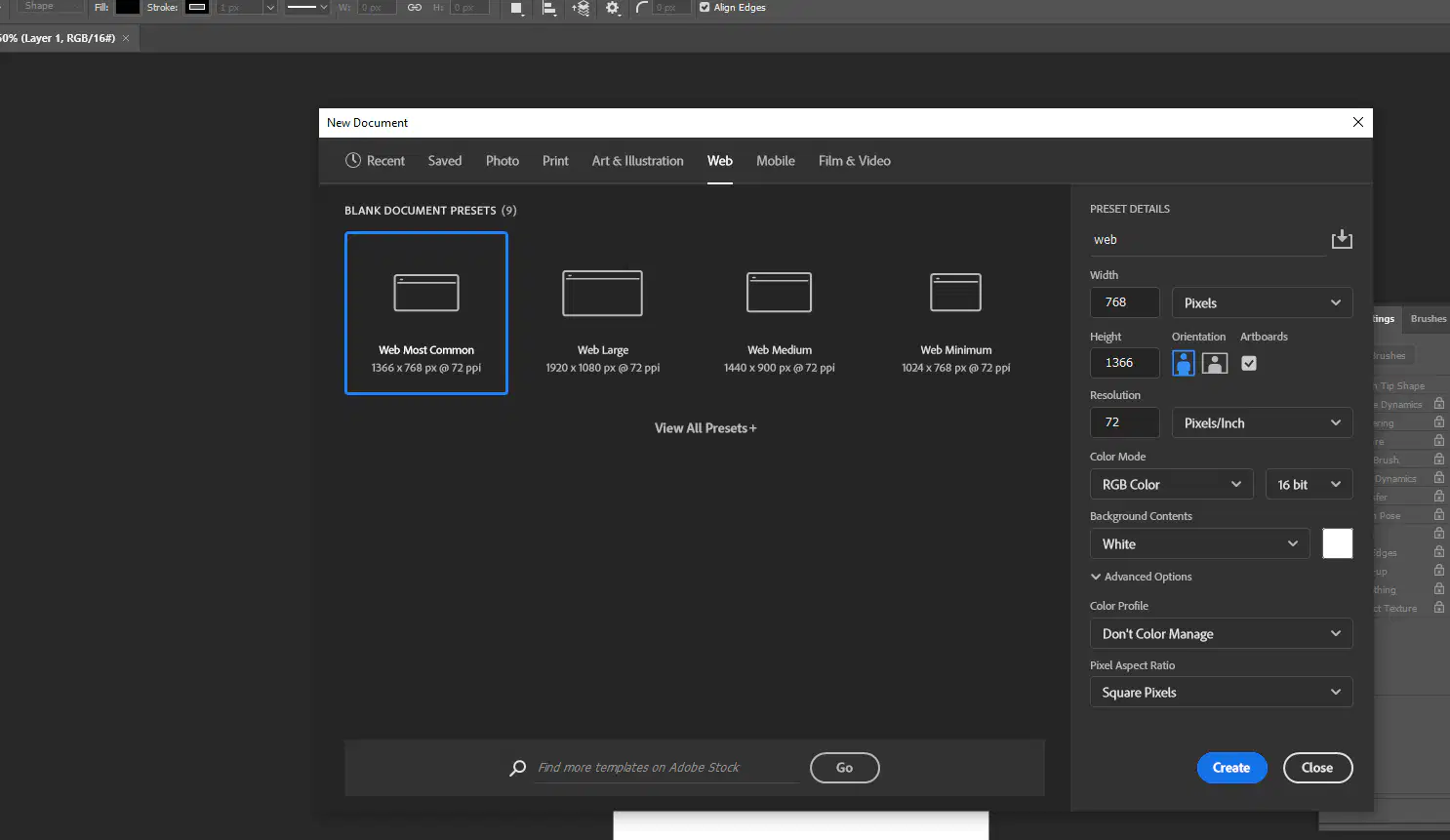
WHAT WOULD BE AN EXAMPLE OF A PRESET OR TEMPLATE FOUND IN PHOTOSHOP WHEN CREATING A NEW(PSD) PHOTSHOP DOCUMENT
WEB LARGE
WEB MOST COMMON
TABLOID
LETTER
ALL OF THE ABOVE
WHERE IS "FILE INFO " FOUND IN PHOTOSHOP ( UNDER WHAT MENU?)
FILE
EDIT
NEW
FILE INFO TAB
WHAT IS PROJECT SCOPE?
CHOOSE ALL THAT APPLY
THE COST ESTIMATE AND PROJECT SCHEDULE
HOW LONG IT WILL TAKE TO DO THE PROJECT AND HOW MUCH WILL IT COST
THE TARGET AUDIENCE
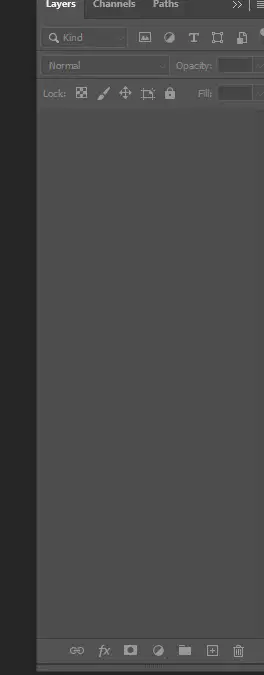
WHICH TOOL OR ICON DO YOU USE IN THE LAYERS PANEL TO CREATE A NEW LAYER>
tHE ONE THAT LOOKS LIKE A PLUS SIGN IN A BOX
THE ONE THAT LOOKS LIKE ARECTANGLE WITH A DOT IN THE MIDDLE
THE ONE THAT LOOKS LIKE A CIRCLE
THE ONE THAT LOOKS LIKE A PAPER WITH A FOLDED EDGE OR A FOLDER
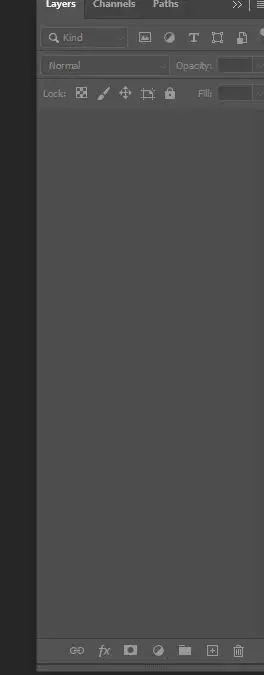
WHICH ICON ADDS A NEW GROUP LAYER
FOLDER
CIRCLE
PLUS SIGN
FX
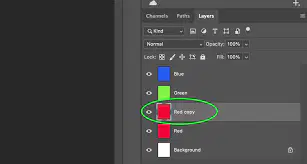
WHAT DOES THIS ICON DO?
CLICK ALL THAT APPLY
SAVES THE IMAGE
DELETES THE IMAGE
HIDES THE IMAGE
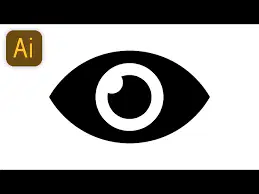
HIDES AND UNHIDES THE LAYEER

