wayground logo

Free Printable Worksheets

Font size

S
M
L
XL
Worksheets

Mastery grade 9/10

Total questions: 133

Worksheet time: 2hrs 31mins

Name
Class
Date
1.
Define Computer hardware
a)
the collection of physical parts of a computer system. 
b)
the color of the computer 
c)
how the computer looks 
2.
Is a data storage device that uses magnetic storage to store and retrieve digital information using one or more rigid rapidly rotating disks (platters) coated with magnetic material.
a)
RAM
b)
Hard Disk
c)
DVD
d)
ROM
3.
Is a disk drive that uses laser light or electromagnetic waves within or near the visible light spectrum as part of the process of reading or writing data to or from optical discs
a)
CD/DVD Drive
b)
Hard Disk
c)
Mother Board
d)
Power Supply
4.
Is a form of computer data storage that stores data and machine code currently being used
a)
ROM
b)
USB
c)
Hard Disk
d)
RAM
5.
Is the electronic circuitry within a computer that carries out the instructions of a computer program by performing the basic arithmetic, logical, control and input/output (I/O) operations specified by the instructions.
a)
USB
b)
ROM
c)
CPU
d)
UPS
6.
Is the main printed circuit board (PCB) found in general purpose microcomputers and other expandable systems. It holds and allows communication between many of the crucial electronic components of a system
a)
Video Card
b)
Sound Card
c)
Motherboard
d)
Network Card
7.
Is an expansion card which generates a feed of output images to a display. Frequently, these are advertised as discrete or dedicated graphics cards, emphasizing the distinction between these and integrated graphics.
a)
Graphic Card
b)
Sound Card
c)
TV Card
d)
Network Card
8.
Is a hand-held pointing device that detects two-dimensional motion relative to a surface. This motion is typically translated into the motion of a pointer on a display, which allows a smooth control of the graphical user interface.
a)
Mouse
b)
Light Pen
c)
Touch Pad
d)
Trackball Mouse
9.
A display screen used to provide visual output from a computer, cable box, video camera, VCR or other video generating device.
a)
Projector
b)
Printer
c)
Monitor
d)
Speakers
10.

When building a computer, consider first

a)

cost

b)

processor speed

c)

use

d)

RAM

11.

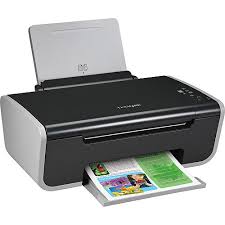
Is this device Input or Output?

Printer

a)

Input

b)

Output

12.
Is this device Input or Output?
Keyboard
a)
Input
b)
Output
13.
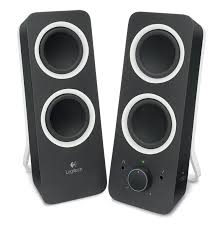
Is this device Input or Output?
Speaker
a)
Input
b)
Output
14.
a)
input
b)
output
15.
What type of device is this? Smartphone screen
a)
Input
b)
Output
c)
Input and Output
16.
Wires are output devices because they come OUT of a computer
a)
True
b)
False
17.
Small light on the front of the computer that indicates if the computer is switched on...
a)
LED
b)
CRT
c)
TFT
d)
LCD
18.
What are the four tasks(classifications)  that make up a computer?
a)
input, color, pixels, and application
b)
input, output, process, store
c)
printers, output, monitors, microphones
d)
keyboards, mouse, joysticks, and memory card
19.
Is a smart phone considered a computer?
a)
true
b)
false
20.
What does CPU stand for?
a)
Critical Processing Unit
b)
Core Processing Unit
c)
Common Processing Unit
d)
Central Processing Unit
21.

What am I?

a)

Desktop PC

b)

Smart phone

c)

Laptop

d)

Mainframe computer/server

22.

We are mobile devices.

a)

Laptop

b)

Desktop PC

c)

Smart phone

d)

Xbox 360

23.
What Operating System is on a Microsoft computer?
a)
OSX
b)
CentOS
c)
Windows
d)
Android
24.
The long term memory in a computer is the:
a)
a. RAM
b)
b. Power Supply
c)
c. Hard Drive
d)
d. Motherboard
25.

CD's and DVD's are examples of storage media devices.

a)

True

b)

False

26.

Select the correct definition for Volatile Memory:

a)

Contents are lost when the computer is turned off.

b)

Contents are not lost when the computer is turned off.

27.

Select all of the following input devices:

a)

keyboard

b)

touchpad

c)

joystick

d)

screen

28.

Select all of the following output devices:

a)

mouse

b)

photo printer

c)

data projector

d)

fax machine

29.

It can be described as the brain of computer

a)

CPU

b)

Mouse

c)

Keyboard

30.

Identify which device is in the picture

(a)  
31.

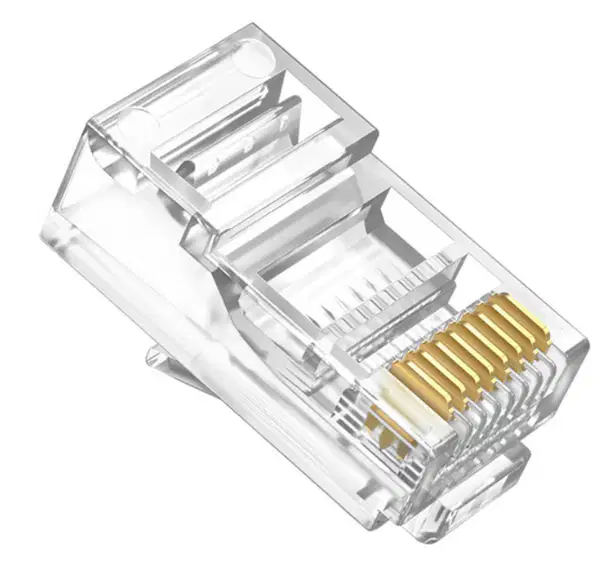
Identify which device is in the picture

(a)  
32.

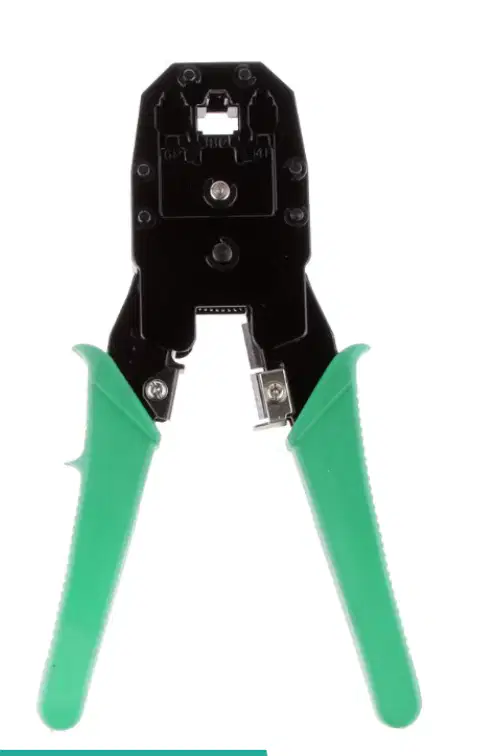
Identify which device is in the picture

(a)  
33.

Identify which device is in the picture

(a)  

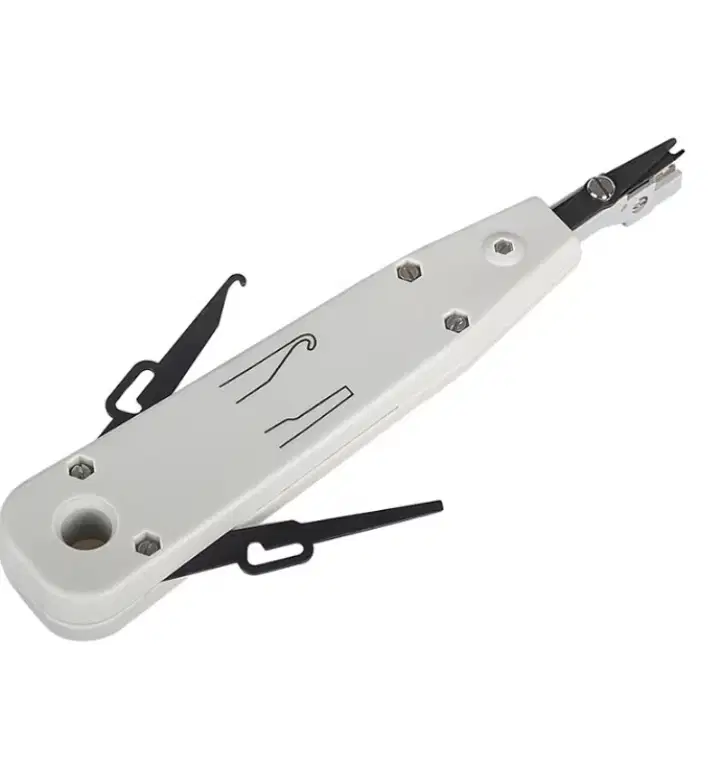
34.

It is used to attach an rj45 to the cable

a)

b)

c)

d)

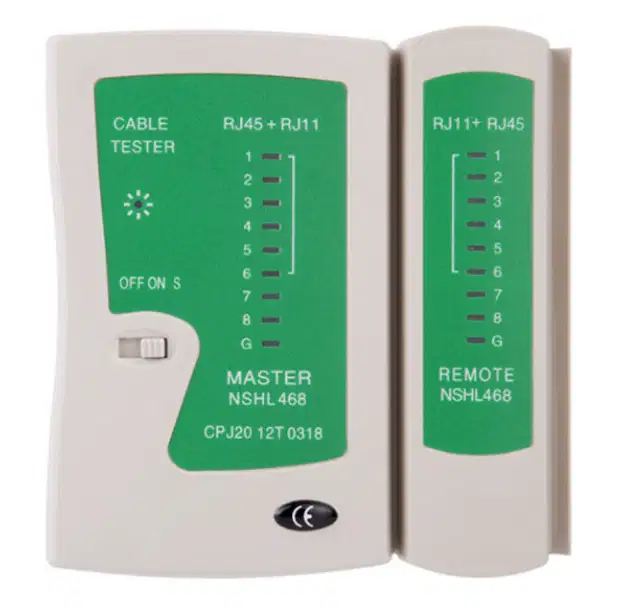
35.

It is used to test cables by testing all rj45 pins

a)

b)

c)

d)

36.

it is used as a cable terminator in able for you to plug it to network devices.

a)

b)

c)

d)

37.
Is a data storage device that uses magnetic storage to store and retrieve digital information using one or more rigid rapidly rotating disks (platters) coated with magnetic material.
a)
RAM
b)
Hard Disk
c)
DVD
d)
ROM
38.
Is a disk drive that uses laser light or electromagnetic waves within or near the visible light spectrum as part of the process of reading or writing data to or from optical discs
a)
CD/DVD Drive
b)
Hard Disk
c)
Mother Board
d)
Power Supply
39.
Is a form of computer data storage that stores data and machine code currently being used
a)
ROM
b)
USB
c)
Hard Disk
d)
RAM
40.
Is the electronic circuitry within a computer that carries out the instructions of a computer program by performing the basic arithmetic, logical, control and input/output (I/O) operations specified by the instructions.
a)
USB
b)
ROM
c)
CPU
d)
UPS
41.
Is the main printed circuit board (PCB) found in general purpose microcomputers and other expandable systems. It holds and allows communication between many of the crucial electronic components of a system
a)
Video Card
b)
Sound Card
c)
Motherboard
d)
Network Card
42.
Is an electrical device that supplies electric power to an electrical load. The primary function of a power supply is to convert electric current from a source to the correct voltage, current, and frequency to power the load.
a)
USB
b)

CPU

c)
RAM
d)
Power Supply
43.
Fans attached to components are usually used in combination with a heat sink to increase the area of heated surface in contact with the air, thereby improving the efficiency of cooling.
a)
Cooling Fan
b)
Heating Fan
c)
Hard d]Disk Fan
d)
DVD Fan
44.
Is an internal expansion card that provides input and output of audio signals to and from a computer under control of computer programs.
a)
Graphic Card
b)
Sound Card
c)
TV Card
d)
Network Card
45.
Is an expansion card which generates a feed of output images to a display. Frequently, these are advertised as discrete or dedicated graphics cards, emphasizing the distinction between these and integrated graphics.
a)
Graphic Card
b)
Sound Card
c)
TV Card
d)
Network Card
46.
Is an electronic device that connects a computer to a computer Network, usually a LAN.
a)
Graphic Card
b)
Sound Card
c)
TV Card
d)
Network Card
47.
Is a hand-held pointing device that detects two-dimensional motion relative to a surface. This motion is typically translated into the motion of a pointer on a display, which allows a smooth control of the graphical user interface.
a)
Mouse
b)
Light Pen
c)
Touch Pad
d)
Trackball Mouse
48.
A display screen used to provide visual output from a computer, cable box, video camera, VCR or other video generating device.
a)
Projector
b)
Printer
c)
Monitor
d)
Speakers
49.
A device that projects an enlarged image of an acetate or other transparency placed on it on to a wall or screen.
a)
Projector
b)
Printer
c)
Monitor
d)
Speakers
50.
Is a peripheral device which makes a persistent human-readable representation of graphics or text on paper.
a)
Projector
b)
Printer
c)
Monitor
d)
Speakers
51.
A device that converts analog audio signals into the equivalent air vibrations in order to make audible sound.
a)
Projector
b)
Printer
c)
Monitor
d)
Speakers
52.
A video camera connected to a computer, allowing its images to be seen by Internet users.
a)
Webcam
b)
Speakers
c)
Keyboard
d)
Light Pen
53.
Is a typewriter-style device which uses an arrangement of buttons or keys to act as a mechanical lever or electronic switch. 
a)

Mouse

b)
Speakers
c)
Keyboard
d)
Light Pen
54.
A machine allowing the creation of a physical object from a three-dimensional digital model, typically by laying down many thin layers of a material in succession.
a)
Inkjet Printer
b)
Laser Printer
c)
Dot Matrix Printer
d)
3D Printer
55.
Is a device that analyses a real-world object or environment to collect data on its shape and possibly its appearance. The collected data can then be used to construct digital three-dimensional models.
a)
Handheld Scanner
b)
3D Scanner
c)
Flatbed Scanner
d)
Sheetfed Scanner
56.

This term refers to the devices or equipment that send information to the computer. It provides the data to be processed by the computer.

a)

Input devices

b)

Output devices

c)

Process devices

d)

Storage devices

57.

This device converts data from the computer into a form that can be read and sensed by the user.

a)

Input devices

b)

Output devices

c)

Process devices

d)

Storage devices

58.

It is a device that is capable of storing and retrieving data.

a)

Input device

b)

Output device

c)

Process device

d)

Storage device

59.

Which of the following types of computer has the highest computing power?

a)

Mini computers

b)

Micro computers

c)

Mainframe computers

d)

Super computers

60.

Which of the following parts of a computer is considered as an input device?

a)

keyboard

b)

printer

c)

monitor

d)

speaker

61.

Which of the following parts of a computer is considered as an output device?

a)

monitor

b)

microphone

c)

mouse

d)

keyboard

62.

What type of computer will you commonly see in large companies that provide services to client computers?

a)

servers

b)

workstation

c)

embedded computers

d)

information appliances

63.

Desktop, laptop, PDA and smartphone are examples of

a)

Supercomputers

b)

Mini computers

c)

Micro computers

d)

Mainframe computers

64.
Which one is an output device?
a)
monitor
b)
speaker
c)
printer
d)
all of them
65.
Which one is NOT an output device?
a)
printer
b)
earphones
c)
keyboard
d)
speakers
66.
Which one is NOT an input device?
a)
scanner
b)
monitor
c)
mouse
d)
microphone
67.

What is meant by hardware?

a)

A part of a computer system that has no physical or invisible form

b)

A collection of electronic data stored and regulated by a computer in the form of a program that can execute a command

c)

Collection of physical components that make up a computer device

d)

Something not important on a computer

68.

The function of data storage is

a)

Send data or information to other people

b)

As a place to store information

c)

Receive data or information from outside sources

d)

Manipulate data quickly and precisely

69.

One technical difference between a Desktop PC and a Laptop Computer is

a)

Dekstop has less power than laptop

b)

Laptop has less power than desktops

c)

Has no difference

d)

Desktop PCs are more expensive than laptop computers

70.

ESD

a)

Electric-Static Discharge

b)

Electro-Static Device

c)

Electro-Static Discharge

d)

Electro-State Discharge

71.

BIOS

a)

Base Input and Output System

b)

Basic Input and Output Serial

c)

Basic Input and Output System

d)

Basic In and Out System

72.

HDD

a)

Hard Digital Disc

b)

Home Digital Disc

c)

Home Drive Disc

d)

Hard Disk Drive

73.

RAM

a)

Random Access Module

b)

Random Access Memory

c)

Read Access Memory

d)

Random Advance Module

74.

ROM

a)

Read Only Module

b)

Read Output Memory

c)

Read Only Memory

d)

Random Only Memory

75.

USB

a)

Universal State Bus

b)

Universal Serial Bus

c)

Unified Serial Bus

d)

Unified Serial Boot

76.

VGA

a)

Video Graphic Attachment

b)

Video Graphic Advance

c)

Video Game Array

d)

Video Graphic Array

77.

OS

a)

Operating Status

b)

Operating Set

c)

Operating System

d)

Output System

78.

CD

a)

Computer Disc

b)

Compact Disc

c)

Compact Drive

d)

Computer Drive

79.

SATA

a)

Serial Advance Technology Allocation

b)

Setup Advance Technology Allocation

c)

Serial Advance Technology Attachment

d)

Setup Advance Technology Attachment

80.

CSS

a)

Computer System Servicing

b)

Computer Set Servicing

c)

Communication System Set

d)

Communication Set System

81.

ICT

a)

Information Computer Technology

b)

International and Computer Technology

c)

Information Communications Track

d)

Information and Communications Technology

82.

Press the ______ key to type one capital letter.

a)

shift

b)

backspace

c)

caps lock

83.

Press the ______ key to erase.

a)

shift

b)

backspace

c)

caps lock

84.

Which hand presses the letter F ?

a)
b)
85.

Which finger is red?

a)

pointer finger

b)

middle finger

c)

ring finger

d)

pinky finger

86.

Which hand presses the letter P ?

a)
b)
87.

What finger do I use to type the letter "Y"?

a)

Left hand index/pointing finger

b)

Left hand middle finger

c)

Right hand index/pointing finger

d)

Right hand middle finger

88.

What finger will press the S key?

a)

Left pinkie finger

b)

Left ring finger

c)

Left index finger

d)

Left thumb

89.
Where do your pointer fingers go on the keyboard?
a)
F & H
b)
D & K
c)
G & H
d)
F & J
90.
What does WPM stand for?
a)
Work per mile
b)
Words per minute
c)
Weight per meter
d)
Words per metric
91.

Why are there small bumps on the 2 keys of the keyboard?

a)

The bumps help users correctly position their left and right hand on the keyboard without having to look at the keyboard.

b)

These two buttons are the most frequently used and most important keys.

c)

These bumps serve no purpose whatsoever.

d)

The bumps mean these two keys should be avoided and not used.

92.
What is this?
a)
VGA Cable
b)
DisplayPort Cable
c)
Mini-USB Cable
d)
Ethernet Cable
93.
What is this?
a)
VGA Port
b)
Ethernet Port
c)
USB 3.0 port
d)
HDMI port
94.
What is this?
a)
USB Cable
b)
Lightning Cable
c)
DVI Cable
d)
HDMI cable
95.
What is this?
a)
VGA Port
b)
Ethernet Port
c)
USB port
d)
DVI Port
96.
What is this?
a)
VGA Port
b)
Ethernet Port
c)
USB 3.0 port
d)
HDMI port
97.
What is this?
a)
DVI Cable
b)
Ethernet Cable
c)
Micro-USB Cable
d)
HDMI cable
98.
What is this?
a)
DVI Port
b)
Ethernet Port
c)
DisplayPort
d)
HDMI Port
99.
What is this?
a)
DVI Cable
b)
Ethernet Cable
c)
Mini-USB Cable
d)
VGA cable
100.
What is this?
a)
DVI Port
b)
Ethernet Port
c)
Power Port
d)
HDMI Port
101.
What is this?
a)
DisplayPort
b)
Ethernet Port
c)
Mini-USB Port
d)
1/8" Headphone Port
102.
What is this?
a)
DisplayPort Cable
b)
Power Cable
c)
Micro-USB Cable
d)
DVI cable
103.
What is this?
a)
DisplayPort Cable
b)
HDMI Cable
c)
Micro-USB Cable
d)
1/8" Headphone cable
104.
What is this?
a)
DisplayPort
b)
HDMI Port
c)
Micro-USB Port
d)
1/8" Headphone Port
105.
What is this?
a)
Power Cable
b)
Mini-USB Cable
c)
Micro-USB Cable
d)
Lightning cable
106.
What is this?
a)
Power Port
b)
HDMI Port
c)
USB 3.0 Port
d)
VGA Port
107.
What is this?
a)
Micro USB Cable
b)
HDMI Cable
c)
Power Cable
d)
VGA Cable
108.
What is this?
a)
Lightning Cable
b)
DisplayPort Cable
c)
DVI Cable
d)
VGA Cable
109.
What is this?
a)
Mini USB Cable
b)
Ethernet Cable
c)
DVI Cable
d)
VGA Cable
110.
a)

VGA

b)

USB Type A

c)

Ethernet

d)

HDMI

111.
a)

Micro USB

b)

USB Type A

c)

USB Type B

d)

USB Type C

112.
a)

VGA

b)

Ethernet

c)

USB Type B

d)

HDMI

113.
a)

Ethernet

b)

USB Type C

c)

Micro USB

d)

VGA

114.
a)

USB Type B

b)

Power Socket

c)

Ethernet

d)

HDMI

115.
a)

Micro USB

b)

USB Type B

c)

USB Type A

d)

Power Socket

116.
a)

USB Type A

b)

USB Type B

c)

Mini USB

d)

VGA

117.
a)

Audio Input

b)

Audio Output

118.
a)

Audio Input

b)

Audio Output

119.
a)

USB Type B

b)

Power Socket

c)

HDMI

d)

Mini USB

120.

Define Computer Port

a)

A cable used to connect 2 electronic devices

b)

A connection point or interface between a computer and a device

c)

A special place where large amounts of data a temporarily stored

d)

A part of the computer that houses the CPU

121.

What does USB stand for?

a)

Universal Serial Bus

b)

Unedited System Bracket

c)

Unified Sound Bar

d)

Unique Sequencing Bus

122.

Which is the most common USB connector?

a)

USB Type A

b)

USB Type B

c)

USB Type C

d)

Mini USB

123.

Which USB connectors are most used charging portable devices?

a)

Mini USB

b)

Micro USB

c)

USB Type B

d)

Both Mini & Micro USB

124.

What are VGA cables used for?

a)

Video

b)

Audio

c)

Data Transfer

d)

Power

125.

What are Ethernet cables used for?

a)

Networking

b)

Internet

c)

Audio

d)

Both Internet & Networking

126.

What are 3.5mm Cables most commonly used for?

a)

Video

b)

Audio

c)

Network

d)

Power

127.

What is the newest and fastest form of USB?

a)

USB Type B

b)

Micro USB

c)

USB Type A

d)

USB Type C

128.

What is HDMI used for?

a)

Power

b)

Video

c)

Networking

d)

Data Sharing

129.

What is a mini display port?

a)

A port used to connect the computer to the internet.

b)

A port used to connect the computer to a monitor.

c)

A port used to connect the computer to speakers.

d)

A port used to connect the computer to power.

130.

HDMI stands for what?

(a)  

131.

VGA stands for what?

(a)  

132.

DVI stands for what?

(a)  

133.

USB stands for what?

(a)