wayground logo

Free Printable Worksheets

Font size

S
M
L
XL
Worksheets

Review_CS_Final Exam

Total questions: 110

Worksheet time: 55mins

Name
Class
Date
1.
What does
    stand for?
a)
Defines an ordered list.
b)
Defines a section in a document.
c)
Defines an unordered list.
d)
Creates an anchor tag that is used to create hyperlinks.
2.
What does HTML stand for?
a)
Hypertone Markup Language
b)
Hypertension Markup Language
c)
Hypertext Markup Language
d)
Hyper Markup Language
3.
Which of the following is a valid CSS rule?
a)
h1{color=blue;
b)
h1{color:blue;}
c)

{color:blue;}

d)
h1{color="blue";
4.
What is the selector in this example: h1{color:green;}
a)
color
b)
green
c)
h1
d)
{ }
5.
What is the property in this example: h1{color:green;}
a)
color
b)
green
c)
h1
d)
{ }
6.
What is the value in this example: h1{color:green;}
a)
color
b)
green
c)
h1
d)
{ }
7.
What is " ; " called?
a)
semi-colon
b)
angle-bracket
c)
period-comma
d)
hashtag
8.
What are "< >" called?
a)
the Devel's triangles
b)
Pacman and Mrs. Pacman
c)
angle brackets
d)
semi-colons
9.
What are "{ }" called?
a)
parentheses
b)
curly braces
c)
semi-colons
d)
angle-brackets
10.
What is ":" called?
a)
colon
b)
two dots
c)
semi-colon
d)
period
11.
Which HTML line creates a heading?
a)

sally sells seashells by the sea shore

b)

a noisy noise annoys an oyster

c)
How much could a woodchuck chuck if a woodchuck could chuck wood?
d)
There once was a young lady named Bright, whose speed was faster than light.
12.
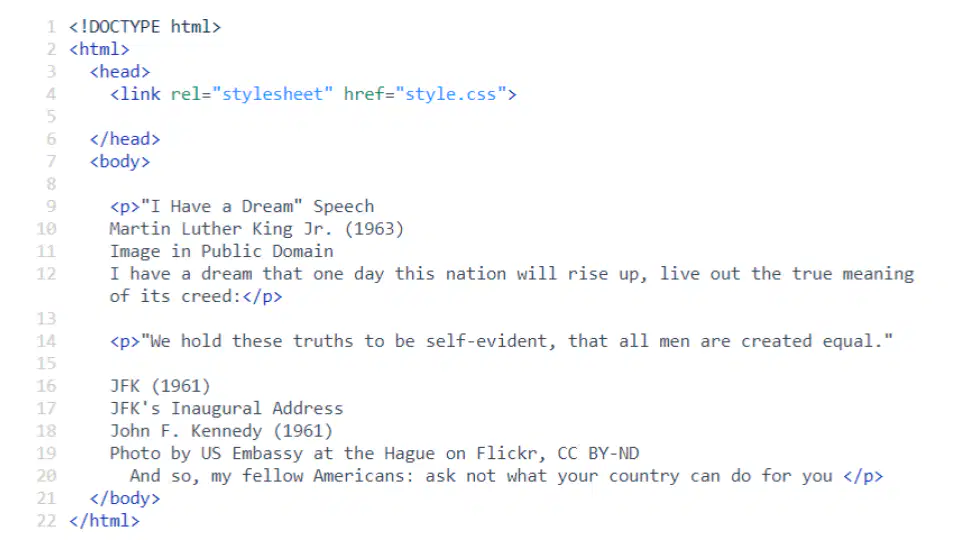
Is this an HTML file or a CSS file?
a)
HTML
b)
CSS
c)
Both
d)
Neither
13.
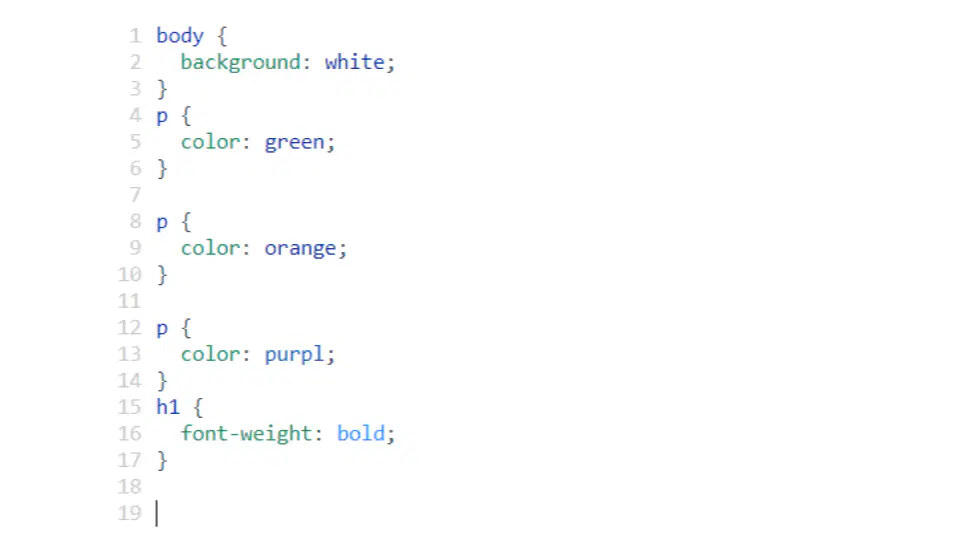
Is this an HTML file or a CSS file?
a)
HTML
b)
CSS
c)
Both
d)
Neither
14.
Attributes......
a)
puts a break in the middle of a paragraph
b)
puts a number below a phrase or word
c)
is an element that is usually shown on top of the window
d)
tells us more about the element
15.
What programming language is used to create websites?
a)
Scratch
b)
Java
c)
HTML
d)
CSS
16.
How do you close a HTML tag?
a)

</>

b)
< >
c)
{ }
d)
<=>
17.
Which HTML tag(s) create(s) a line break?
a)

<hr>

b)

<br>

c)

<p> and </p>

d)

<h1> and </h1>

18.
Which HTML tag(s) create(s) a horizontal line?
a)

<hr>

b)

<br>

c)

<p> and </p>

d)

<h1> and </h1>

19.
Which HTML tag(s) create(s) a(n) ordered list?
a)

<ol> and </ol>

b)

<li> and </li>

c)

<list> and </list>

d)

<ul> and </ul>

20.
Which HTML tag(s) create(s) a(n) unordered list?
a)

<ol> and </ol>

b)

<list> and </list>

c)

<li> and </li>

d)

<ul> and </ul>

21.
Which HTML tag(s) create(s) a(n) list element?
a)

<ol> and </ol>

b)

<li> and </li>

c)

<list> and </list>

d)

<ul> and </ul>

22.
What are the things that go around HTML elements called?
a)
rules
b)
properties
c)
lines
d)
tags
23.
What connects the HTML and CSS files so the webpage knows which styles to apply to the HTML elements?
a)
the connection
b)
WiFi
c)
magic
d)
the link
24.
Why is CSS important?
a)
It helps the website by adding color and style.
b)
It is not important.
c)
It is the code for the whole website.
d)
It doesn't do anything.
25.
What code do you use for a body?
a)
body
b)

<body>

c)

<body> and </body>

d)

<body> and <body>

26.
What do you use for starting a paragraph?
a)

<p>

b)
p
c)

<h1>

d)

<br>

27.
What symbol separates the property and values?
a)
colon
b)
semi-colon
c)
curly brace
d)
quotation mark
28.
What type of braces are used for CSS?
a)
square
b)
curly
c)
stars
d)
angle
29.
What does CSS stand for?
a)
Classic Style Sheet
b)
Computer Style Sheet
c)
Conditional Style Sheet
d)
Cascading Style Sheet
30.
Which word below matches the following definition? Definition: Cascading Style Sheets; a language used to describe how HTML elements should be styled.
a)
CSS
b)
CSS Selector
c)
CSS Property
d)
CSS Value
31.
Which word below matches the following definition? Definition: The style attributes that you want to change (ex: color, text-align, font-family)
a)
CSS
b)
CSS Selector
c)
CSS Property
d)
CSS Value
32.
Which words below matches the following definition? Definition: Specifies which elements are to be influenced by the style rule (ex: p, h1, ol).
a)
CSS
b)
CSS Selector
c)
CSS Property
d)
CSS Value
33.
Which words below matches the following definition? Definition: Suggests how the property should be formatted. (ex: color: blue; - text-align:center;)
a)
CSS
b)
CSS Selector
c)
CSS Property
d)
CSS Value
34.
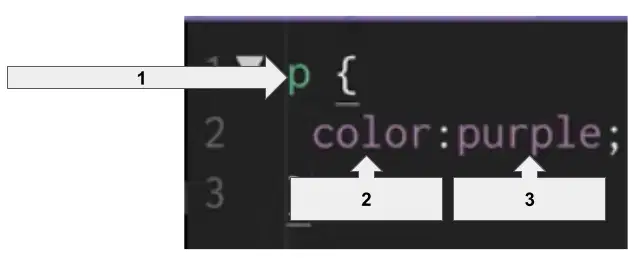
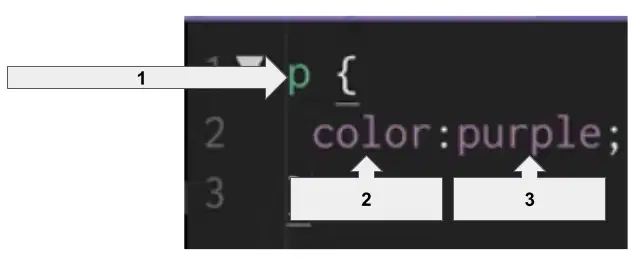
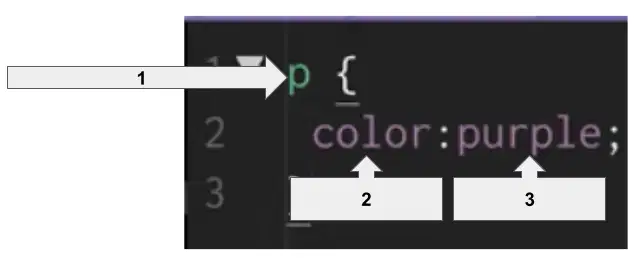
Look at the CSS rule set below. Arrow #1 represents the ______________.
a)
selector
b)
property
c)
value
35.
Look at the CSS rule set below. Arrow #2 represents the ______________.
a)
selector
b)
property
c)
value
36.
Look at the CSS rule set below. Arrow #3 represents the ______________.
a)
selector
b)
property
c)
value
37.
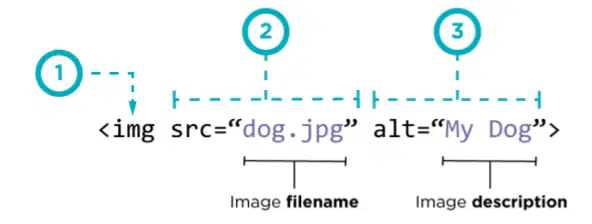
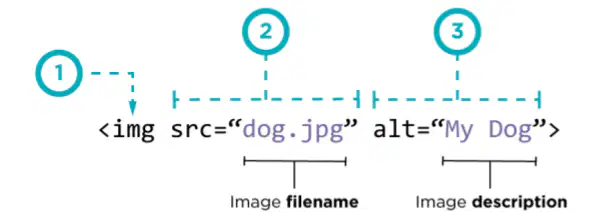
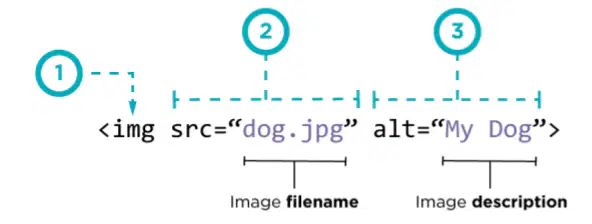
Look at the image tag below. What is the purpose of the img abbreviation?
a)
Tells HTML to include an image.
b)
Tells HTML where to find the image.
c)
Text that will be used if the file cannot be found.
38.
Look at the image tag below. What is the purpose of the src abbreviation?
a)
Tells HTML to include an image.
b)
Tells HTML where to find the image.
c)
Text that will be used if the file cannot be found.
39.
Look at the image tag below. What is the purpose of the alt abbreviation?
a)
Tells HTML to include an image.
b)
Tells HTML where to find the image.
c)
Text that will be used if the file cannot be found.
40.
Determine if the following scenario would be a part of your digital footprint. Scenario: You post a video online.
a)
Yes
b)
No
41.
Determine if the following scenario would be a part of your digital footprint. Scenario: You receive a birthday card from your grandmother for your birthday.
a)
Yes
b)
No
42.
Determine if the following scenario would be a part of your digital footprint. Scenario: Someone screenshots a private text message that you send them and sends it in another group chat.
a)
Yes
b)
No
43.
Determine if the following scenario would be a part of your digital footprint. Scenario: You posted something mean about your friend, but then deleted it.
a)
Yes
b)
No
44.
Determine if the following scenario would be a part of your digital footprint. Scenario: You wrote a note on a piece of paper to your best friend.
a)
Yes
b)
No
45.
Determine if the following scenario would be a part of your digital footprint. Scenario: Your best friend took a picture of the paper note you wrote and posted it on SnapChat.
a)
Yes
b)
No
46.
Determine if the following scenario would be a part of your digital footprint. Scenario: Your picture is on the school's website for perfect attendance.
a)
Yes
b)
No
47.
Determine if the following scenario would be a part of your digital footprint. Scenario: Your friend posts a message wishing you good luck at your game.
a)
Yes
b)
No
48.
Choose the vocabulary word for the following definition: Mistakes in code which causes the program not to work as planned.
a)
HTML
b)
Debugging
c)
Bug
d)
Heading
49.
Choose the vocabulary word for the following definition: The process of finding and fixing bugs.
a)
HTML
b)
Debugging
c)
Bug
d)
Heading
50.
Choose the vocabulary word for the following definition: The text and images on a website.
a)
HTML
b)
HTML Element
c)
Website Structure
d)
Website Content
51.
Choose the vocabulary word for the following definition: How the content of a website is organized.
a)
HTML
b)
HTML Element
c)
Website Structure
d)
Website Content
52.
Choose the vocabulary word for the following definition: Hyperlink Markup Language; a language used to create web pages.
a)
HTML
b)
HTML Element
c)
HTML Tag
d)
Informational Text
53.
Choose the vocabulary word for the following definition: The special set of characters that indicates the start and end of an HTML element and that element’s type.
a)
HTML
b)
HTML Element
c)
HTML Tag
d)
Informational Text
54.
Choose the vocabulary word for the following definition: The special set of characters that indicates the start and end of an HTML element and that element’s type.
a)
HTML
b)
HTML Element
c)
HTML Tag
d)
Informational Text
55.
Choose the vocabulary word for the following definition: A piece of a website, marked by a start tag and often closed with an end tag.
a)
HTML
b)
HTML Element
c)
HTML Tag
d)
Informational Text
56.
All of the following are examples of bugs EXCEPT...
a)
Putting the backslash in the closing tag
b)
Forgetting to put the backslash in the closing tag
c)
Forgetting the beginning tag
d)
Forgetting the closing tag
57.
Select the HTML tag that goes with the following descriptor: Paragraph tags
a)

<p> </p>

b)

<h1> </h1>

c)
  • <li> </li>

d)
  • <ul> </ul>

58.
Select the HTML tag that goes with the following descriptor: Heading tags
a)

<p> </p>

b)

<h1> </h1>

c)
  • <li> </li>

d)
  • <ol> </ol>

59.
Select the HTML tag that goes with the following descriptor: List tags
a)

<p> </p>

b)

<h1> </h1>

c)
  • <li> </li>

d)
  • <ul> </ul>

60.
Select the HTML tag that goes with the following descriptor: Unordered list tags
a)

<ol> </ol>

b)

<li> </li>

c)
  • <p> </p>

d)
  • <ul> </ul>

61.
Select the HTML tag that goes with the following descriptor: Ordered list tags
a)
  1. <ol> </ol>

b)

<ul> </ul>

c)
  • <p> </p>

d)
  • <hr>

62.
Select the HTML tag that goes with the following descriptor: Line Break tags
a)

<br>

b)
  • <li>

c)

<background>

d)

<hr>

63.
Select the HTML tag that goes with the following descriptor: Horizontal Line tags
a)

<br>

b)
  • <list>

c)

<ul>

d)

<hr>

64.
Select the HTML tag that goes with the following descriptor: List tags
a)

<hl> </hl>

b)
  • <li> </li>

c)
  • <ol> </ol>

d)
  1. <ul> </ul>

65.
How many heading tags does the Web Lab offer?
a)
2
b)
4
c)
6
d)
8
66.
What color does the HTML code turn if there is an error?
a)
Red
b)
Blue
c)
Green
d)
Pink
67.
Look at the following code. Which word would be the smallest of the three words?

Shoulders

Knees

Toes

a)
Shoulders
b)
Knees
c)
Toes
d)
Shin
68.
Look at the code below. What type of list will this code create?
  1. Brownies
  2. Ice Cream
  3. Apple Pie
a)
Unordered list
b)
Ordered list
c)
Grocery list
d)
Dessert list
69.
Look at the code below. What type of list will this code create?
  • Ham
  • Turkey
  • Pastrami
a)
Unordered list
b)
Ordered list
c)
Grocery list
d)
Sandwich list
70.

Look at the code below. Which line of text has the mistake? 

1 - <Top Three Cities>

2 - <ol>

3 - <li> Charleston </li>

4 - <li> Orlando </li>

5 - <li> Atlanta </li>

6 - </ol>

a)
Line 1
b)
Line 2
c)
Line 4
d)
Line 6
71.

Look at the code below. Which line of text has the mistake? 

1 - <h1> Top Three Pizza Places </h1>

2 - <ul>

3 - <li> Paisanos </li>

4 - <li> Famulari's <li>

5 - <li> Dominos </li>

6 - </ul>

a)
Line 1
b)
Line 2
c)
Line 4
d)
Line 6
72.

Look at the code below. Which line of text has the mistake? 

1 - <h1> Top Three Grocery Stores </h1>

2 - <ul>

3 - <li> Publix </li>

4 - <li> Harris Teeter </li>

5 - <li> Food Lion </li>

6 - <ul>

a)
Line 1
b)
Line 2
c)
Line 4
d)
Line 6
73.
Which tag is being used in the following line of code? This is used when you write poems on websites.
a)
Beginning tag
b)
Line Break tag
c)
Horizontal Line tag
d)
Heading tag
74.
Which tag is being used in the following lines of code? This section is for the name of different sports teams.
This section is for the name of their mascot.
a)
Beginning tag
b)
Line Break tag
c)
Horizontal Line tag
d)
Heading tag
75.

Look at the following code. Which word would be written as a paragraph?

<h1> Porsche </h1>

<p> Ford Mustang </p>

<h3> Dodge Viper </h3>


a)
Porsche
b)
Ford Mustang
c)
Dodge Viper
76.
Which word below matches the following definition? Definition: The collected information about an individual across multiple websites on the Internet.
a)
digital
b)
footprint
c)
digital footprint
d)
online sleuthing
77.
Determine if the situation below is part of your digital footprint. Situation: Posting a photo online,
a)
Yes
b)
No
78.
Determine if the situation below is part of your digital footprint. Situation: A birthday card from your aunt sent to you in the mail.
a)
Yes
b)
No
79.
Determine if the situation below is part of your digital footprint. Situation: Your friend posts a message wishing you good luck at your game.
a)
Yes
b)
No
80.
Determine if the situation below is part of your digital footprint. Situation: You wrote a note to your best friend.
a)
Yes
b)
No
81.
Determine if the situation below is part of your digital footprint. Situation: Your picture is on the school's website for perfect attendance.
a)
Yes
b)
No
82.
Determine if the situation below is part of your digital footprint. Situation: You posted something mean about your friend, but then deleted it.
a)
Yes
b)
No
83.
Determine if the situation below is part of your digital footprint. Situation: Your friend took a picture of a handwritten note that you gave them and posts it on Snapchat.
a)
Yes
b)
No
84.
Determine if the situation below is part of your digital footprint. Situation: You wrote a note to your best friend.
a)
Yes
b)
No
85.
Determine if the situation below is part of your digital footprint. Situation:
a)
Yes
b)
No
86.
Which HTML tags create a list element?
a)
    and
b)
  • and
  • c)
    and
    d)
      and
    87.
    What connects the HTML and CSS files so the webpage knows which styles to apply to the HTML elements?
    a)
    the connection
    b)
    WiFi
    c)
    magic
    d)
    a link
    88.
    Why is CSS important?
    a)
    It helps the website by adding color and style.
    b)
    It is not important.
    c)
    It is the code for the whole website.
    d)
    It doesn't do anything.
    89.
    What symbol separates the property and values?
    a)
    colon
    b)
    semi-colon
    c)
    curly brace
    d)
    quotation mark
    90.
    What does CSS stand for?
    a)
    Classic Style Sheet
    b)
    Computer Style Sheet
    c)
    Conditional Style Sheet
    d)
    Cascading Style Sheet
    91.
    The first step of the problem solving process is
    a)
    designate
    b)
    deliberate
    c)
    define
    d)
    determine
    92.
    The second step of the problem solving process is ________.
    a)
    participate
    b)
    prepare
    c)
    prioritize
    d)
    ponder
    93.
    The third step of the problem solving process is ________.
    a)
    take away
    b)
    triumph
    c)
    tether
    d)
    try
    94.
    The third step of the problem solving process is ________.
    a)
    take away
    b)
    triumph
    c)
    tether
    d)
    try
    95.
    The fourth step of the problem solving process is ________.
    a)
    reflect
    b)
    redo
    c)
    reminisce
    d)
    resolve
    96.
    When can the problem solving process be used?
    a)
    Only when dealing with computers.
    b)
    At anytime, for anything.
    c)
    Only when trying something new.
    d)
    When more than two people are involved.
    97.
    When using the Problem Solving Process, which statement best describes the prepare stage?
    a)
    Determine what was learned.
    b)
    Identifying a problem that needs to be solved.
    c)
    Brainstorm possible solutions and come up with a plan.
    d)
    Put a plan into action.
    98.
    When using the Problem Solving Process, which statement best describes the try stage?
    a)
    Compare pros and cons.
    b)
    How do your results compare to the goals you set?
    c)
    What are your constraints?
    d)
    Put a plan into action.
    99.
    When using the Problem Solving Process, which statement best describes the reflect stage?
    a)
    What can you learn from or do better next time.
    b)
    What problem are you trying to solve?
    c)
    What does success look like?
    d)
    Putting your plan into action.
    100.
    What is one of the key components of Computer Science?
    a)
    A computer
    b)
    Robotics
    c)
    Coding
    d)
    Problem Solving
    101.
    When using the Problem Solving Process, which statement best describes the define stage?
    a)
    What can you learn from or do better next time.
    b)
    What problem are you trying to solve?
    c)
    What does success look like?
    d)
    What new problems have you discovered?
    102.
    A machine that works with information is ____________.
    a)
    a storage unit
    b)
    a wheelbarrow
    c)
    a coder
    d)
    a computer
    103.
    The information computers give to users, devices, or other computers is _______________.
    a)
    input
    b)
    output
    c)
    motherboard
    d)
    a computer
    104.
    The information computers get from users, devices, or other computers is _______________.
    a)
    input
    b)
    output
    c)
    motherboard
    d)
    a computer
    105.
    Thinking work computers do to turn input into output is known as ___________________,
    a)
    input
    b)
    output
    c)
    processing
    d)
    storage
    106.
    Saving information to use in the future is known as ___________________.
    a)
    storage
    b)
    processing
    c)
    input
    d)
    output
    107.
    There are 4 types of processing, the one that means "if something is true, do something else" is __________________.
    a)
    Finding a Match
    b)
    Comparing
    c)
    If/Then
    d)
    Counting
    108.
    There are 4 types of processing, the one that means "check whether things are the same" is __________________.
    a)
    Finding a Match
    b)
    Comparing
    c)
    If/Then
    d)
    Counting
    109.
    There are 4 types of processing, the one that means "search a list or group of things for a match" is __________________.
    a)
    Finding a Match
    b)
    Comparing
    c)
    If/Then
    d)
    Counting
    110.
    There are 4 types of processing, the one that means "keeping track of how many of something there are" is __________________.
    a)
    Finding a Match
    b)
    Comparing
    c)
    If/Then
    d)
    Counting