
 Worksheets
Mid Quarter Knowledge Check
Total questions: 25
Worksheet time: 13mins
Name
Class
Date
1.

Alyssa has created a spreadsheet for her sea battle game. In the picture below, where should she click to add a title to her spreadsheet?
a)
A
b)
B
c)
C
d)
D
2.

Marc wants to add a border around a group of cells in his spreadsheet. In the picture below, where should Marc click to add a border?
a)
A
b)
B
c)
C
d)
D
3.

Meg is placing her ships in her sea territory. In the picture below, where should Meg click to shade the cells representing her ship a different color?
a)
A
b)
B
c)
C
d)
D
4.
Mina is formatting her game sheet so that the cells are square. What should Mina do to create square cells in her sheet?
a)
Change the fill color of her cells
b)
Add borders to each of the cells
c)
Adjust the pixel size of the rows and columns
d)
Add a border around a section of rows and columns
5.
The text on Raj's spreadsheet is too small and hard to read. What should Raj do to make the text larger?
a)
Resize the text
b)
Add another text box
c)
Center the text
d)
Change the color of the text
6.
Isaac and Marina are using conditional formatting to show when a ship has been "hit" in the game. What does conditional formatting do?
a)
Changes the color of cells, rows, or columns based on rules
b)
Resizes all of the text in a spreadsheet at once
c)
Adds a border around the rows and columns that make up a game area
d)
Deletes text from a cell if the cell meets certain conditions
7.
Bradlee and his partner Rafael are guessing the location of each other's ships by calling out the column letter and row number of different cells. What is this address (for example, A1) called?
a)
Formula
b)
Cell reference
c)
Hit
d)
Conditional formatting
8.
Dominique wants her partner to easily find Dominique's territory in her spreadsheet. What should Dominique do to add a descriptive label to the tab at the bottom of the spreadsheet?
a)
Make a copy of the tab in the spreadsheet
b)
Open the share settings for the tab in the spreadsheet
c)
Give her partner viewing access to the tab in the spreadsheet
d)
Rename the tab in the spreadsheet
9.
Nadia is sharing her spreadsheet with her partner. What should Nadia do so that her partner cannot make any changes to the sheet?
a)
Share the spreadsheet with viewing permission
b)
Add conditional formatting to the spreadsheet
c)
Share the spreadsheet with editing permission
d)
Add a border around the cells of the game territory
10.
Chase and their partner added a list with the name of each ship and how many cells that ship contains to their spreadsheet to help keep track of which ships have been sunk. What is this list called?
a)
A dictionary
b)
A condition
c)
A key
d)
A pixel
11.
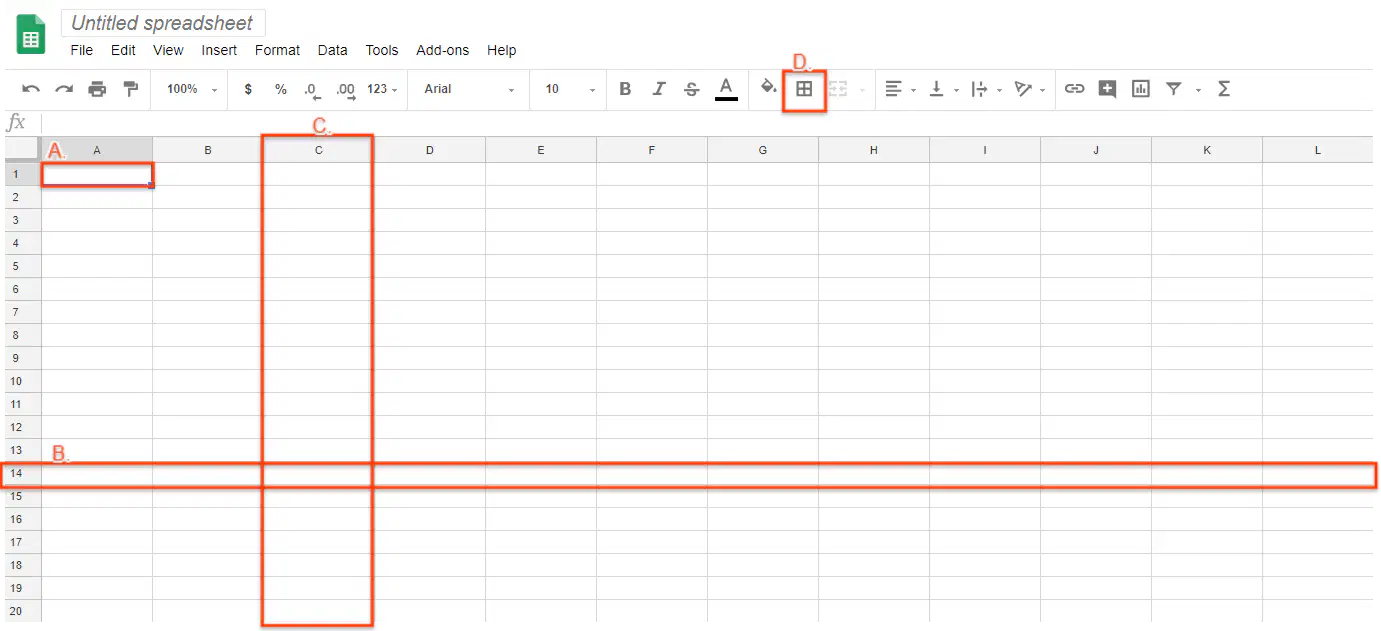
In the picture below, which one is a "column"?
a)
A
b)
B
c)
C
d)
D
12.
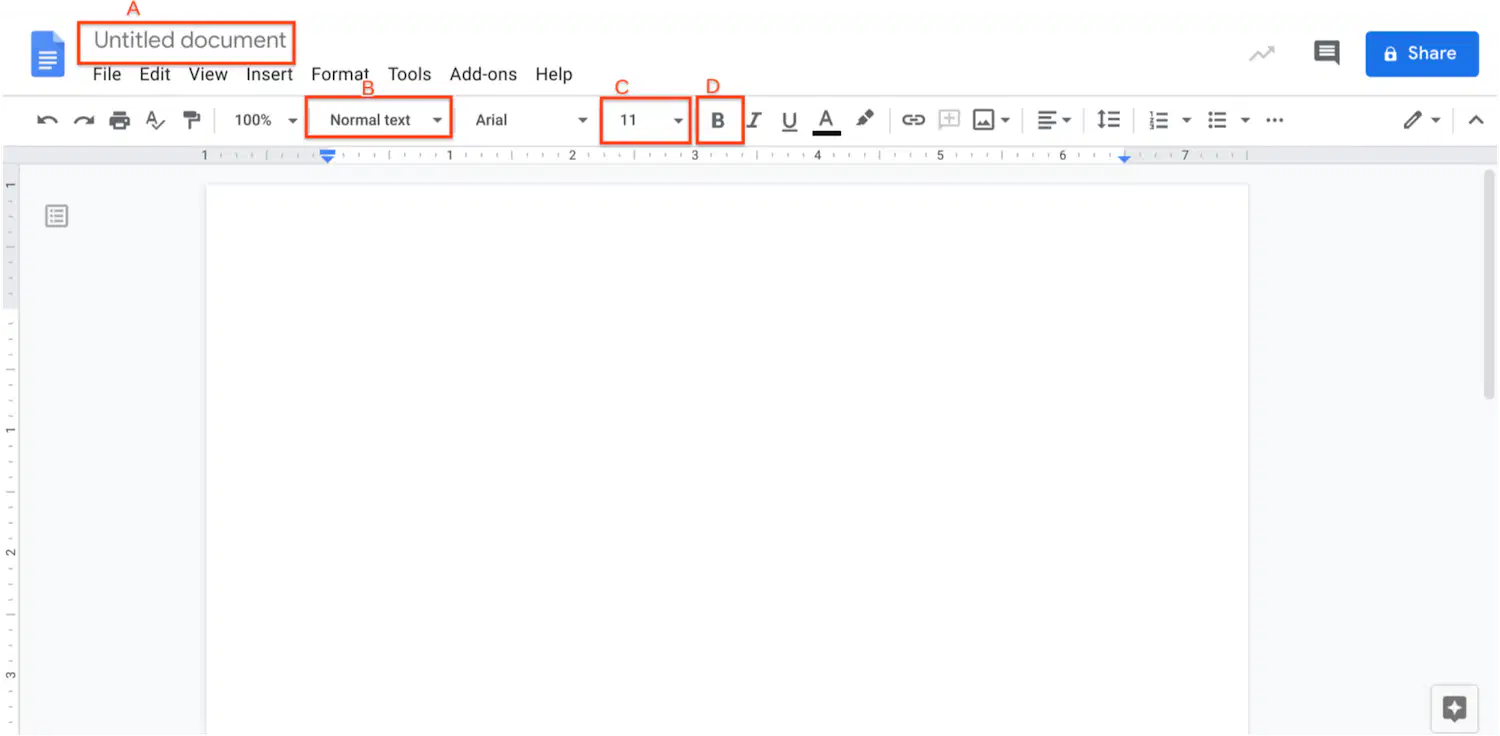
Where would you rename a document?
a)
A
b)
B
c)
C
d)
D
13.

Which option should you choose to resize your flyer to 8.5 x 11 inches?
a)
A
b)
B
c)
C
d)
D
14.
What does a theme do in Google Slides?
a)
Duplicates all the slides in the presentation
b)
Adds transitions and animations between slides
c)
Applied a set of colors and formats to all slides
d)
Automatically shares the presentation with others
15.
What should you use to make sure that all pages and content are arranged in the same way using slides?
a)
Publish the website
b)
Change the share settings for the website
c)
Use the same font style for each page
d)
Choose the same layout for each page
16.
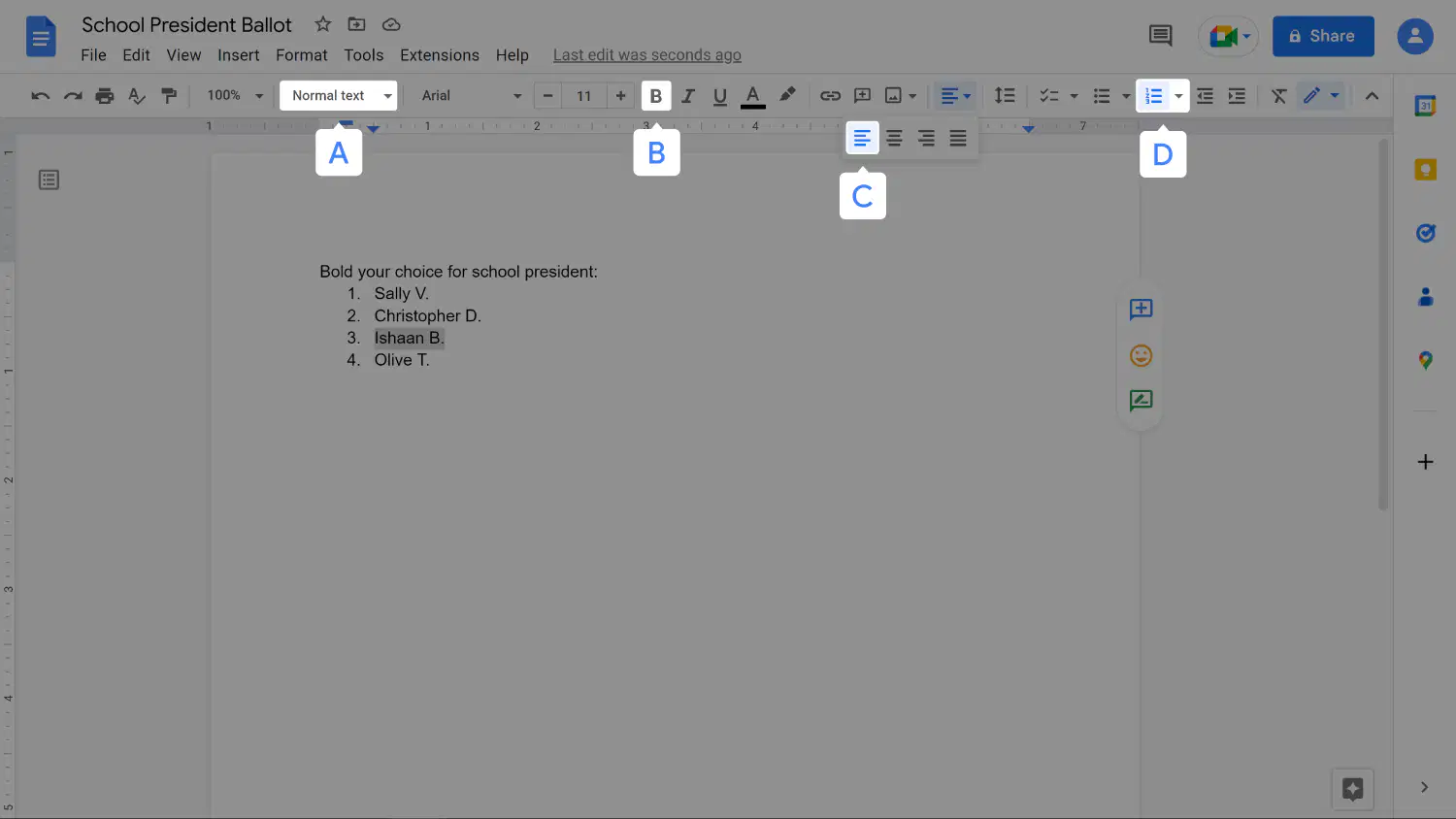
Based on the image below, where would you click to bold text?
a)
A
b)
B
c)
C
d)
D
17.
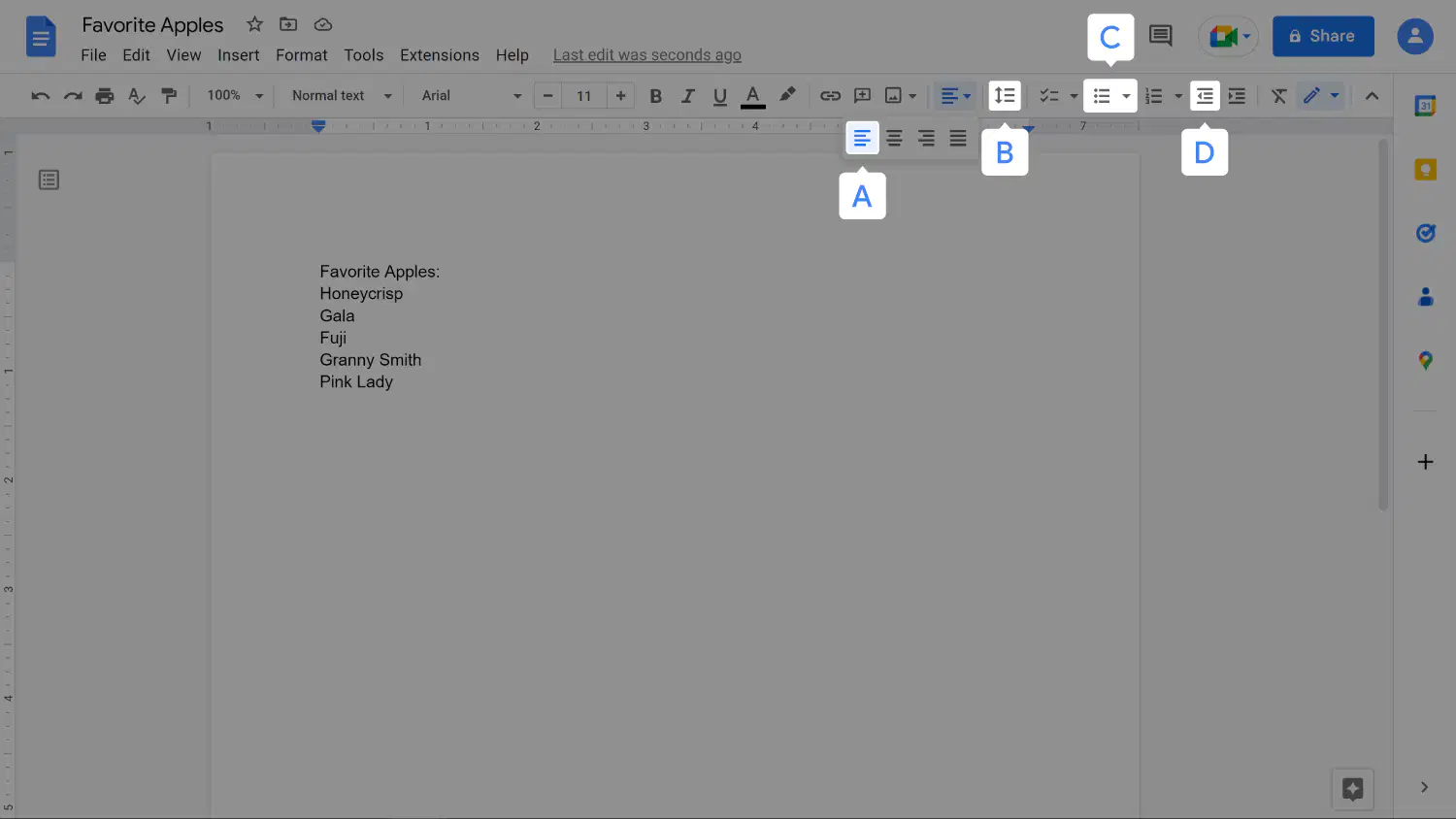
Where would you click to make a bulleted list?
a)
A
b)
B
c)
C
d)
D
18.

In the picture, which part is the title?
a)
A
b)
B
c)
C
d)
D
19.
This lets you point to objects on the screen, click on them, and move them.
a)
Mouse
b)
Microphone
c)
Keyboard
d)
Monitor
20.
What is a writing prompt?
a)
An idea to help you start writing
b)
A group project
c)
A way to format the text on a document
d)
A list of your group members' names
21.
How do you add words to a flyer?
a)
Insert a background color
b)
Insert a text box
c)
Insert a custom color
d)
Insert an image
22.
What should you do to apply a color to your flyer's background?
a)
Right-click in the canvas to choose a color
b)
Insert a shape on the canvas and add a fill color
c)
Change the size of the canvas
d)
Add an image to the canvas from the web
23.

If you want to add a photo from the internet, which should you click to add an image from the internet?
a)
A
b)
B
c)
C
d)
D
24.
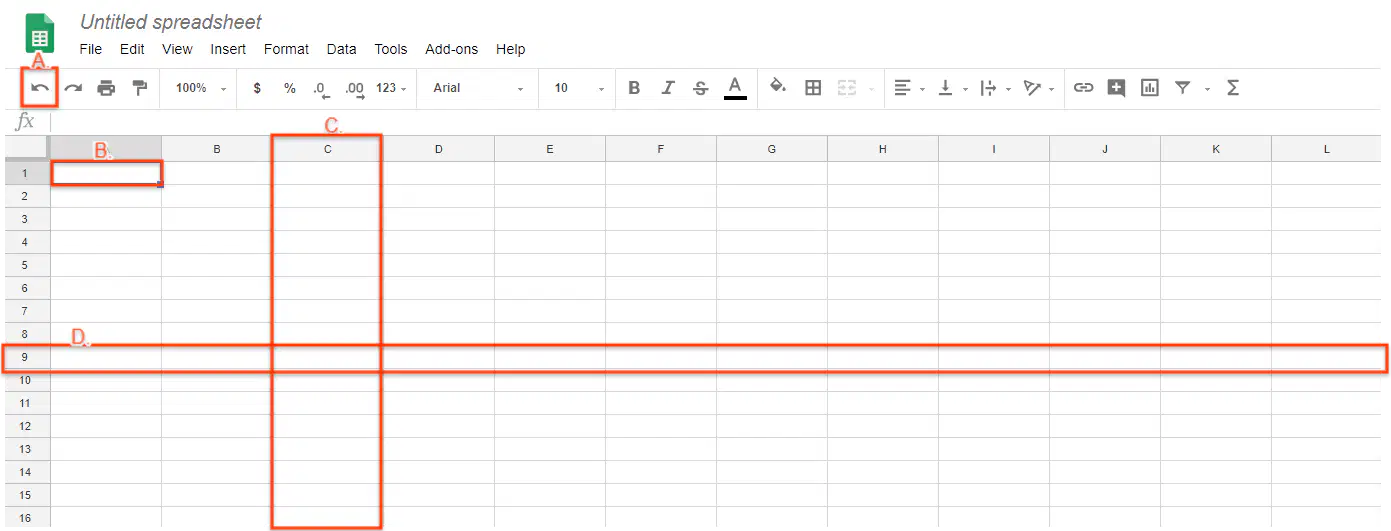
In the picture below, which one is a "row"?
a)
A
b)
B
c)
C
d)
D
25.
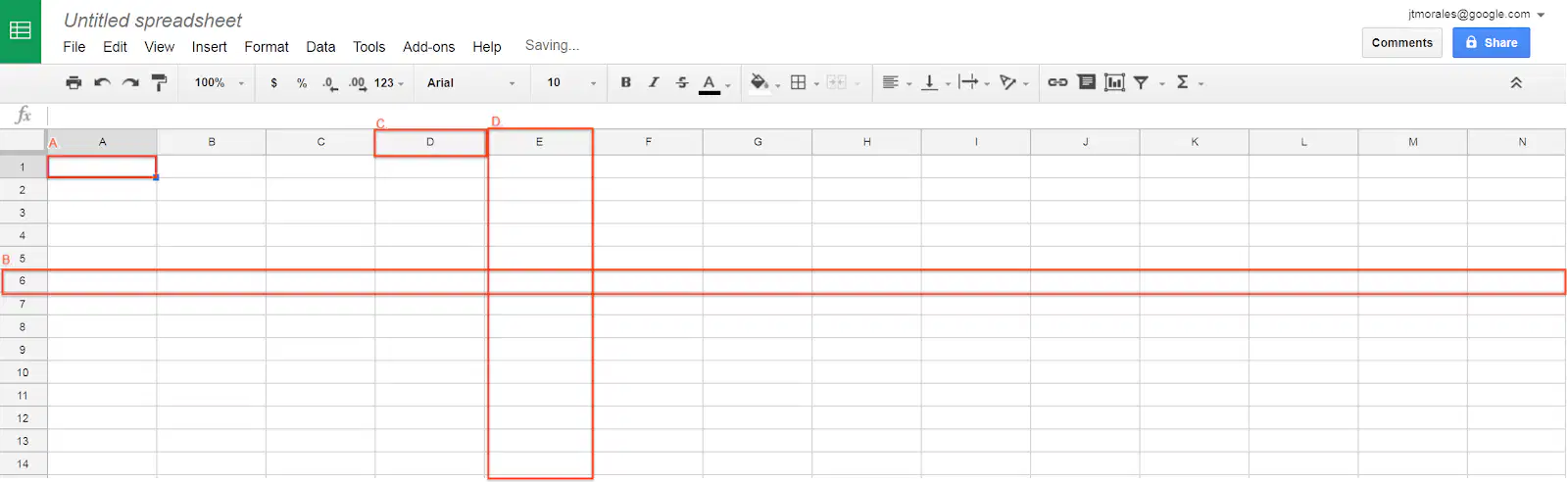
In the picture below, which one is a "cell"?
a)
A
b)
B
c)
C
d)
D
100 %

