
 Worksheets
IG1 U3a&b Revision
Total questions: 171
Worksheet time: 2hrs 48mins
What is input devices?
Hardware devices place outside the computer
Hardware devices that use for producing report
Hardware devices for data entry to the computer
Hardware devices that allow user to enter data
Keyboards are used to input the following data, except;
Text
Number
Instruction
Image
Select one disadvantage of using keyboard;
Enable fast data entry of text
Entering data is slow when compare with automatic methods
Information entered instantly appears on the screen
Very easy to use
What is manual input devices?
Data is input into the computer by hand / user
Data is input into the computer directly by machine
Data is input into the computer by sensor
Data is input into the computer by actuator
Select one disadvantage of using mice;
Faster to select icons and option when compare to a keyboard
Easy to navigate around document and windows
Small size and less space taken
Require flat surface in order to work properly
How trackerball works?
Touch the ball with finger
Typing the buttons
By rotating the large ball with hand
Rolling on the flat surface
A capacitive touch screen..
Uses pressure and conductivity to work
Uses a humans electric field to work
Uses nothing to work
Uses Hankai students to work
A resistive touch screen..
Uses pressure and conductivity to work
Uses a humans electric field to work
Uses nothing to work
Uses Hankai students to work
What device doesn't use a ball to move the cursor on the screen?
Trackerball
Mechanical Mouse
Optical Mouse
This device uses two layers, when one layer is pressed down, it affects the electrical current on the bottom layer.
Resistive Touch Screen
Microphone
Mechanical Mouse
Trackerball
This device has a magnetic coil that vibrates when it is hit by sound waves..
Keyboard
Trackerball
Capacitive Touch Screen
Microphone
Which of the following is not a manual input device?
Keyboard
Sensor
Mouse
Microphone
This device can be used to control the motorized wheelchair
Light pen
Joystick
Mouse
Trackerball
Which one is vulnerable to scratches
Capacitive
Resistive
This device is mostly used with portable computers where space is not sufficient
Light pen
Joystick
Mouse
Trackerball
Inputting data into the computer by hand describe which type of input device ?
Hand held input device
Manual Input Device
Direct input device
Physical input device
This/these device is used to enter numbers and SIMPLE text and symbols into a computer system
Numeric Keypads
keyboard
Touchscreen monitor
Telephone
What are the main types of pointing devices?
Light pen
Mouse
Touchpad
Keyboard
Trackball
This device input analogue sounds into a digital computer
Sound card
Microphone
Telephone
Speakers
Use to input texts, numbers, and instructions
Keyboard
Numeric Keypad
Joystick
Graphics Tablet
Used for entering numbers in a computer system
Keyboard
Numeric Keypad
Joystick
Graphics Tablet
Pieces of hardware that are used to control a pointer(cursor) on the screen
Keyboard
Mouse
Pointing Devices
Joystick
It allows users to input commands into a computer by pressing or touching buttons/icons on the screen
Mouse
Touch screen
Graphics Tablet
Light Pen
Used to enter information on paper into a computer
Scanner
Printer
Microphone
Digital Camera
Used to input analogue sounds into a digital computer
Speaker
Microphone
Digital Camera
Webcam
What are the three types of touchscreen technology?
Capacitive
Infrared
Resistive
Blueray
Don't work with gloves on
If projective technology is used, multi-touch facility is allowed.
Has good clarity in all lighting conditions.
High sensitivity to touch input with better image clarity.
Be sensitive to magnetic fields or microwaves
Has good resistance to dust and water
Low sensitivity
Doesn't allow multi-touch facilities
Vulnerable to scratches and cracked layers.
Allow multi-touch facility
Can be sensitive to moisture or water
Can be sensitive to light interference
Have a smooth surface and easy to press
Poor visibility in strong sunlight
It is possible for accidental activation to take place
The operability isn't affected by a scratched or cracked screen
Very durabel screens that have high scratch resistance
Which touch screen doesn't work with a glove on?
Capacitive
Resistive
Infrared
Which touchscreen doesn't allow a multi-touch facility?
Projective Capacitive
Surface capacitive
Infrared
Resistive

Storage devices
Input devices
Output devices
Processing devices
Choose the devices needed in a POS.
Keyboard
Monitor
Printer
Chip and pin reader
The benefits of this devices is that dirt can’t get trapped in any of the mechanical components.


These are the disadvantages of a capacitive touchscreens.
only work with bare fingers or a special stylus
sensitive to electromagnetic radiation
sensitive to water or moisture
possible for accidental activation to take place

Name label A.
cone
disk
diaphragm
vibration

Name label A.
mirror
lens
disc
platter

What is the most common illness of too much use of keyboard?
repetitive strain injury
headache
backache
eye fatigue
Which statement about a 3D scanner's operation does not belong?
Moving laser projects beam of laser light onto object
Two sensor cameras record changing distance and shape of laser in 3D
Shape of object appears as millions of points known as a “dot cloud"
Point cloud data is merged into a 3D representation of the object
Tomography means...
To image something by analysing the object in very thin slices
To use a tomograph laser for 3D scanning
Scanning in 3D or 2D using an advanced mological laser
Not a common kind of barcode:
UPC-A
Code 128
CP 256
To represent letters and numbers in a barcode, use
UPC-A
Code 128
Code 99-A
The bars on the sides and middle of a UPC-A barcode are called
Guard bars
Security bars
Side rails
Double lines

The number 3 on the LHS of a barcode is shown below. What would it look like on the RHS


Which statement about a barcode scanner's operation does not belong?
Scanner shines a light at barcode
Microprocessor interprets data from digital values
Photoelectric cells detect light
Pattern of lines is beamed out
Not part of what a digital camera's microprocessor controls.
Opening and closing the shutter
Collecting the colour and intensity readings from sensors
Focus the lens on the image
Giving you ideas on what to photograph next
Not part of how a barcode uniquely identifies a product in a supermarket
Each product must have a unique barcode
Each barcode number and its product's details must be stored in a database
Use scanners at tills to identify products and get their prices
Make sure the teller charges more for the bigger version of products
Why is facial recognition not working so well recently?
Covid masks
People are very stressed due to Corona
Heat and sweat
Bugs in the software
Which step does not belong in capturing a photo?
Capture image through CCD sensor
Convert image to digital form
Compress image data and store
Manipulate image data to downgrade image
Not true of a CT scan machine:
Stands for Computed Tomography scan
Uses processed combinations of many X-ray measurements to produce images
Creates cross-sectional images or virtual "slices" of an object
Makes excellent 9D scans
Sometimes called a CAT scan machine
Computers equipped with (a) (OCR) software allow the scanned text to be converted into a text file format, which can then be imported into a word processor. (Uppercase the first letter)

What are the tasks of this device?
adjust the size of the image
focus the image automatically
distance between the eyes
shape of the cheek bones
A scanner which scans solid objects through x, y and z coordinates and takes images at several points along these three coordinates.
3D scanner
2D scanner
Magnetic strip reader
barcode reader

What type of code is this?
Quick Response Code
Barcode
Radio frequency Identification
Frame Quick Response Code

What device is being presented here?
3D printer
2D printer
3D scanner
2D scanner
Which statement about a scanner's operation does not belong?
A bright light illuminates the document
A head moves across the document. Scanned image is sent to lens
A light-sensitive sheet gets the focused image
Sheet is made up of a dozen pixels which record the light intensity
Face recognition software works in this way:
It measures & compares proportions of a person’s face with those stored
It measures & compares proportions of a person’s face with a passport photo
It measures nose, eyes and hair and compares with stored values
Which statement about a 3D scanner's operation does not belong?
Moving laser projects beam of laser light onto object
Two sensor cameras record changing distance and shape of laser in 3D
Shape of object appears as millions of points known as a “dot cloud"
Point cloud data is merged into a 3D representation of the object
Tomography means...
To image something by analysing the object in very thin slices
To use a tomograph laser for 3D scanning
Scanning in 3D or 2D using an advanced mological laser
Which statement about a camera's operation does not belong?
Breaks up what it sees through its lens into a grid of pixels
Shutter opens to let light onto a DVD sensor at the back of the lens
Intensity or colour of light is measured by millions of tiny sensors
Information is stored as an image in the camera’s memory
Not a common kind of barcode:
UPC-A
Code 128
CP 256
To represent letters and numbers in a barcode, use
UPC-A
Code 128
Code 99-A
The bars on the sides and middle of a UPC-A barcode are called
Guard bars
Security bars
Side rails
Double lines
The number 3 on the LHS of a barcode is shown below. What would it look like on the RHS
Which statement about a barcode scanner's operation does not belong?
Scanner shines a light at barcode
Microprocessor interprets data from digital values
Photoelectric cells detect light
Pattern of lines is beamed out
OCR stands for
Optical Character Recognition
Optical Character Recollection
Optical Camera Resolution
Office of Civil Rights
Not part of how a scanner recognises a character of text using OCR technology
Algorithms of analysis are done on each letter
The text is despeckled and split up into separate letters
Each letter recognised is converted to its ASCII equivalent
Accuracy can be increased if the output is installed in a review
Not part of what a digital camera's microprocessor controls.
Opening and closing the shutter
Collecting the colour and intensity readings from sensors
Focus the lens on the image
Giving you ideas on what to photograph next
Not part of how a barcode uniquely identifies a product in a supermarket
Each product must have a unique barcode
Each barcode number and its product's details must be stored in a database
Use scanners at tills to identify products and get their prices
Make sure the teller charges more for the bigger version of products
Not an application for printed barcodes.
Library books
Laboratory samples
Event tickets
Pet ID
A fast and accurate method of collecting handwritten multiple choice answers
OMR(Optical Mark Recognition)
OCR(Optical Character Recognition)
Scanning
Why is facial recognition not working so well recently?
Covid masks
People are very stressed due to Corona
Heat and sweat
Bugs in the software
Which step does not belong in capturing a photo?
Capture image through CCD sensor
Convert image to digital form
Compress image data and store
Manipulate image data to downgrade image
Not true of a CT scan machine:
Stands for Computed Tomography scan
Uses processed combinations of many X-ray measurements to produce images
Creates cross-sectional images or virtual "slices" of an object
Makes excellent 9D scans
Sometimes called a CAT scan machine
_______________is a device which automatically inputs data into a computer system, where the data is constantly changing.
keyboard
Microphone
Joystick
Sensor
______________sensor is used to measure heat in the room.
Light
Temperature
Pressure
Sound
______________sensor is used in detecting the plants when they become too dry.
Humidity
Temperature
Pressure
Sound
_________________ is constantly changing and it changes very smoothly
Digital Data
Analogue Data
Street Lighting control is done by ______________ sensors.
Pressure
Humidity
Light
Sound
Readings taken using sensors are more accurate
than those taken by a human.
True
False
What type of sensor can be used in Clapped Control Lights?
Acoustic(Sound)
Pressure
Humidity
Light
Which of the following sensors would NOT be used to detect a car approaching a traffic light?
Temperature
Sound
Pressure
Motion
A sensor stores data that it collects
True
False
Automatic Door would use______________ sensors
Moisture
Temperature
Humidity
Motion
Where might a proximity sensor be used?
A Car
A House
A Shop
A Green House
Where might a Humidity sensor be used?
A Shop
A Green House
A Car
A Mobile Phone
Which sensor measures weight?
Light Sensor
Pressure Sensor
Motion Sensor
Proximity Sensor
Which sensor measures the distance between itself and and object?
Motion Sensor
Pressure Sensor
Light Sensor
Proximity Sensor
Automatic doors would use a:
Motion Sensor
Light Sensor
Temperature Sensor
Moisture Sensors
These sensors are used in the greenhouse except ..
Temperature
Humidity
Acoustic(Sound)
Light
Match the following
Moisture
measures water levels in soil
Humidity
measures amout of water vapour(in air)
Acoustic
measures/detects sound
pH
measure acidity and alkalinity
Accelerometer
measures acceleration and motion
All of these are examples of sensors, except ...
Gas
Acoustic
Mouisture
Accelerometer
Actuator
Define the term 'sensor'. Choose the most appropriate definition.
Used to capture and can measure physical quantities
A hardware device that collects data and stores it.
Which sensor would be used to measure the amount of sunlight when recording weather data?
Light Sensor
Temperature Sensor
Infra-red sensor
Pressure Sensor
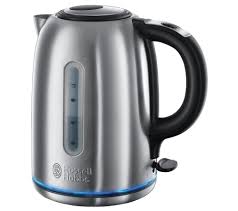
What type of sensor would be used in this kettle?
Light Sensor
Temperature Sensor(Themometer)
Infra-red sensor
Pressure Sensor

What type of sensor would be used in a washing machine?
Light Sensor
Water-level Sensor
Infra-red sensor
Motion Sensor

What type of sensor is used in a central heating system?
Temperature Sensor
Water-level Sensor
Infra-red sensor
Motion Sensor

What type of sensor would be used in these clap controlled lights?
Acoustic(Sound) Sensor
Pressure Sensor
Infra-red sensor
Motion Sensor
Where might a motion sensor be used?
A Greenhouse
A Security system
A Car
A Street Light
Sensors contains
ADC
DAC
microprocessor
microcontroller
Which of the following sensors are used in the greenhouse environment control?
humidity
moisture
temperature
pH
light
Device which reads or measures physical properties from the surroundings.
monitor
screen
sensors
printer
These are examples of monitoring sensor applications.
patient's vital signs
burglar alarm
temperature of air conditioning
street light
Choose the devices needed in a POS.
Keyboard
Monitor
Printer
Chip and pin reader
It is often used in presentations and in multimedia applications.
printer
projector
speaker
plotter
Device which reads or measures physical properties from the surroundings.
monitor
screen
sensors
printer
An device that produces a sound.
printer
speaker
projector
monitor
What device is being presented here?
3D printer
2D printer
3D scanner
2D scanner
The device that produce covering of prosthetic limbs can be made to exactly fit the limb.
2D printer
3D printer
2D scanner
3D scanner

Actuators are used for tasks such as:
controlling robotic arm
spinning a fan
pumping water
controlling flight control surfaces
This type of screen tends to be used for large outdoor displays due to the brilliance of the colours produced.
touchscreen monitor
LCD monitor
LED monitor
OLED monitor
It require full user interaction
Manual
It partialy require user interaction
Direct
It does not require user interaction
Sensor

Manual Input Device

Direct Input Device

Sensor Input Device

Normal Output Device

Control Output Device

What is an output device?
It is something you don't connect to a computer that has information sent to it.
It is something you connect to a computer that sends information into the computer.
It is something you connect to a computer that has information sent to it.
It is somebody you connect to a computer that sends information into the computer.

Choose the output devices.
monitor, printer, mouse
monitor, printer, keyboard
monitor, printer, speakers
mouse, keyboard, smartboard
Fires ink into the page
Laser Printer
Inkjet Printer
3D Printer
Used to create prototype and models
Inkjet Printer
Laser Printer
3D Printer
Works layer by layer
Inkjet Printer
Laser Printer
3D Printer
Useful for producing architectural drawings
dot-matrix
plotter
thermal
It is often used in presentations and in multimedia applications.
printer
projector
speaker
plotter
A device use produce high quality printouts and are very fast when making multiple copies of a document.
inkjet
plotter
laser
scanner

Choose the benefits of an OLED screen.
OLEDs give a brighter light than LEDs
OLEDs generate their own light
plastic, organic layers of an OLED are thinner, lighter and more flexible
OLEDs have a very large field of view
What device is being presented here?
3D printer
2D printer
3D scanner
2D scanner
Actuators are used for tasks such as:
controlling robotic arm
spinning a fan
pumping water
controlling flight control surfaces
This type of screen tends to be used for large outdoor displays due to the brilliance of the colours produced.
touchscreen monitor
LCD monitor
LED monitor
OLED monitor
DLP means(Uppercase the first letter)
(a)
LCD means (Uppercase the first letter)
(a)
What are the two types of the projectors?
LCD
LED
DLP
DMD
What are the two technologies of producing the ink droplets?
Themal bubble
Pizoelectric
Inkjet
Laser
Reorder the following steps for creating a solid object using 3D printers
A design is made using computer aided design(CAD) software
The finalised drawing is imported into some special software that prepares it in a format that is understood by the 3D printer
The 3D printer is first set up to allow the solid object to be made
The solid object is built up layer by layer
The object is removed from the printer and is then prepared
higher contrast rotios
higher longevity/reliability
quieter
smaller
better suited to dusty or smoky atmospheres
suffer from 'shadows' when showing a moving image
do not have grey components in the image
low colour definition
give a sharper image
better colour saturation
generate less heat
have a limited life
tend to degrade with time
It is often used in presentations and in multimedia applications.
printer
projector
speaker
plotter
Choose the benefits of an OLED screen.
OLEDs give a brighter light than LEDs
OLEDs generate their own light
plastic, organic layers of an OLED are thinner, lighter and more flexible
OLEDs have a very large field of view
Actuators are used for tasks such as:
controlling robotic arm
spinning a fan
pumping water
controlling flight control surfaces
This type of screen tends to be used for large outdoor displays due to the brilliance of the colours produced.
touchscreen monitor
LCD monitor
LED monitor
OLED monitor
Which monitor is not good for your health (eyestrain, headache, etc)
CRT
TFT
LCD
LED
This monitor is better in terms of the display which has more vivid colour.
CRT
TFT
LCD
LED
Consist of thousand tiny pixels made up of transistor.
CRT(Cathode-Ray Tube)
TFT(Thin Film Transistor)
LCD(Liquid Crystal Display)
LED(Light-Emitting Diodes)
The front layer is made of liquid crystal diodes.
CRT
TFT
LCD
LED
Glare view might give headache to user due to the sharpness of the images.
CRT
TFT
LCD
LED
Which of the following are NOT used for input?
Mouse
Scanner
Printer
Keyboard
Projector
A teacher uses a (a) to show her presentation slides.
Name the three main types of printers that print onto paper:
Which type of printer would you use for printing high quality photographs?
Laser
Inkjet
Dot-matrix
Plotter
Which type of printer would you use to print 2000 copies of a letter for students?
Laser
Inkjet
Dot-matrix
Plotter
What are the benefits of a laser printer?
What are the disadvantages of a laser printer?
What are the benefits of an inkjet printer?
What are the disadvantages of an inkjet printer?
For which of the following would you use a dot-matrix printer?
Printing party invitations
Printing employee payslips
In an office environment
In a factory
Printing homework
What are the advantages of using a dot-matrix printer?
What are the drawbacks of using a dot-matrix printer?
What is a printer driver?
What is the printer buffer?

What type of printer is this?
(a)
List some items you can print with a 3D printer:
Which of the following is an impact printer?
Thermal
Dot Matrix
Laser
Ink Jet
Which of the following printers creates a physical object?
Dot Matrix
Laser
3D Printer
Thermal
Which of the following uses a ribbon to imprint the ink on the paper?
Dot Matrix
Inkjet
Laser
Thermal
What does the platen do?
Apply ink to the paper
Fuse toner to the paper
Hold the paper in place
Place the head of printer on the printer
Which is the Platen?


What type of printer would you find at a Gas Station or fast food restaurant to print a customer receipt?
Dot Matrix
Inkjet
Laser
Thermal
What type of printer would you find at a mortgage company where a customer signs a document but they need to keep 3 physical versions of the contract to give one to customer and to other departments?
Dot Matrix
Inkjet
Laser
Thermal
Which type of printer is classified as a page printer?


A laser printer fuses toner on to the drum?
True
False
Toner is made up of plastic?
True
False
A drum in a laser printer is metal or plastic?
Metal
Plastic
Which type of printer can print duplex?
Which printer feature has the ability to print fastest?
300 dpi
8 ppm
600 dpi
15 ppm

A printer that uses toner to burn text / images onto a page is called what?
Laser
Plotter
Inkjet
Dot Matrix

Printer that uses a printer head and ribbon to generate text / images is called what?
Dot Matrix
Plotter
Inkjet
Laser

A printer usually found in homes that uses cartridges and can produced high quality photos is called what?
Inkjet
Plotter
Dot Matrix
Laser

