
 Worksheets
TinkerCAD Codeblocks Quiz makeup
Total questions: 14
Worksheet time: 7mins
What do you use first when starting a project in TinkerCAD Codeblocks?
SHAPES BLOCK
MOVE BLOCK
CREATE TEMPLATE
MODIFY BLOCK
What is the purpose of defining a template in TinkerCAD Codeblocks?
To place a shape on the workplane
To name the project
To tell the program what your design is going to be
To change the number of sides of a shape
Where are all the shapes located in TinkerCAD Codeblocks?
TEMPLATE category
POLYGON block
SHAPES category
DESIGN category
How does TinkerCAD Codeblocks place a shape on the workplane. Choose ALL correct answers.
Exactly in the middle of the plane at (0,0,0)
Half above the plane and half below
Lying down
At a random position on the plane
Which axis do we turn around to make a shape rotate forward like a front flip or the Spiderman gif? (We used it to make the hexagon "stand up" for our pen holder)
Y-axis
X-axis
Z-axis
No axis is needed
What do you need to change to MOVE a shape up (+) or down (-)?
X value
Y value
Z value
No value needs to be changed
What does the "i" in the "count with" block represent?
A fixed number
A variable that will change
The number of times an action is repeated
The final number in the count
If you want to ROTATE a shape sideways like a cartwheel, which axis would you rotate around?
X-axis
Y-axis
Z-axis
No axis is needed

What is the purpose of this block?
To select different shapes
To change the color of shapes
To repeat an action over and over
To group shapes
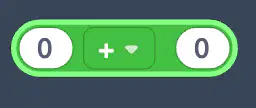
What category does this block belong to?
Shapes
Math
Control
Modify

What is the purpose of this block?
To change the color of an object
To move an object to a different location
To make the object pivot around the origin.
To add a comment to the code
What is the purpose of the "comments" block in the code?
To rotate an object
To change the value of a variable
To tell another person something about the code
To change the coordinates of an object
Which of the following blocks would you use to move the shape to your right on the workplane


Which of the following is a true statement?
If you have a "CREATE FROM" template, but not a "DEFINE" template block, the object will appear on the workplane
If you have a "DEFINE" template block, but NOT a "CREATE FROM" template, the object will not appear on the workplane
If the CREATE FROM template is above the DEFINE template, the object will appear on the workplane
If you have a "DEFINE" template block but no "CREATE FROM" template block, the object will appear on the workplane

