
 Worksheets
KINHS ( 1st Semester)
Total questions: 30
Worksheet time: 20mins
Who is the father of computer?
Charles Babage
Allen Musk
Allen Turing
Blais Pascal
The blinking black line showing where the next character will be typed is called the
Cursor
Line
Arrow
Pointer
The name of a document is the.....
tab name
file name
document name
none of the above
This contains commands you need to complete a task.
Ribbon
File Name
Cursor
Toolbar
The keyboard shortcut to print a document is....
ctrl+P
ctrl+Print
ctrl+O
ctrl+W
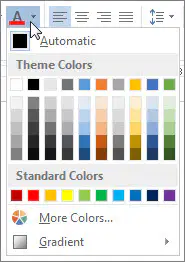
This part of the MS Word window allows you to change the font
Type
Size
Shading
Color
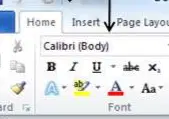
The arrow is pointing to the
Font Color
Font Face
Font Size
Font Shading
"Hat" This font is using which text formatting
Italics
Underline
None
Bold
"Hat" This font is using which text formatting
Bold
Underline
Italics
None
The option to change the font color is found under the _____ tab.
Home
Insert
Edit
View
Changing the way that text looks on the page is called......
Typing
Editing
Formatting
The program used to create text documents is.....
MS Excel
MS Word
MS Access
MS Notepad

An _____________ is the most important software that runs on a computer. It manages the computer's memory and processes, as well as all of its software and hardware.
Banana
Hardware
Software
Operating System

Every laptop has a _______, which allows you to use the laptop when it's not plugged in.
Cable
USB
Computer
battery

A ________ is a general term for any type of handheld computer.
Device Mobile
Mobile Device
Laptop
Toplap

The ______ is where your software, documents, and other files are stored. It long-term storage, which means the data is still saved even if you turn the computer off or unplug it.
RAM
USB
Hard Drive
Storage Drive

____ is your system's short-term memory. Whenever your computer performs calculations, it temporarily stores the data in the RAM until it is needed.
REM
RIM
RAM
ROM

The CPU fits into the motherboard's CPU socket, which is covered by the ____, an object that absorbs heat from the CPU.
Sink
Heat Sink
Fan
Ice

The _____, also called a processor, is located inside the computer case on the motherboard. It is sometimes called the brain of the computer, and its job is to carry out commands.
CPU (Central Processing Unit)
PUC (Processing Unit Central)
CUP (Central Unit Processing)
Center Process Unification

The ________ is the computer's main circuit board. It's a thin plate that holds the CPU, memory, connectors for the hard drive and optical drives, expansion cards to control the video and audio, and connections to your computer's ports.
RAM
CPU
Optical Disc Drive
Motherboard

A _____ is used to print documents, photos, and anything else that appears on your screen.
Camera
Smartphone
Printer
e - Reader

You can use this port for networking and connecting to the Internet.
USB Port
Serial Port
Ethernet Port
Power Button

This is where you'll connect the power cord to the computer.
USB Port
Audio In/ Audio Out
Power Socket
Serial Port

These can be used to connect almost any type of device, including mice, keyboards, printers, and digital cameras.
Audio In
Audio Out
USB Port
Monitor Port

The _____ works with a video card, located inside the computer case, to display images and text on the screen.
Monitor
Computer Case
Keyboard
Mouse

The _______ is the metal and plastic box that contains the main components of the computer, including the motherboard, central processing unit (CPU), and power supply.
Monitor
Computer Case
Keyboard
Mouse

A _______ is an electronic device that manipulates information, or data.
Software
Hardware
Keyboard
Computer

