
 Worksheets
Prelim Exam HTML-CSS
Total questions: 88
Worksheet time: 2hrs 6mins
Which tag is used to create a hyperlink in HTML?
<link>
<a>
<href>
<url>
What does CSS stand for?
Computer Style Sheets
Creative Style Sheets
Cascading Style Sheets
Colorful Style Sheets
Which HTML tag is used to define an unordered list?
<ul>
<ol>
<li>
<list>
What is the correct CSS syntax to change the text color of a paragraph to red?
p {text-color: red;}
p {color: red;}
p {font-color: red;}
p {text: red;}
Which property is used to change the background color in CSS?
color
bgcolor
background-color
background
What is the correct HTML for creating a hyperlink to another website?
<a href="http://www.example.com">Click here</a>
<a url="http://www.example.com">Click here</a>
<a link="http://www.example.com">Click here</a>
<a src="http://www.example.com">Click here</a>
What is the correct CSS syntax to change the font size of a paragraph to 16px?
p {font-size: 16px;}
p {size: 16px;}
p {text-size: 16px;}
p {font: 16px;}
Which HTML tag is used to create a table?
<table>
<tr>
<td>
<th>
What does HTML stand for?
Hyper Text Markup Language
Highly Technical Markup Language
Home Tool Markup Language
Hyperlink Text Markup Language
What is the correct HTML for inserting an image?
<img src="image.jpg" alt="MyImage">
<image src="image.jpg" alt="MyImage">
<img href="image.jpg" alt="MyImage">
<image href="image.jpg" alt="MyImage">
How do you add a background color for all <h1> elements?
h1 {background-color: #FFFFFF;}
h1.all {background-color: #FFFFFF;}
all.h1 {background-color: #FFFFFF;}
<all.h1 {background-color: #FFFFFF;}>
Which HTML tag is used to define a table row?
<tr>
<table>
<td>
<th>
What is the correct CSS syntax to center align text?
p {text-align: center;}
p {align: center;}
p {center-align: true;}
p {align-text: center;}
Which HTML tag is used to create a line break?
<br>
<lb>
<break>
<line>
What is the correct CSS syntax to make text bold?
p {font-weight: bold;}
p {bold: true;}
p {text-bold: true;}
p {weight: bold;}
The < (a) > tag is used to define a hyperlink in HTML.
CSS stands for Cascading Style (a) .
The class attribute in HTML is used to apply styles from (a) .
The < (a) > tag is used to define an image in HTML.
The href attribute in the <a> tag specifies the (a) of the linked document.
The <!DOCTYPE> declaration in HTML is used to specify the (a) type.
The (a) property in CSS is used to change the color of text.
The < (a) > tag is used to define a table in HTML.
The _________ - _____ property in CSS is used to change the background color of an element.
(a)
What is the correct CSS syntax to change the background image of a div?
div {background-image: url('image.jpg');}
div {image: url('image.jpg');}
div {bg-image: url('image.jpg');}
div {background: url('image.jpg');}
Which HTML tag is used to create a numbered list?
<ol>
<ul>
<li>
<nl>
What is the correct CSS syntax to add a border around an element?
element {border: 1px solid black;}
element {add-border: 1px solid black;}
element {border-style: solid;}
element {outline: 1px solid black;}
What is the correct HTML for creating a hyperlink to an email address?
<a href="mailto:email@example.com">Email me</a>
<a link="mailto:email@example.com">Email me</a>
<a src="mailto:email@example.com">Email me</a>
<a email="email@example.com">Email me</a>
What is the correct way to comment out multiple lines in CSS?
/* This is a comment */
// This is a comment //
<!-- This is a comment -->
// This is a comment //
This exam consists of answer questions related to HTML and CSS. Each question requires a brief written response. Please read each question carefully and provide your answer concisely.
Describe the difference between padding and margin in CSS.
What is the purpose of the alt attribute in the <img> tag?
This exam consists of answer questions related to HTML and CSS. Each question requires a brief written response. Please read each question carefully and provide your answer concisely.
What is the purpose of the alt attribute in the <img> tag?
This exam consists of answer questions related to HTML and CSS. Each question requires a brief written response. Please read each question carefully and provide your answer concisely.
How can you link an external CSS file to an HTML document?
What is the correct HTML for creating a checkbox?
<input type="checkbox">
<checkbox>
<check>
<input type="check">
Which CSS property is used to change the text color of an element?
color
text-color
font-color
text-style
What is the correct HTML for creating a radio button?
<check>
<input type="select">
<radio>
<input type="radio">
Which HTML tag is used to create a footer section?
<footer>
<bottom>
<section>
<div>
Which attribute specifies the URL where the form data should be sent?
method
action
url
target
Which of the following is NOT a valid value for the type attribute?
number
http
text
The placeholder attribute is used for:
Making an input read-only
Displaying a hint inside the input field
Defining the visible width of the input field
Setting the initial value of the input field
Which element groups related form controls?
label
fieldset
legend
section
What is the role of the for attribute in a label?
To specify the form’s method type
To identify the input element the label belongs to
To define form submission behavior
To group radio buttons
Which element is used to add a title to a table?
title
caption
thead
tfoot
Which HTML element is used for table headers?
td
tr
th
thead
What is the purpose of the colspan attribute?
To merge rows
To merge columns
To style columns
To change cell width
Which input type allows only one option from a group to be selected?
checkbox
radio
select
dropdown
What is the “focused state” of an input field?
When it is read-only
When it is disabled
When it is selected by the user
When it is empty
The HTML element used to group related form controls together is called (a)
The attribute that specifies the HTTP method used to send form data is (a)
The <td> element in a table represents a (a) cell.
The attribute that merges multiple table columns into one is called (a)
The <legend> element is used to provide a _______ or _____ for a fieldset.
(a)
To make a single option selectable among many, you use the (a) input type.
The placeholder text is displayed (a) the user types in the input.
The <thead> element contains (a) rows of a table.
The <caption> element must be the (a) element inside a table.
When an input is selected and ready for typing, it is in (a) state.
Which is the correct way to create a checkbox?
<input checkbox="type">
<input type="checkbox">
<input type="check">
<input check="box">
Correct way to merge 3 columns in a table:
<td merge="3">
<td colspan="3">
<td col="3">
<td column="3">
Proper <thead> structure:


None
Correct HTML for a text input with placeholder:
<input type="text" placeholder="Enter name">
<input type="placeholder" text="Enter name">
<input placeholder type="text">
<input type="text" hint="Enter name">
Valid HTML for a form with GET method:
<form method="GET">
<form type="GET">
<form http="GET">
<form get="true">
Code for a button inside a form:
<input type="button" value="Submit">
<btn>Submit</btn>
<button>Submit</button>
Both a and c
Correct way to connect a label with an input:


Both a and b
None
Code for a table footer row:


Correct way to add table caption:
<title> inside <table>
<caption> as first element inside <table>
<caption> after <tbody>
<caption> anywhere in HTML
HTML code for numeric input:
<input type="numeric"
<input type="number">
<input number>
<input num>
Create a table header row with columns "Name", "Age", and "Email".
Write an input field for email with placeholder "Enter your email".
Make a checkbox labeled "Subscribe".
Create a radio button group for "Gender" with options "Male" and "Female"
Create a <tfoot> row showing "Total Books: 5" spanning 4 columns.
Build a <form> that sends data via POST to /submit.
NOTE: No input fields , Just form only.
Add a caption to a table that says "Student Grades".
Create a number input for "Quantity" with default value 1.
Link a label to an input field for "Username" using for and id.
Create a text input limited to 10 visible characters.
Which CSS property would you use to create space between the border of an element and its neighboring elements?
padding
border
margin
width
What is the key characteristic that distinguishes inline-block elements from inline elements?
Inline-block elements cannot be nested inside block elements
Inline-block elements automatically span the full width of their container
Inline-block elements allow setting of height and width, unlike inline elements
Inline-block elements always break onto a new line
What will happen if you set width: 600px; and max-width: 500px; on a div element?
The element will be 600px wide
The element will be 500px wide
The element will be 550px wide
The element will be 100px wide
Which type of CSS is best suited for applying styles to a single webpage only?
Inline CSS
External CSS
Internal CSS
Universal CSS
What is the default behavior of block-level elements in CSS?
They take up as much width as necessary and stay within the flow of content
They take up the full width of their container and start on a new line
They are only used for images and links
They are always aligned to the center of the page
What does width=device-width in the meta viewport tag accomplish?
Sets the width of all images to match the device width
Tells the browser to match the page width to the device's screen width
Adjusts the font size based on the device width
Limits the maximum width of the webpage
Which of the following correctly describes the anatomy of a CSS rule?
property { selector: value; }
selector { property: value; }
value { selector: property; }
selector: property { value }
What is the primary purpose of CSS in web development?
To structure the content of web pages
To handle server-side logic
To separate the presentation of a document from its content
To manage database operations
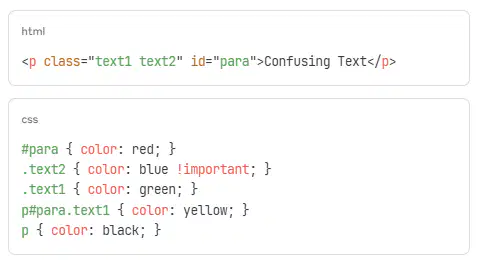
Cascading Order Trap: What color will this paragraph be?
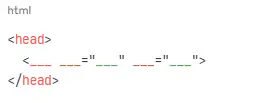
External CSS Linking Question: Complete the HTML to properly link an external stylesheet named "main.css":
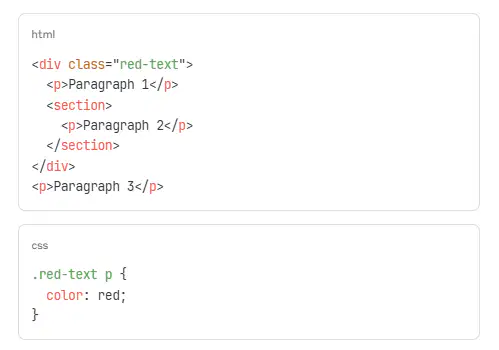
CSS Inheritance Question: Given this HTML structure and CSS, which p elements will be red?

