
 Worksheets
EthanGr2Computer_Q4
Total questions: 129
Worksheet time: 1hrs 28mins

Identify the Window Control button.
Restore
Maximize
Minimize
Close

Identify the Window Control button.
Restore
Maximize
Minimize
Close

Identify the Window Control button.
Restore
Maximize
Minimize
Close

Identify the Window Control button.
Restore
Maximize
Minimize
Close
This button lets you see other window and icons underneath your current window. The window will become a button on the taskbar.
Restore
Maximize
Minimize
Close
This button when clicked fills the whole screen and lets you see more. It makes the window big.
Restore
Maximize
Minimize
Close
You can make the window return to its previous size after it has been maximized by clicking this button
Restore
Maximize
Minimize
Close
This button closes the window.
Restore
Maximize
Minimize
Close
To open a program or window, you have to click the icon three times.
true
false
To open a program or window, you can double click the icon.
true
false
In closing s window, click the minimize button.
true
false
In closing a window, click the close button.
true
false
In order to resize the window, click and drag the edges or corners of the window.
true
false
You can restore a minimized window by clicking on the maximize button.
true
false
You can restore a minimized window by clicking on the minimize button.
true
false
In order to resize the window, double click the window.
true
false
The minimized window can be found on the taskbar.
true
false
A maximized window fills up the whole screen of your computer.
true
false
A minimized window fills up the whole screen of your computer.
true
false
You can move a window by clicking and dragging the title bar
true
false
Determine if the following statement below shows good care of ourselves while using the computer.
Sit properly.
true
false
Determine if the following statement below shows good care of ourselves while using the computer.
The chairs should fit us.
true
false
Determine if the following statement below shows good care of ourselves while using the computer.
Our backs are against the backrest of our chairs.
true
false
Determine if the following statement below shows good care of ourselves while using the computer.
Our knees should make a right angle.
true
false
Determine if the following statement below shows good care of ourselves while using the computer.
Our feet should be flat on the floor.
true
false
Determine if the following statement below shows good care of ourselves while using the computer.
Our legs should not be crossed
true
false
Determine if the following statement below shows good care of ourselves while using the computer.
Place the monitor at an appropriate distance.
true
false
Determine if the following statement below shows good care of ourselves while using the computer.
The computer monitor should be in front of us.
true
false
Determine if the following statement below shows good care of ourselves while using the computer.
The computer monitor must be slightly below our eye level.
true
false
Determine if the following statement below shows good care of ourselves while using the computer.
Bring the chair up close to the keyboard.
true
false
Determine if the following statement below shows good care of ourselves while using the computer.
Our elbows should be at the same height as the keyboard.
true
false
Determine if the following statement below shows good care of ourselves while using the computer.
Our elbows should be relaxed while using the keyboard.
true
false
Determine if the following statement below shows good care of ourselves while using the computer.
Our wrists must be relaxed when typing.
true
false
Determine if the following statement below shows good care of ourselves while using the computer.
Put the mouse near the keyboard.
true
false
Determine if the following statement below shows good care of ourselves while using the computer.
Take short breaks while using your computer.
true
false
Determine if the following statement below shows good care of ourselves while using the computer.
Rest your eyes.
true
false
Determine if the following statement below shows good care of ourselves while using the computer.
Rest, bend back a few times, stretch and move around every 30 minutes to let our bodies relax.
true
false
Determine if the following statement below shows good care of our computers.
Make sure our hands are clean and dry before using our computers.
true
false
Determine if the following statement below shows good care of our computers.
Keep the food and drinks away from our computers.
true
false
Determine if the following statement below shows good care of our computers.
Press the computer keys softly.
true
false
Determine if the following statement below shows good care of our computers.
Press the computer in a clean and dry place.
true
false
Determine if the following statement below shows good care of our computers.
Do not place anything heavy on top of any part of our computer.
true
false
Determine if the following statement below shows good care of our computers.
Only adults may touch the electrical parts of our computers.
true
false
Determine if the following statement below shows good care of our computers.
Keep your computers from direct heat or sunlight or in place where they might get wet.
true
false
Determine if the following statement below shows good care of our computers.
Clean the computers with a soft and dry cloth.
true
false
Determine if the following statement below shows good care of our computers.
Cover the computers when not in use to keep them free from dust and dirt.
true
false
Determine if the following statement below shows good care of our computers.
Do not touch the computer screen and protect the display monitor.
true
false
Keep the computer clean.
proper way of using the computer
not a proper way of using the computer
Press the keyboard of the computer hard.
proper way of using the computer
not a proper way of using the computer
Eat or drink near a computer.
proper way of using the computer
not a proper way of using the computer
Maintain a proper posture while using the computer.
proper way of using the computer
not a proper way of using the computer
Turn off the computer properly when not in use.
proper way of using the computer
not a proper way of using the computer
Pull-out the cables and wires of the computer.
proper way of using the computer
not a proper way of using the computer
Use the computer for a whole day.
proper way of using the computer
not a proper way of using the computer
Maintain a proper distance from the monitor of the computer.
proper way of using the computer
not a proper way of using the computer
Keep the computer turn on even if you don't use it.
proper way of using the computer
not a proper way of using the computer
Do not insert objects into the computer.
proper way of using the computer
not a proper way of using the computer
Sit up straight while using the computer.
proper way of using the computer
not a proper way of using the computer
Do not use the computer for a very long time.
proper way of using the computer
not a proper way of using the computer
You should always use the computer with the permission of your parents or your teachers.


Play with the wires of the computer.


Place the computer on a safe and clean place.


Press the keys of your keyboard too hard.


Always shut down the computer properly when you are done using it.


Switch off your computer directly, like pressing the button on the CPU or the main power supply button.


Do not eat and drink while working on the computer.


Make sure to give your computer some rest.


Always press the keys of the keyboard gently.


Touch the mouse and the keyboard with dirty and wet hands.


Which picture shows CARE for the computer?


Which is good to put your laptop on?


You should always use the computer with the permission of your parents or your teachers.
Play with the wires of the computer.
Place the computer on a safe and clean place.
Switch off your computer directly, like pressing the button on the CPU or the main power supply button.
Do not eat and drink while working on the computer.
Make sure to give your computer some rest.
Always press the keys of the keyboard gently.
Touch the mouse and the keyboard with dirty and wet hands.
Is a list of commands you can use to do a specific task.
Menu
Windows
To view the items on the menu, just click on the name of the menu, and the rest of the menu will appear.
true
false
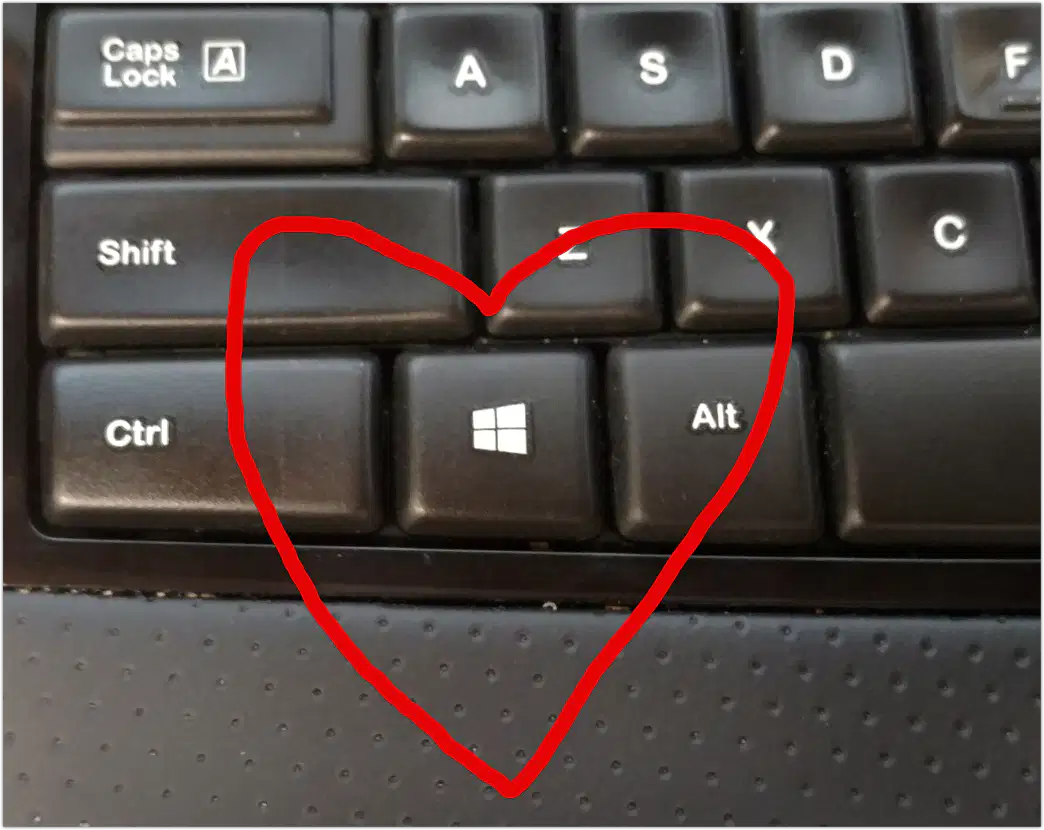
Identify the short cut key describe below:
Located at the bottom part of the keyboard.
It is between Ctrl and Alt Keys.
Windows Key
Function key
Displays the Start Menu

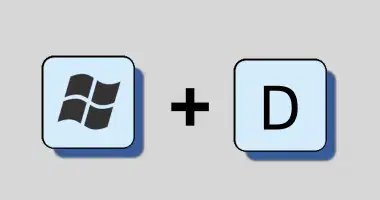
This key, when pressed with another key, performs a task that saves you a few seconds since your hands remain on the keyboard.
Minimizes all windows and shows the Desktop.
Minimizes all windows.

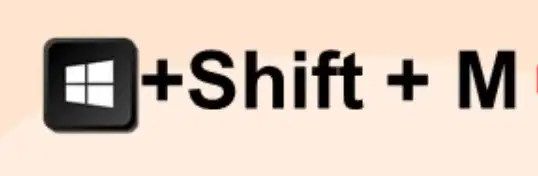
Restores all previously open windows to how they went before you minimized them.
Selects All items.

Adds or removes Bold formatting.
Adds or removes Italic formatting.
Opens a New document.


Prints a document.
Saves a document.
Adds or removes Underline formatting.

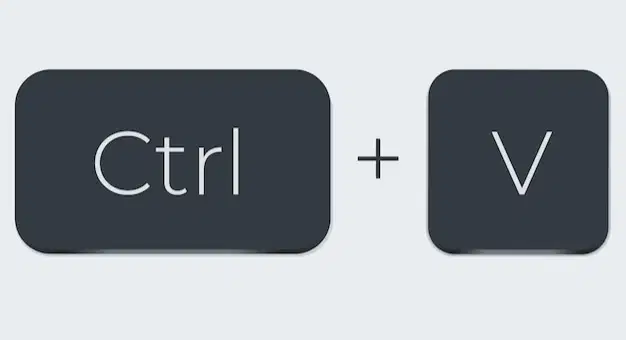

Pastes or inserts the cut or copied items in the area where your flashing cursor is or in the area you have selected or highlighted.
Closes the document currently open.
Cuts or removes the selected or highlighted item.

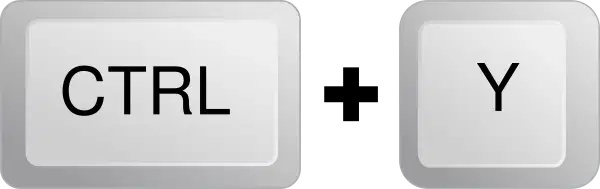
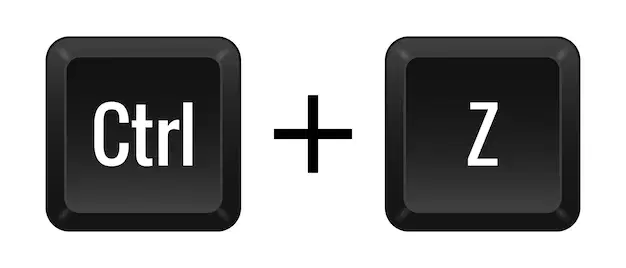
Lets you redo the last command.
Lets you undo the last command.
Choose True if the statement about caring for oneself in using the computer and caring for the computer is correct and False if otherwise.
Taking short breaks every hour to stretch and move around is unnecessary.
true
false
Choose True if the statement about caring for oneself in using the computer and caring for the computer is correct and False if otherwise.\
Adjusting your chair height so your feet are flat on the floor can prevent body pains.
true
false
Choose True if the statement about caring for oneself in using the computer and caring for the computer is correct and False if otherwise.\
Looking away from the screen every 20 minutes for 20 seconds helps prevent eye strain.
true
false
Choose True if the statement about caring for oneself in using the computer and caring for the computer is correct and False if otherwise.\
Ignoring aches and pains in your body while using the computer won't have long-term consequences.
true
false
Choose True if the statement about caring for oneself in using the computer and caring for the computer is correct and False if otherwise.\
Sitting for long periods without getting up is a good way to maintain energy levels.
true
false
Choose True if the statement about caring for oneself in using the computer and caring for the computer is correct and False if otherwise.\
Drinking plenty of water throughout the day helps with focus while using the computer
true
false
Choose True if the statement about caring for oneself in using the computer and caring for the computer is correct and False if otherwise.\
Leaving your computer on all the time is the best way to ensure it's always ready to use.
true
false
Choose True if the statement about caring for oneself in using the computer and caring for the computer is correct and False if otherwise.
Regularly cleaning the dust filters in your computer helps maintain cooling and prevent overheating.
true
false
Choose True if the statement about caring for oneself in using the computer and caring for the computer is correct and False if otherwise.
Spilling liquids on your computer is a guaranteed hardware failure.
true
false
Choose True if the statement about caring for oneself in using the computer and caring for the computer is correct and False if otherwise.
Proper sitting position while using the computer will prevent neck and back pains.
true
false
Choose True if the statement about caring for oneself in using the computer and caring for the computer is correct and False if otherwise.
We should make sure that our hands are clean and dry before using the computer.
true
false
Choose True if the statement about caring for oneself in using the computer and caring for the computer is correct and False if otherwise.
We should have our snacks like biscuits and juice near our computer so we won't be hungry while using the computer.
true
false
Choose True if the statement about caring for oneself in using the computer and caring for the computer is correct and False if otherwise.
We should place our computers in a clean, cool and dry place.
true
false
Choose True if the statement about caring for oneself in using the computer and caring for the computer is correct and False if otherwise.
We should not put anything heavy on top of any part of our computer.
true
false
Choose True if the statement about caring for oneself in using the computer and caring for the computer is correct and False if otherwise.
We should use a soft and wet cloth in cleaning our computers.
true
false
The Windows key is located beside the Shift Key.
true
false
A menu is a list of commands you can use to do a specific task
true
false
Windows key is located at the top of the keyboard.
true
false
You can see the Windows key if you are using a Windows Keyboard.
true
false
Ctrl means close.
true
false
Match the items below.
Ctrl + I
Adds or removes Italic formatting.
Windows Key
Displays the Start Menu.
Windows key + M
Minimizes all windows
Ctrl + Z
Lets you undo the last command
Ctrl + A
Selects all items
Match the items below.
Ctrl + B
Adds or removes Italic formattin
Ctrl + C
Displays the Start Menu.
Ctrl + U
Minimizes all windows
Ctrl + S
Lets you undo the last command
Ctrl + N
Opens a new document
Match the items below.
Ctrl + X
Cuts or removes highlighted items
Ctrl + Y
Lets you redo the last command
Ctrl + W
Closes the document currently open
Ctrl + P
Prints a document
Ctrl + V
Pastes or inserts the cut or copied item
This button lets you see other windows and icons underneath your current window. The window will become a button on the taskbar.
Minimize button
Close button
Maximize button
This button closes the window.
Minimize button
Close button
Maximize button
This button when clicked fills the whole screen and lets you see more. It makes the window big.
Minimize button
Close button
Maximize button
You can make the window return to its previous size after it has been maximized by clicking this button.
Restore button
Menu
Windows key
It is a list of commands you can use to do a specific task.
Restore button
Menu
Windows key
This key is located at the bottom part of the keyboard. It is between the control key and the Alt key.
Restore button
Menu
Windows key
Drag under YES if the sentence refers to caring for the computer and yourself, and NO if otherwise.
You should be gentle with the computer mouse and keyboard.
You should keep your computer in a cool, dry place.
You should wash your hands before using the computer.
Taking short breaks every hour to stretch and move around is necessaary.
You should eat and drink your favorite juice near the computer.
It is okay to bang on the computer keyboard with your fists.
You should pull out the plug of the computer to turn it off.
Leaving your computer on all the time is the best way to ensure it's always ready to use.

