
Font size
 Worksheets
Computing 6 - OI - Review Final 2
Total questions: 52
Worksheet time: 27mins

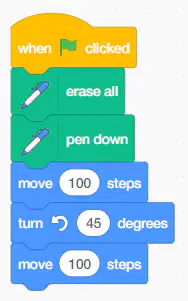
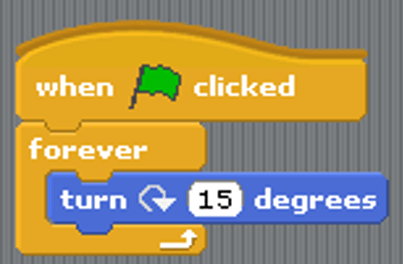
What is the output of the program?


What is the output of the program?


TO DRAW IN SCRATCH WE USE:


WHAT IS THE RESULT OF THE PROGRAM


WHICH ONE OF THE FOLLOWING BLOCKS IS NOT A REPETITION LOOP.


To change the appearance of a sprite we can give it a different...
Costume
Look
Style
Stage

When the value of Score is equal to 3 what does the sprite say?
4
Score
"Nearly there..."
"High Score"

What does this block mean? (mark all correct options)
number of days = 5
increase number of days by 5
make the variable 'number of of days' hold a value of 5
Add 5 to whatever value number of days was holding before.

If this script is given to a sprite, what will the sprite say?
3
9
2
8

What will the value of lives be when the code is finished?
27
1
2
costume2
Which one is a complete branching structure in Scratch?


Which one is an incomplete branching structure in Scratch?

How many times do you need to repeat for drawing a regular triangle?
3
4
5
6

Choose the program to draw this.


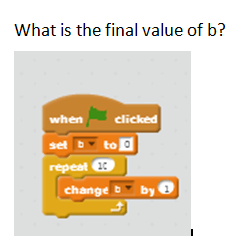
What is the final value of b when the code fishes?
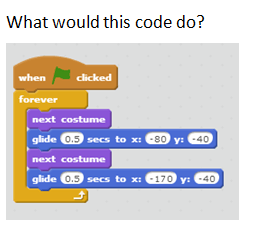
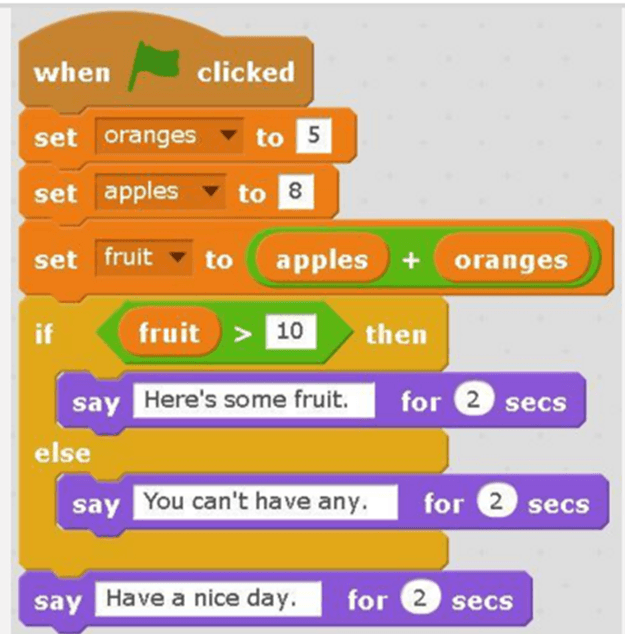
What will the cat say when this script is run?
Sensing blocks are used to tell the sprite what to do when touching something on the stage.
True
False
The Y axis helps Sprites to move:
Up and Down
Left and Right
Up and Right
Left and Down
The X axis helps Sprites to move:
Up and Down
Left and Right
Up and Right
Left and Down
What are the two axis in scratch?
x and y
n and t
j and w
j and k

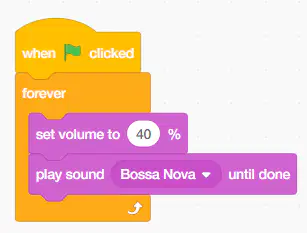
What can this code do?
Play background music
Add backdrop
Change the music
Play the music one time

What do we use Microsoft Word for?
To create a database
To create a worksheet
To create a document
To create a presentation

What type of alignment is this?
Left
Center
Right
Justify

What type of alignment is this?
Left
Center
Right
Justify

To insert a table, where do you click?
Home tab --> Table
Insert tab --> Table
Design tab --> Table
Layout tab --> Table
Too add extra COLUMN, we will use ..... (choose 2 options)


Too add extra ROW, we will use ..... (choose 2 options)
Too add extra COLUMN, we will use ..... (choose 2 options)

What is the blank space at the top, bottom, left, and right of a document where you cannot type?
Alignment
Header
Margin
Footer
When formatting a paragraph of text, which button do you need to click to increase the left indent?


When formatting a paragraph of text, which button do you need to click to decrease the left indent?
When change line spacing, which button do you need to click?

Shortcut key to Find is....
Ctrl + H
Ctrl + F
Ctrl + T
Ctrl + E
Shortcut key to use Replace function is .......
Ctrl + H
Ctrl + F
Ctrl + T
Ctrl + E

Shortcut key to align Left is .....
Ctrl + L
Ctrl + R
Ctrl + E
Ctrl + J
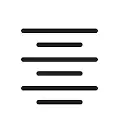
Shortcut key to align Center is....
Ctrl + L
Ctrl + R
Ctrl + E
Ctrl + J
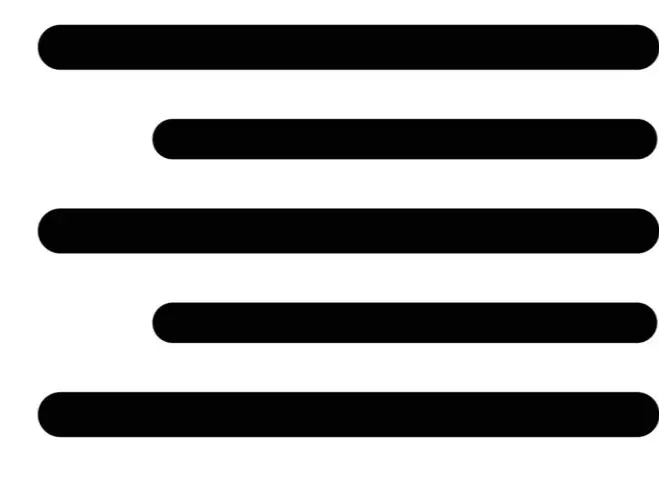
Shortcut to align Right is .....
Ctrl + L
Ctrl + R
Ctrl + E
Ctrl + J

Shortcut key to align Justify is ...
Ctrl + L
Ctrl + R
Ctrl + E
Ctrl + J
To search for the word "James" in the text, we need to:
Home tab -> Editing group -> Find
CTRL + F
Both are wrong
Both are correct
To search for a word in MS Word, we need three steps. What is the correct order?
a. Click on the Home tab.
b. Type the word or phrase you want to search for, then press Enter.
c. In the Editing group --> Find.
a – b – c
a – c – b
c – a – b
b – a – c

To replace a word, there are 3 steps. What is the correct order?
a. Type the word or phrase you want to replace, then press Enter.
b. In the Editing group --> Replace.
c. Click on the Home tab.
c - b - a
a – c – b
c – a – b
b – a – c
How many margins does a document have?
2 margins
3 margins
4 margins
5 margins

To change from Portrait to Landscape and vice versa, which command do we use in the Page Layout tab, in the Page Setup group?
Orientation
Size
Margins
Columns
In text editing software, what does the Portrait command do?


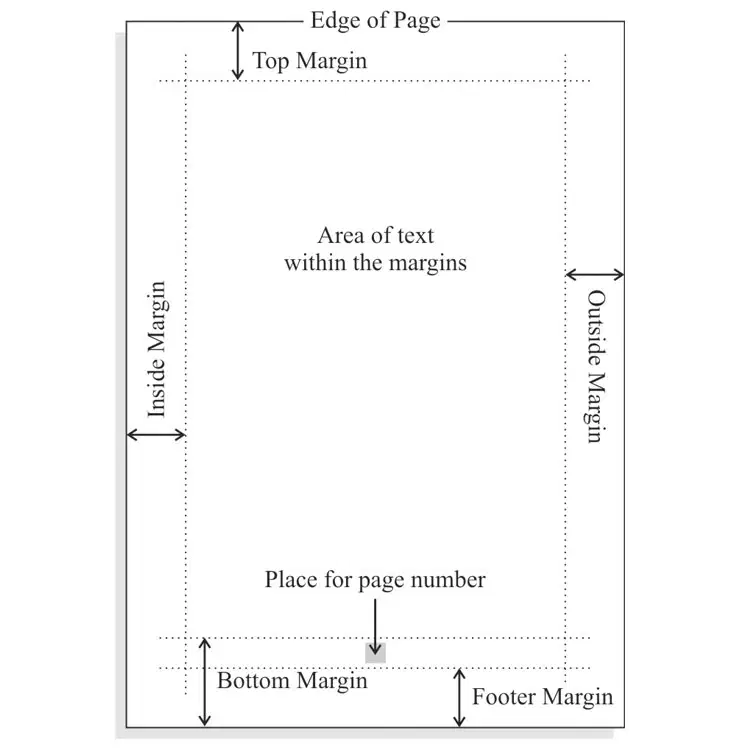
Select margins
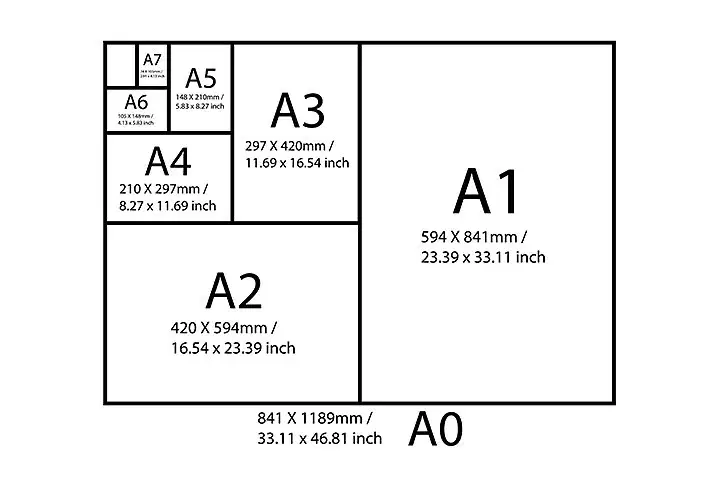
Select paper size
To preview a document before printing, we go to:
File menu, select Print command, customize settings before printing.
Insert menu, select Print command, customize settings before printing.
Home menu, select Print command, customize settings before printing.
Page Layout menu, select Print command, customize settings before printing.
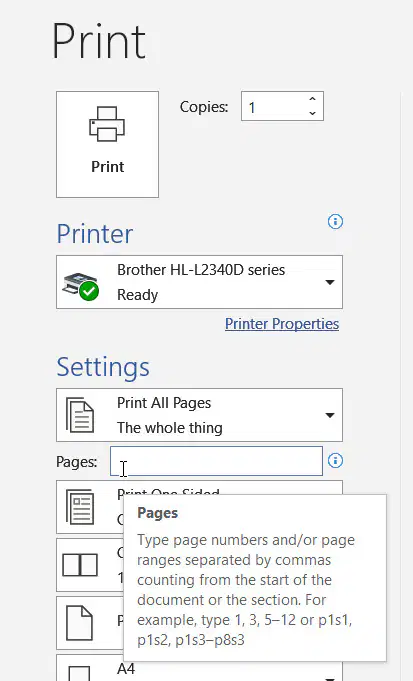
Your document has 10 pages, and you want to print page 6 and page 7. How do you enter this in the pages box?
Type 1-7
Type 6 - 8
Type 6,7
Type 7
Shortcut key to Print is ....
Ctrl + P
Ctrl + E
Ctrl + U
Ctrl + H

