
 Worksheets
Getting To Know Canvas: Scavenger Hunt
Total questions: 14
Worksheet time: 9mins
Name
Class
Date
1.
When you click on the "Dashboard" on the left sidebar it takes you to
a)
Your gradebook
b)
A list of your classes/courses
c)
A view of your Calendar
2.
On the "Dashboard" you can see any upcoming assignments or events from your calendar listed on the right-hand side.
a)
True
b)
False
3.
Click on the "Calendar" link on the left sidebar. Your calendar will show your work for every class you are enrolled in. How can you tell which class the assignment is for?
a)
It is labeled with the class name by the assignment
b)
Your classes are Color Coded
c)
You cannot tell which class it is for
4.
If you click on an assignment name in the calendar, it will
a)
Open a window with the assignment details
b)
Take you to the assignment when you click on the window
c)
Tell you which class it is for
d)
All of the above
5.
Click on the "Inbox" link on the left sidebar. Your inbox is where you can
a)
find messages from your teachers
b)
message your teacher/s
c)
message your classmates
d)
All of the above
6.
True or False: you click on the pencil in the box in the upper right-hand corner to write an email or message?
a)
True
b)
False
7.
Return to our class. Find the "modules" link in the left sidebar or homepage. What is a module?
a)
A place where assignments are chunked or grouped
b)
A list of materials/resources to complete (assignments, quizzes, agendas. etc.)
c)
Live links to the work to be completed for our class
d)
All of the above
8.
How will "Modules" help you to stay organized this school year?
4 lines
9.
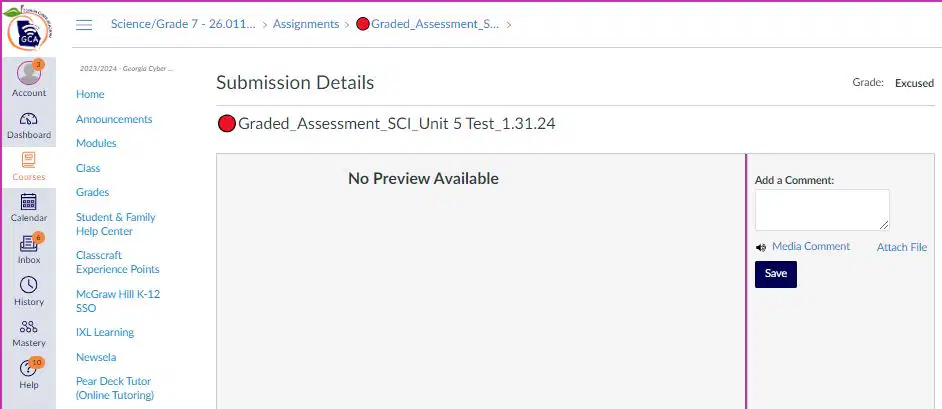
What scenario would you get this screen in?
a)
You are trying to access an assignment you haven't done through grades
b)
You have taken the quiz and are waiting on your score
c)
Your teacher forgot to upload the assignment details
d)
Your teacher forgot to link the assignment in grades
10.
Where would you click on this page to get to the assignment details?
A
B
C
11.
Click on the "announcements" link on the left sidebar. Have any announcements been posted to our class yet?
a)
Yes
b)
No
12.
Where should you click for the unit notes, assignments and weekly checklists ?
A
B
C
13.
What is one question you have right now about Canvas or how it works?
4 lines
14.
On a scale of 1 to 5, how comfortable are you using Canvas right now?
(I am so lost. What is Canvas? = 1, Easy Peasy! Let's get started = 5)
(I am so lost. What is Canvas? = 1, Easy Peasy! Let's get started = 5)
a)
1
b)
2
c)
3
d)
4
e)
5
100 %

