
 Worksheets
R050 Topics Quiz
Total questions: 16
Worksheet time: 37mins
What is the primary role of an operating system in a computer?
To control and organise the general operation of the computer
To create software applications
To provide internet access
To manage email services
What does the operating system use to store data?
Backing store
RAM
External cloud storage
USB drives
Which of the following is a function of an operating system?
Organises the use of memory between programs
Streams videos online
Translates foreign languages automatically
Charges the computer's battery
What does the operating system manage between programs and users?
Graphics quality
Processing time
Social media notifications
Email exchanges
Which of the following is a responsibility of an operating system regarding security?
Monitors internet usage
Filters spam emails
Encrypts television signals
Maintains security and access rights of users
What type of interfaces does the operating system provide between the user and the computer?
Biometric interfaces
Audio interfaces
Graphical user interfaces
Mechanical interfaces
Which operating system is mentioned as an example in the text?
Linux Ubuntu
Windows Vista
Apple iOS
Google Chrome OS
What does "Backing store" mean?
Storage devices for data i.e. hard disk drive
An area at the rear of the computer case
Folder for storing on-screen wallpaper backgrounds and screensavers
A backup device for spare copies of information
"Security and access rights for users" refers to
Not all users should have the same permissions on the system in case of accidental deletion/damage
Some people shouldn't be allowed to touch computers because they break them
Some people have to share computers on different days
The computer can automatically call for security guards to come to the office
Real-time processing
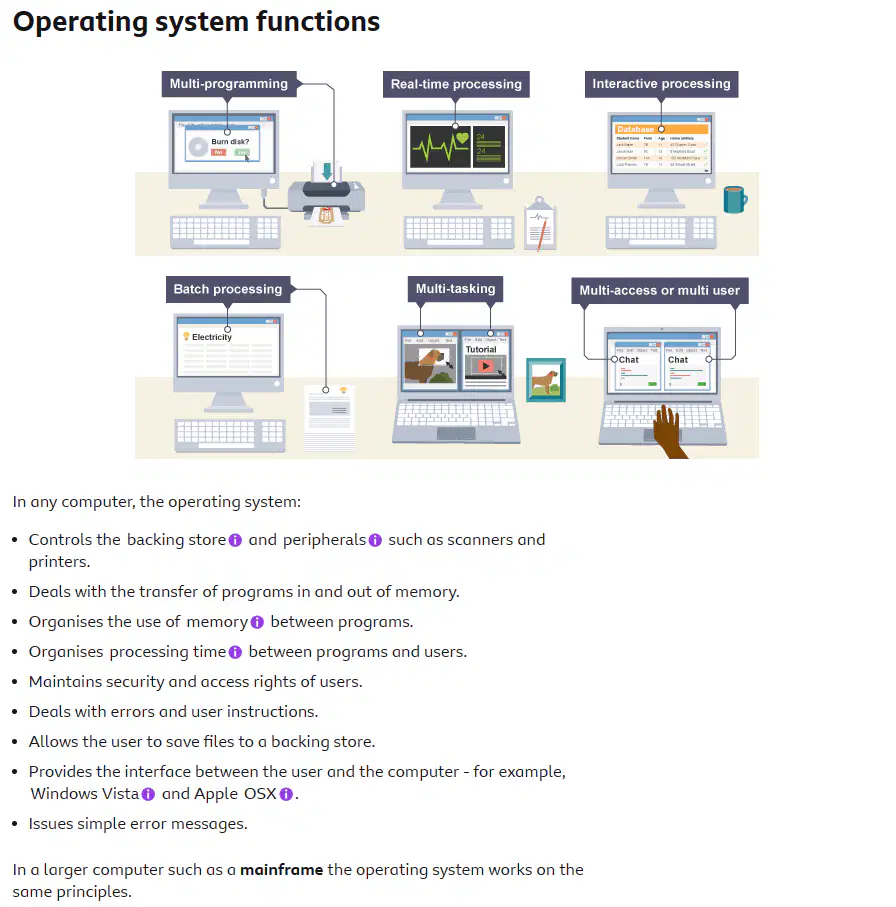
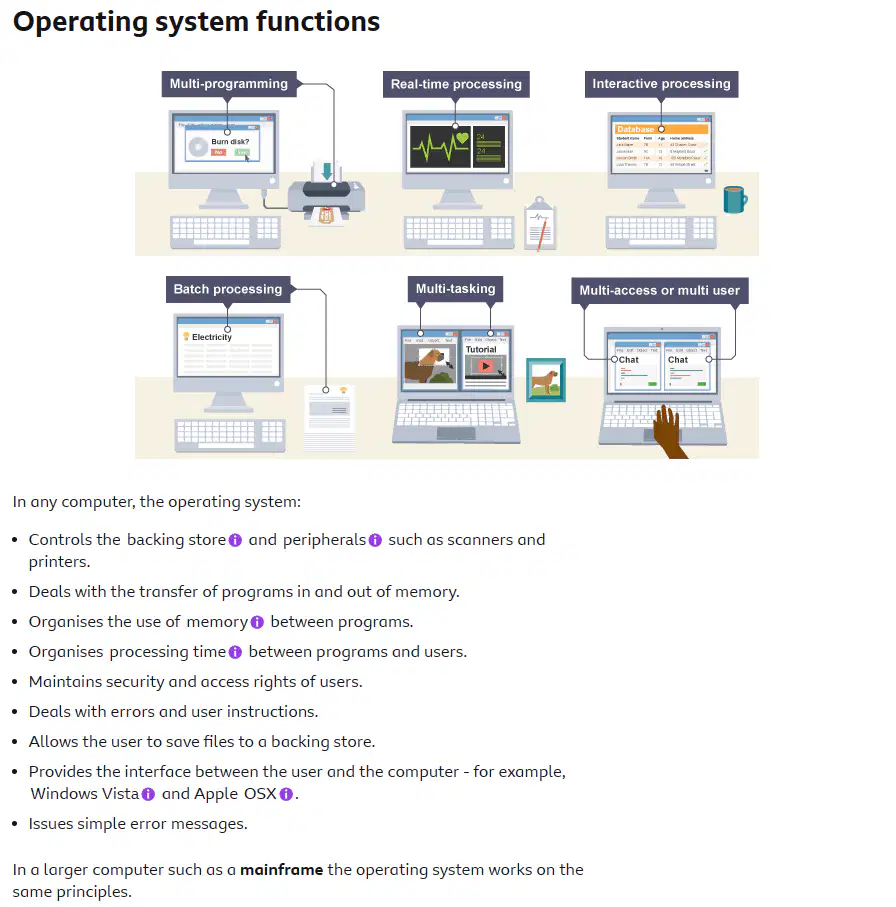
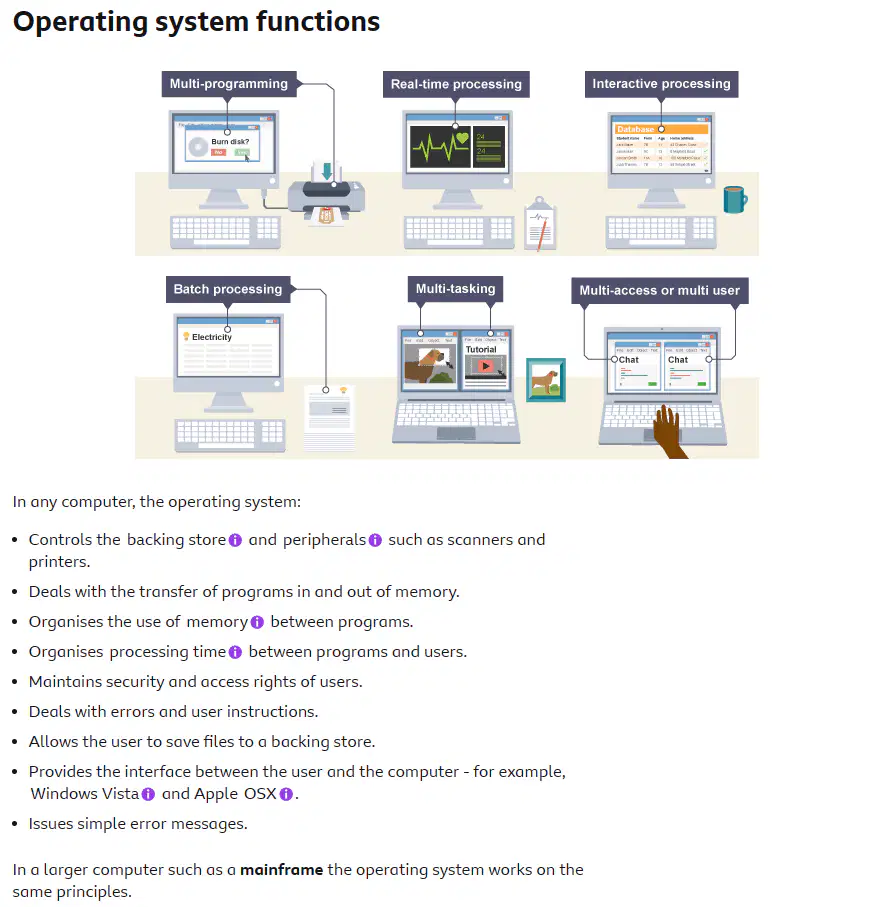
When the computer has to react within a guaranteed time to an input, a real-time operating system (RTOS) is used. For example, the engine management system within a car uses a real-time operating system in order to react to feedback from sensors placed throughout the engine.
A real-time operating system does not necessarily have to be fast. It simply has to be quick enough to respond to inputs in a predictable way. Embedded computers often contain an RTOS as many are used to control something.
Computers operating in real time are often dedicated to the control of systems such as industrial processes, planes and space flights.
What is a key requirement for an RTOS according to the text?
Being fast
Being slow
Being unpredictable
Being quick enough to respond predictably
Why do embedded computers often contain an RTOS?
To enhance security measures
To improve energy efficiency
To control something in real-time
To provide better user interface
What is involved in real-time processing?
Using a real-time operating system (RTOS) to react within a guaranteed time to an input
Using a regular operating system to process data at any time
Using a real-time operating system (RTOS) to process data at any time
Using a regular operating system to react within a guaranteed time to an input
What type of system does the engine management system in a car use to react to feedback from sensors throughout the engine?
Batch processing system
Real-time operating system
Distributed system
Multitasking system
What are computers operating in real time often dedicated to controlling?
Home appliances
Agricultural machinery
Industrial processes
Personal vehicles
Batch processing
A batch processing system is where programs or data are collected together in a batch and processed in one go. Typically the processing of payrolls, electricity bills, invoices and daily transactions are dealt with this way.
This method of operation lends itself to jobs with similar inputs, processing and outputs where no human intervention is needed. Jobs are stored in a queue until the computer is ready to deal with them. Often batch processed jobs are done overnight.
Multi-tasking
This isn't just about running more than one application at the same time. Multi-tasking allows multiple tasks to run concurrently, taking turns using the resources of the computer.
This can mean running a couple of applications, sending a document to the printer and downloading a web page.
What is multi-tasking not just about?
Running multiple applications simultaneously
Sharing computer resources among tasks
Running applications sequentially
Running applications independently
What are some common uses of batch processing?
Data analysis
Inventory management
Payrolls, bills, and transactions
Real-time processing
What is one of the benefits of multi-tasking on a computer?
Improved efficiency
Decreased memory usage
Slower processing speed
Limited functionality
How does multi-tasking enable efficient utilization of computer resources?
By allowing tasks to use resources simultaneously
By restricting tasks from using resources
By randomly allocating resources to tasks
By limiting the number of tasks that can use resources
What type of jobs is batch processing suitable for?
Jobs with different inputs
Jobs with similar inputs
Jobs requiring constant human intervention
Jobs done in real-time
User interfaces
A user interface is the method by which the user and the computer exchange information and instructions. There are three main types - command-line, menu driven and graphical user interface (GUI).
Command-line interfaces
A command-line interface allows the user to interact with the computer by typing in commands. The computer displays a prompt, the user keys in the command and presses enter or return.
In the early days of personal computers, all PCs used command-line interfaces.
Features of a command-line interface
Commands must be typed correctly and in the right order or the command will not work.
Experienced users who know the commands can work very quickly without having to find their way around menus.
An advantage of command driven programs is that they do not need the memory and processing power of the latest computer and will often run on lower spec machines.
Command driven programs do not need to run in Windows.
A command-line interface can run many programs, for example a batch file could launch half a dozen programs to do its task.
An inexperienced user can sometimes find a command driven program difficult to use because of the number of commands that have to be learnt.
An example of a common command driven interface is MS-DOS. The MS-DOS command to display all files on c:\ would be: dir c:\
Command-driven programs do not need as much memory and processing power as a
(a)
How do users interact with the computer in command-line interfaces?
By typing in commands
By clicking on icons
By using touch gestures
By speaking to the computer
An example of a common command-driven interface is (a) -DOS.
Menu driven interfaces
Simple menu
The user is offered a simple menu from which to choose an option. One menu often leads to a further menu. Part of the screen may have an instruction followed by a numbered list of options to choose from.
Full screen menu
A full screen menu takes up the entire screen.
Menu bar
A menu bar is the set of options at the top of the screen. When an option is chosen a drop-down menu may be offered.
Features of menu driven interfaces include:
they are easy to use as the user does not have to remember sets of commands
they are user friendly - you can often guess your way around the options
they can be irritating if there are too many levels of menus to move around - with a command-line interface you can go to the option required immediately
What do menu driven interfaces offer?
Simple menus with numbered options to choose from
Complex interfaces with no options
Voice activated commands
Gesture-based controls
What do menu bars provide at the top of the screen?
Icons
Text boxes
Drop-down menus
Buttons
One disadvantage of a menu interface is
If there are too many levels for you to be able to navigate it easily
It doesn't let you type
It doesn't let you click things
If there are words with spelling mistakes it wouldn't look professional
Graphical user interfaces
Graphical user interface is sometimes shortened to GUI. The user chooses an option usually by pointing a mouse at an icon representing that option.
Features of GUIs include:
They are much easier to use for beginners.
They enable you to easily exchange information between software using cut and paste or 'drag and drop'.
They use a lot of memory and processing power. It can be slower to use than a command-line interface if you are an expert user.
They can be irritating to experienced users when simple tasks require a number of operations.
When discussing user interfaces, it is important to note that Windows XP, Windows Vista, Apple OSX and Ubuntu all have graphical user interfaces.
Good user interfaces
A good user interface should:
be attractive and pleasing to the eye
allow the user to try out different options easily
be easy to use
use suitable colours for key areas
use words that are easy to understand aimed at the type of user
have help documentation
It should also consider the needs of the users. For example, young children are likely to prefer pictures to words and people with disabilities may benefit from particular input or output devices.
GUIs require (a) memory and processing power than a command line interface
What does GUI stand for and why is it considered easier for beginners to use?
Graphical User Interface, because it provides a visual way to interact with the computer
Graphical User Interface, because it requires advanced coding skills
Graphical User Integration, because it is difficult to navigate
Graphical User Integration, because it is text-based
How do GUIs facilitate the exchange of information between software?
By enabling easy communication
By restricting data flow
By slowing down data transfer
By encrypting all data
Why do GUIs use a lot of memory and processing power?
They require complex algorithms to render graphics
They have to handle user inputs in real-time
They need to constantly update the display
They provide a visual interface for users
Which operating systems have GUIs?
Windows XP
Windows Vista
Apple OSX
Ubuntu
User interfaces should consider the needs of different (a)
Good user interfaces should be attractive, easy to use, and have (a) documentation.
Effects of e-commerce on businesses
High street stores now find themselves competing with each other for business both on the high street and online.
Selling goods online
Advantages
Opens the market to customers nationally and internationally.
Enables smaller companies to compete with larger companies.
Reduces in staffing and/or high street stores thereby reducing costs.
Provides the option to offer 24 hour shopping at minimum additional cost.
Disadvantages
Stiffer competition - businesses once competing with the shop in the next town now find themselves competing on a global scale.
Staff reductions - with increased competition, local companies may have to reduce their work force.
Cost of restructuring - the move to e-commerce may not be a smooth one and will certainly require a degree of investment.
Customer concerns - if high street stores are closed in an effort to save money, customers who prefer to shop on the high street may not be comfortable buying online so may go elsewhere.
Increased dependancy on the internet
Now, both for companies and individuals, there is pressure to have internet access to do everyday things such as submit orders or look up details in a catalogue. There are initiatives to make as many services available on the internet as possible, including e-government, where government departments such as the Inland Revenue can be dealt with using secure websites.
How does e-commerce impact the competitiveness of smaller companies?
It hinders their growth potential
It has no effect on their competitiveness
It enables them to compete with larger companies
It leads to their bankruptcy
What is required when transitioning to e-commerce?
No investment or restructuring
Investment and restructuring
Only investment
Only restructuring
How has e-commerce impacted businesses in terms of competition?
Increased global competition
Decreased global competition
No impact on competition
Limited competition to local markets
How does e-commerce reduce costs?
By increasing staffing in high street stores
By expanding the number of high street stores
By cutting staffing and high street stores
By reducing online presence
How does selling goods online impact the market?
Increases competition
Reduces customer reach
Limits growth potential
Expands nationally and internationally
How has increased dependency on the internet impacted everyday tasks?
It has made tasks more efficient.
It has made tasks more difficult.
It has had no impact on tasks.
It has made tasks more time-consuming.
How do high street stores compete in the current market?
By only focusing on physical stores
By only focusing on online sales
By competing both on the high street and online
By avoiding competition altogether
Electronic money and electronic commerce
Most companies pay their employees via bank transfer, from the companies account to the employees'. It's now rare to be paid in cash.
Goods and services are usually paid for with electronic methods of payment, for example:
direct debit
standing order
debit cards (Switch/Delta)
smart cards
online bank transfers
Electronic Commerce
Electronic Commerce or e-commerce is the selling and buying of goods or services over the internet.
E-commerce has both advantages and disadvantages for businesses and customers.
Advantages for businesses
Increased customer base – with a website, a local store can have an international customer base.
Cost effective – save on staffing a physical shop (or shops) and the associated costs, eg rent, electricity, gas, water etc.
Services - for example, accountancy, lend themselves to being advertised online. Specifics on what's offered can be listed on the website, decreasing the need for real world consultation.
Disadvantages for businesses
Increased competition - competition once limited to other local shops is now on an international scale.
Newcomers - consumers may be reluctant to buy from a company they haven't heard of.
Slow adoption - companies whose competitors already have an online presence may find it hard to gain market share.
Advantages for customers
Increased convenience - customers can find what they're looking for without leaving their home.
Greater choice - customers are no longer limited to shops nearby and can even buy from abroad.
Cost effective - competition on an often international scale means prices are cheaper/more competitive.
Product details - greater wealth of information available online than what a member of staff is able to provide in-store.
Customer reviews - many sites allow customers to review products or services they’ve purchased, increasing buyer confidence.
Disadvantages for customers
No human interaction - some people prefer to buy their goods or services in person.
Returning goods - can be inconvenient (arranging postage) and expensive (if it is a large/heavy item).
Fraud - a website may take your money, but have no intention of delivering the goods.
Stock issues - the product may be out of stock, or if ordered and later found to be out of stock, a substitute product may be sent instead.
What are some advantages for customers in electronic commerce?
Convenience
Greater choice
Cost-effectiveness
Detailed product information
What are some common electronic methods used to pay for goods and services?
Cash and checks
Direct debit and online bank transfers
Barter and cryptocurrency
Credit cards and gift cards
What are some disadvantages for customers in electronic commerce?
Lack of human interaction
Convenient returns
No fraud risks
No stock issues
What are some disadvantages for businesses in relation to electronic money and electronic commerce?
Increased competition
Consumer reluctance
Slow adoption
High profitability
Which of these is a disadvantage of online shopping for customers?
Returning goods
Increased convenience
Customer reviews
Greater choice
How do most companies pay employees?
Cash payments
Bank transfer
Check payments
What are some advantages for businesses in electronic commerce?
Decreased customer base
Increased customer base
High cost
Offline service advertising

