
NEW
Font size
 Worksheets
Spreadsheet Basics Quiz
Total questions: 28
Worksheet time: 14mins
What are the four main mathematical operators on a spreadsheet?
Addition, Subtraction, Multiplication, Division
Addition, Subtraction, Exponentiation, Modulus
Addition, Subtraction, Concatenation, Division
Addition, Subtraction, Multiplication, Concatenation
What is a cell reference?
A unique identifier for a cell, which is formed by combining the column letter and row number
A formula used to calculate values in a spreadsheet
A type of data validation rule
A method to format cells in a spreadsheet
Which of the following symbols is used for addition in a spreadsheet?
-
*
/
+
What identifies a cell on a spreadsheet?
The color of the cell
The letter and number that identifies a cell
The size of the cell
The font used in the cell
What can spreadsheets be used to display?
Text, dates, and numbers
Images and videos
Only text
Only numbers
Why would you use a spreadsheet rather than a database or a table on a word processed document?
Because it looks better
Because it can perform calculations for you
Because it is easier to use
Because it is more secure
What must all formulae in a spreadsheet start with?
+
-
=
*
What can you use to perform calculations in a spreadsheet?
Only numbers
Only cell references
Either numbers or cell references
Only text
What must all formulae start with in a spreadsheet?
+
-
=
*
What will you see when you enter a formula into a cell?
The formula itself
The result/answer
An error message
A blank cell
Where do you need to go to edit a formula in a spreadsheet?
The cell itself
The toolbar
The formula bar at the top
The status bar
What does BODMAS stand for?
Brackets, Of, Division, Multiplication, Addition, Subtraction
Brackets, Of, Division, Multiplication, Addition, Summation
Brackets, Of, Division, Multiplication, Addition, Subtraction
Brackets, Of, Division, Multiplication, Addition, Summation
What is the correct answer to the expression 2 + 3 * 4 according to BODMAS?
20
14
10
18
In the BODMAS rule, which operation should be performed first?
Addition
Multiplication
Brackets
Subtraction
According to BODMAS, which operations come after Brackets and Indices/Powers Of?
Addition and Subtraction
Multiplication and Division
Subtraction and Multiplication
Division and Addition
What is the main advantage of using cell references in a spreadsheet?
You don't need to know the exact numbers.
It makes the spreadsheet look more colorful.
It increases the size of the spreadsheet.
It makes the spreadsheet harder to understand.
What will happen if the figures in the spreadsheet are changed?
The total will remain the same.
The total will update.
The spreadsheet will crash.
The figures will disappear.
What is the main advantage of replicating a formula in a spreadsheet?
It automatically adjusts the cell references relative to where it is.
It changes the formula to a different function.
It deletes the previous formula.
It highlights the cells in a different color.
What does the term "relative" refer to in the context of cell referencing in spreadsheets?
The formula changes based on the absolute position of the cells.
The formula changes based on the relative position of the cells.
The formula remains constant regardless of cell position.
The formula is deleted when moved to a new cell.
What is the function of the fill handle in spreadsheet applications?
To copy and paste data
To drag and fill data based on a pattern
To delete data
To format cells
What is the main purpose of using absolute cell referencing in spreadsheets?
To allow cell references to change when copied
To keep cell references constant when copied
To format cells automatically
To sort data in ascending order
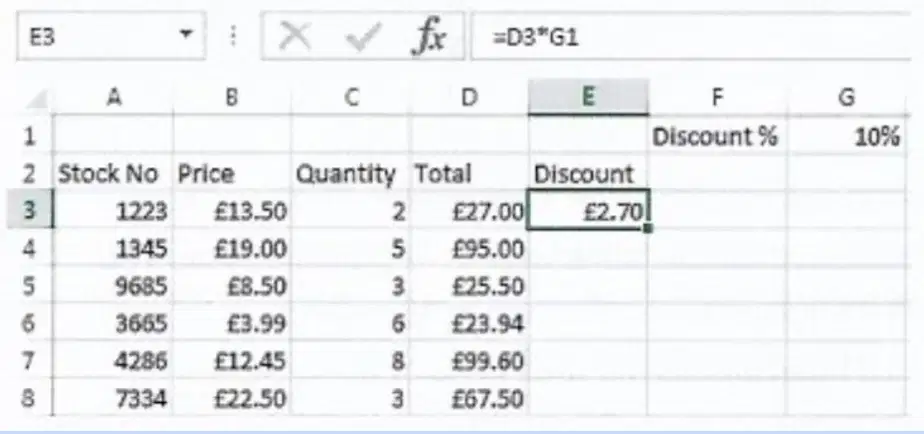
In the given example, which cell reference should be made absolute to correctly multiply each total in column E with the value in G1?
D3
E3
G1
F1
What is an absolute cell reference in Excel?
A) A cell reference that changes when copied to another cell
B) A cell reference that always uses the same cell and does not change
C) A cell reference that only works in certain cells
D) A cell reference that is used for formatting
How do you turn a cell reference into an absolute cell reference in Excel?
A) Add ##
B) Add %%
C) Add $$
D) Add &&
What key can you press to quickly make a cell reference absolute in Excel?
A) F1
B) F2
C) F3
D) F4
What is one way to make it easy to identify cells in Google Sheets?
By using conditional formatting
By naming ranges
By changing cell colors
By using filters
What is true about named ranges in Google Sheets?
Named ranges are always relative
Named ranges are always absolute
Named ranges can be either relative or absolute
Named ranges are only used for formatting
Where can you find the option to name ranges in Excel?
Formulas > Define Name
Edit > Named Ranges
Data > Define Name
View > Named Ranges

