
 Worksheets
Makey Makey, Circuits, & Scratch
Total questions: 24
Worksheet time: 14mins
What is electricity?
Magic!
The flow of small particles called electrons
Water flowing through pipes
The science of atoms

Why isn't this bulb lit?
The circuit isn't complete
The light bulb is broken
The battery is dead
No way to know, it should definitely be lit!
What is a conductor?
A material that does not allow the flow of electricity
An element that can be powered by electricity
A power source
A material that does allow the flow of electricity
Which of the following materials are conductors?
Select all that apply!
Aluminum foil
People
Bananas
Paper clips
What is an insulator?
A material that does not allow the flow of electricity
An element that can be powered by electricity
A power source
A material that does allow the flow of electricity
Which of the following materials are insulators?
Select all that apply!
Copper tape
Plastic
Wood
Potatoes

What is a switch?
Something fun to fidget with
Something that permanently closes a circuit
A component that lets us open & close a circuit
Something that permanently opens a circuit
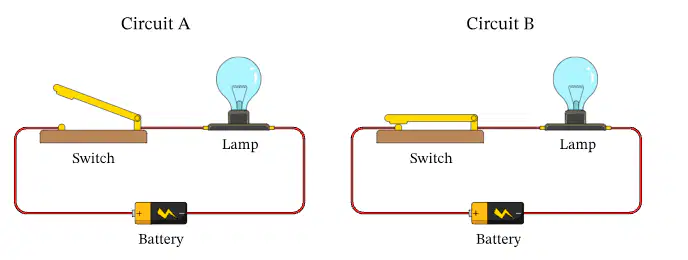
Which circuit will light the lightbulb?
Circuit A
Circuit B
Both
Neither
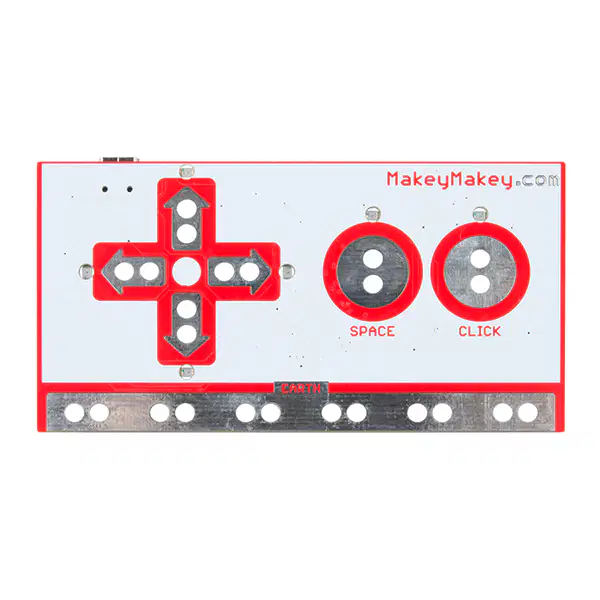
What is a Makey Makey?
A computer
A digital watch
A programmable circuit board
An electronic toy

What can we do with the Makey Makey?
Create external buttons for our computer
Program it to control a robot
Power a light bulb
Use it to calculate complex equations
Which computer operations can I control with my Makey Makey?
Select all that apply!
Pressing the delete key
Pressing the arrow keys
Clicking the mouse
Pressing the space key
In order for our Makey Makey to work, we need to create a complete circuit between the _____ and the _____.
Back of the Makey Makey
Button we want to use
Earth
Power source
What is Scratch?
An AI tool
A video game
A robot
A block-based coding program

Which part of the Scratch environment is circled?
The Sprite Pane
The Block Palette
The Programming Area
The Stage

Which part of the Scratch environment is circled?
The Sprite Pane
The Block Palette
The Programming Area
The Stage
Which block(s) would allow us to use our Makey Makey with a Scratch program?
Select all that apply!


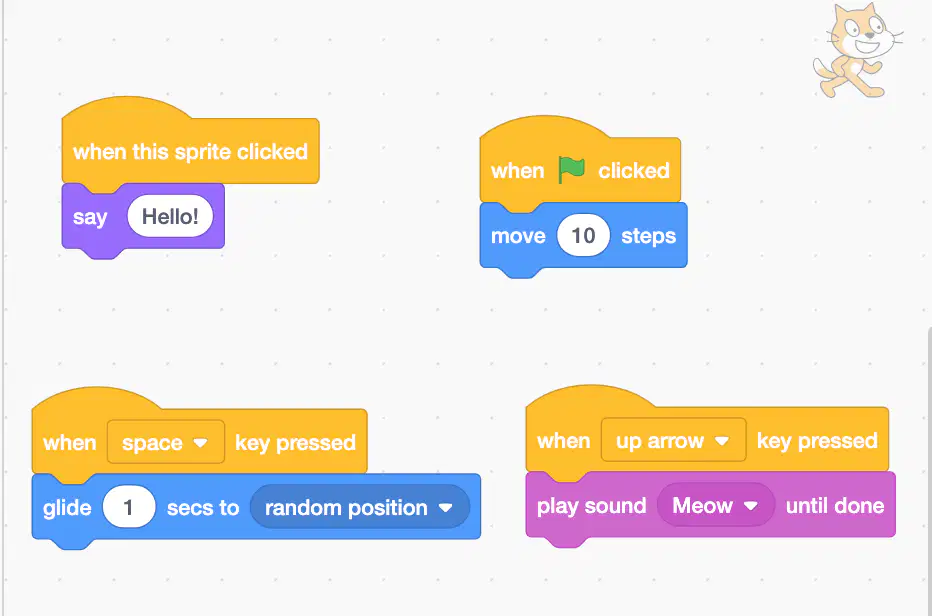
What will happen when I press the space bar on the keyboard (or the space button on my connected Makey Makey)?
My sprite will move 10 steps
My sprite will meow
My sprite will say hello
My sprite will glide to a random spot

Changing the X will move my sprite
right and left
up and down
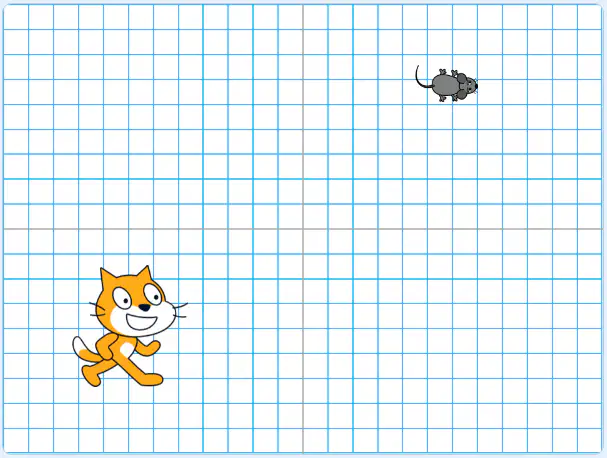
Which sequence would move the cat to the mouse?


Which block would I use if I want my sprite to glide to a specific spot on the stage?


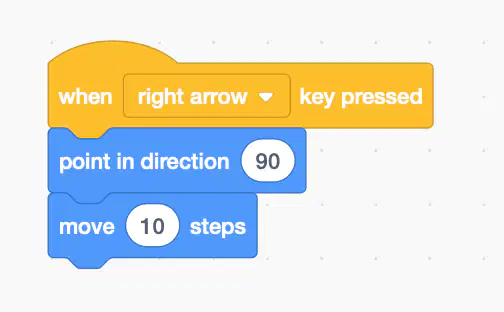
What will this piece of code do?
Turn the sprite to the right
When the right arrow is pressed, the sprite will move to the right
Turn the sprite to the left
When the left arrow is pressed, the sprite will move to the left
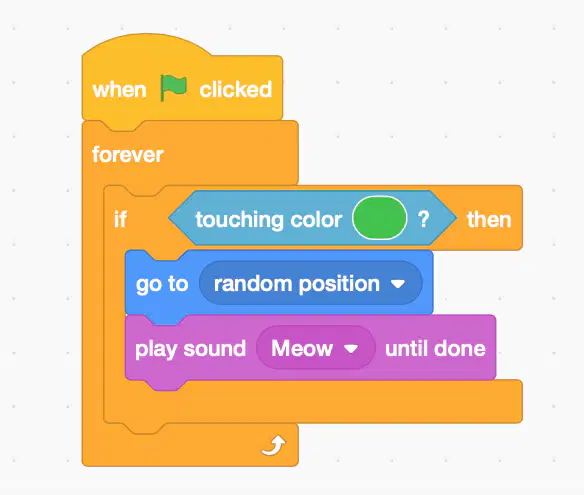
When this code is running, when will the sprite go to a random position and meow?
When the program starts
When the sprite is clicked
When the space bar is pressed
When the sprite is touching the color green

I programmed this code, but it isn't working. What do I need to do?
Add a wait block
Add another if-then statement
Add a forever loop
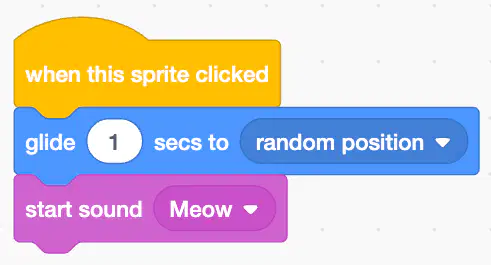
I can use my Makey Makey to run this program.
True
False

