
Font size
 Worksheets
3D Design Exam
Total questions: 20
Worksheet time: 12mins
What is the first step in the design process?
Sketch
3D model
Brainstorm
Present
What is the second step in the design process?
Sketch
3D model
Brainstorm
Present
What online platform did we use for creating our designs?
Fusion 360
Tinkercad
Google Draw
Google Slides
What is Tinkercad primarily used for?
Writing software code
3D modeling and CAD design
Video editing
Spreadsheet calculations
What does CAD stand for?
Cool Automated Design
Computer Assisted Design
Cool Animation Dude
Computer Assisted Doodle
What is the name of the floor in Tinkercad?
Ground
Workplane
Work surface
Square
How can you group multiple shapes together in Tinkercad?
By painting them the same color
By aligning them horizontally
By selecting them and using the 'Group' function
By moving them to the same layer
What is the primary benefit of using the "Hole" feature in Tinkercad?
To save the project
To create empty spaces within solid objects
To color the model
To duplicate objects
What does the "Align" tool do in Tinkercad?
It groups objects together
It distributes objects evenly across the workplane
It ensures objects are positioned at the same height
It lines up the edges or centers of multiple objects
How can you create a mirrored copy of an object in Tinkercad?
Use the 'Copy and Paste' function
Use the 'Duplicate and Mirror' function
Use the 'Group and Align' function
Use the 'Rotate' function
How do you select more than one object at a time?
Press and hold the enter key then select your objects
Hold down shift and select your objects
Hold down Windows and select your objects
You can't select more than one object at a time
How do you raise or lower an object?
Use the corner handles
Use the top cone
Use the rotation arrows
Right click the shape
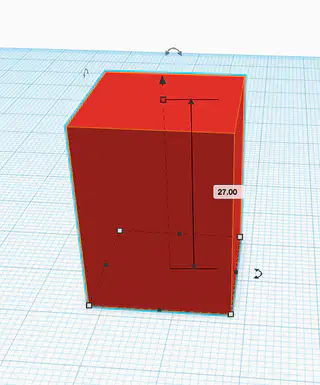
The curved arrows allow you to do what?
Change the size
Change the color
Duplicate the object
Rotate the object
How can you add new objects to your Tinkercad project?
By typing code
By importing images
By dragging them from the shape library
By drawing them freehand
Does Tinkercad save your files automatically?
Yes
No
When you group objects together...
their colors don't change
their colors all change to the same color
What is the significance of the "Snap Grid" feature in Tinkercad?
It allows objects to move freely without alignment
It snaps objects to a specified grid size for precise placement
It changes the color of the grid
It hides the grid from view
What file type did we use for our 3D printing?
.png
.obj
.jpeg
.stl
Which project was the most challenging?
(a)
Which project are you most proud of?
(a)

