
 Worksheets
Grade 5 Term 2 quiz 2
Total questions: 20
Worksheet time: 11mins
What are sprites in Scratch?
Sprites in Scratch are the background images only.
Sprites in Scratch are the characters or objects that perform actions in the project.
Sprites in Scratch are the sound effects used in projects.
Sprites in Scratch are the coding blocks that control the project.
What is the purpose of loops in Scratch?
To change the color of the stage
To create a new sprite
To play music in the background
To repeat a set of blocks multiple times.
Explain the concept of variables in Scratch.
Variables in Scratch are placeholders for storing data that can be used and changed throughout the program.
Variables in Scratch are not necessary for programming
Variables in Scratch are fixed values that cannot be changed
Variables in Scratch are only used for text input
What is broadcasting used for in Scratch?
Broadcasting is used to play music in Scratch.
Broadcasting is used to send messages to trigger actions in different sprites or parts of the program.
Broadcasting is used to create loops in Scratch.
Broadcasting is used to change the background color in Scratch.
How can you make a sprite move in a loop in Scratch?
Use a forever block with the movement code inside to create a loop for the sprite movement.
Use a when green flag clicked block to create a loop for the sprite movement.
Use a stop block to create a loop for the sprite movement.
Set the sprite's position to a fixed value to create a loop for the sprite movement.
Give an example of a costume change block in Scratch.
switch costume to [costume name]
swap costume with [costume name]
change outfit to [costume name]
update costume to [costume name]
What is the 'repeat until' block used for in Scratch?
To repeat a set of blocks until a specified condition is true.
To create a new sprite
To play a sound repeatedly
To change the background color

What do you call the list of commands in Scratch?
Sprite
Script
Scratch
Help
Which Scratch block would be used for a variable?


If Josh is 11 years old, what will this program print out?
It won't print out anything
You are old enough for Year 8
You are still in year 7
It will print out his age

If Jenny is 13, which message will be broadcast?
Message 1
Message 2
Message 3
Message 4

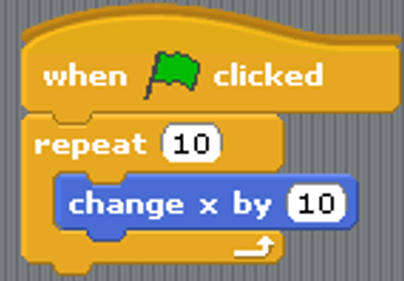

The area where the blocks are dragged to and connected to form the program is the _______________.(#2)
Scratch Library
Preview
Files
Workspace

Once the program is complete, you can see if it runs correctly here. (#3)
Preview
Files
Workspace
Scratch library

Where do you go to get/add a sprite?
Image #1
Image #2
Image #3
Image #4

There can be multiple sprites in a program. Where can you see which sprite you're currently programming?
Image #1
Image #2
Image #3
Image #4
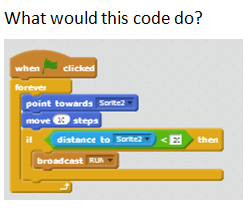
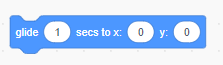
Which group of blocks include the "Glide" block?
Motion
Looks
Control

