
 Worksheets
THESALTCA 4th Quarter Level 1 Robotics Exam
Total questions: 21
Worksheet time: 11mins
Name
Class
Date
1.
Name
4 lines
2.
How do you change the behavior of the VR Robot?
a)
Change the programming language.
b)
Name and save your project.
c)
Change the programming blocks called commands.
d)
Change the Playground.
3.

How far will the VR Robot move based off of this command?
a)
200 millimeters (mm)
b)
400 millimeters (mm)
c)
500 millimeters (mm)
d)
300 millimeters (mm)
4.

What part of the block do you select to change the direction of the [Drive for] block?
a)
1
b)
2
c)
3
d)
4
5.

How will the VR Robot move based off of this command?
a)
Turn left 80 degrees.
b)
Turn right 90 degrees.
c)
Turn left 90 degrees.
d)
Turn right 80 degrees.
6.
Which of the following blocks is used to lift up the VEX VR Pen?
a)
[Set Pen color] block
b)
[Set print color] block
c)
[Move robot pen] block
d)
[Set print precision] block
7.
what is AI
a)
Automatic Instagram
b)
Artificial Intelligence
c)
Aunty Interesting
8.
Which of the following blocks is used to repeat the blocks inside of it for a set number of times?
a)
[Forever] block
b)
[Repeat] block
c)
[Wait until] block
d)
[Break] block
9.
Which of the following describes why a [Repeat] block would be used in a project?
a)
To repeat certain blocks forever.
b)
To save space and time for blocks that repeat more than once in a project.
c)
To only run a stack of blocks one time.
d)
To run an attached stack of blocks when the project is started.
10.
What is the first step in coding the VR Robot to move the VR Pen down to draw a black line?
a)
[Drive for] block set to 2000 millimeters (mm).
b)
Drag the [Turn for] block into the workspace and set the parameter to "400 millimeters (mm)".
c)
Drag the [move robot pen] block into the workspace and use the drop-down menu to set the position to "down".
d)
Drag the [move robot pen] block into the workspace and use the drop-down menu to set the position to "up".
11.
What is the first step in coding the VR Robot to draw a red line?
a)
Drag the [Set Pen color] block into the workspace and use the drop-down menu to set the color to "red".
b)
Drag the [move robot pen] block into the workspace and use the drop-down menu to set the position to "up".
c)
Drag the [Turn for] block into the workspace and set the parameter to "200 millimeters (mm)".
d)
Drag the [Set Pen color] block into the workspace and use the drop-down menu to set the color to "blue".
12.
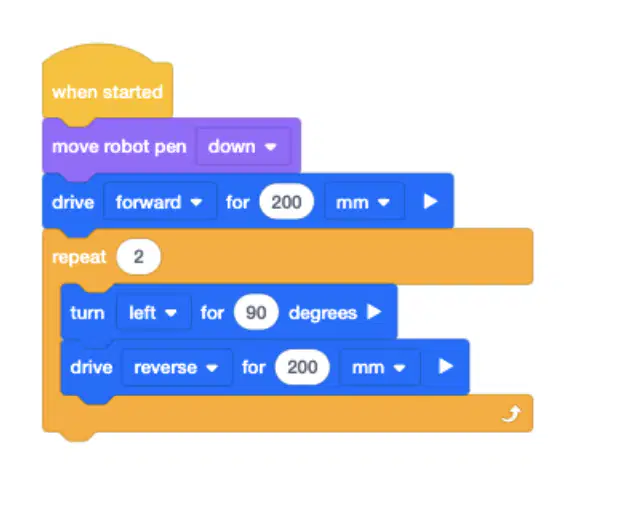
How many times will the [Repeat] block repeat the [Turn for] and [Drive for] blocks inside of it?
a)
Only once.
b)
Two times.
c)
Three times.
d)
Four times.
13.
What is a behavior?
a)
An action performed by the robot.
b)
How to break down instructions into simpler tasks.
c)
How robots communicate with a person.
d)
The way robots send information back to the user.
14.
How can you make the VR Robot move in reverse on the [Drive for] block?
a)
Changing the "forward" parameter to "reverse".
b)
Changing millimeters (mm) to Inches.
c)
Increasing the numeric value.
d)
Moving the block to the bottom of the project.
15.
True or False: A user can change the behavior of a robot by changing the commands.
a)
True
b)
False
16.
what is AR
a)
Augmented reality
b)
Acoustic rhythm
c)
Arc Reactor
17.
which block makes the code run automatically at the beginning
a)
Ready Go
b)
Begin
c)
On Start
18.

Which Direction Should the Robot go?
a)
Left ◀️
b)
Forward 🔼
c)
Right ▶️
d)
Backward 🔽
19.

Which Direction Should the Robot go?
a)
Left ◀️
b)
Forward 🔼
c)
Right ▶️
d)
Backward 🔽
20.

Which Direction Should the Robot go?
a)
b)
c)
21.

Choose the Correct Code
a)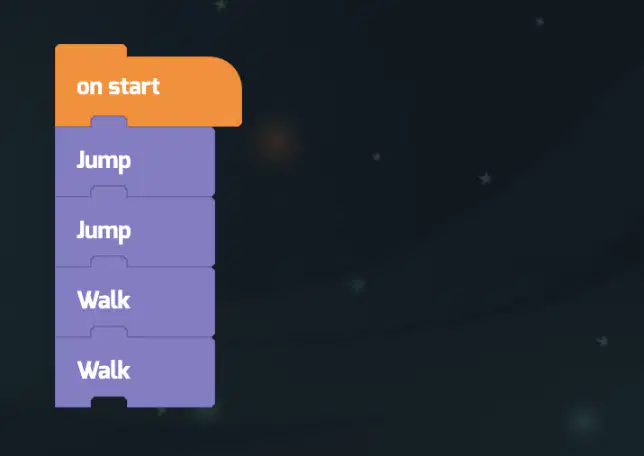
b)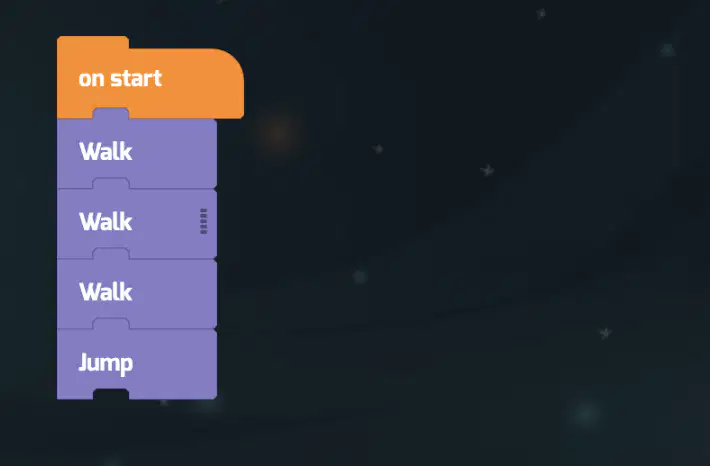
c)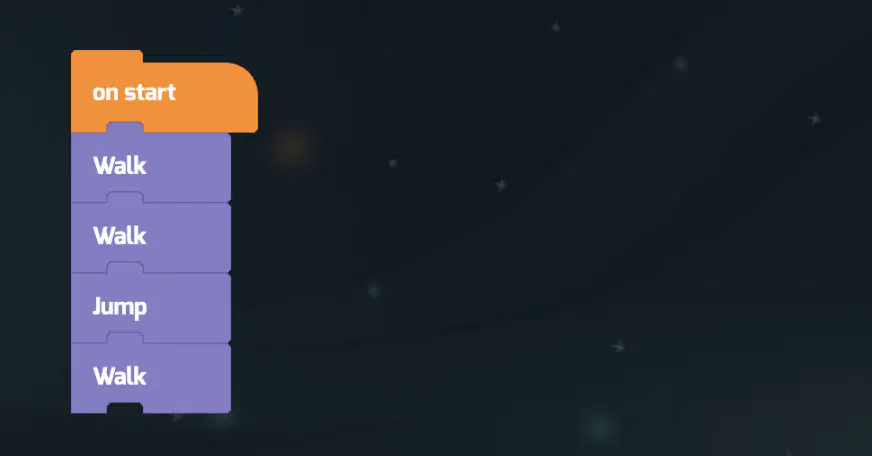
d)
None of the above
100 %

