
 Worksheets
Google Suite Questions
Total questions: 45
Worksheet time: 24mins
What is the primary function of Gmail?
Online shopping
Video streaming
Social networking
Email services
How can you mark an email as important in Gmail?
Click on the 'More' option next to the email, then select 'Mark as important'.
Drag and drop the email into a special folder
Click on the 'Mark as Important' button at the top of the email
Change the font color of the email subject to red
What is the maximum attachment size allowed in Gmail?
30MB for web interface, 60MB for IMAP
25MB for web interface, 50MB for IMAP
20MB for web interface, 40MB for IMAP
10MB for web interface, 30MB for IMAP
Explain the difference between 'Reply' and 'Reply All' in Gmail.
The 'Reply' function replies to all recipients of the email
The 'Reply All' function replies only to the sender
The 'Reply' function includes attachments in the reply
The 'Reply' function replies only to the sender, while 'Reply All' replies to all recipients of the email.
How can you create a new label in Gmail?
Ask a friend to create the label for you
Go to 'More' on the left side of Gmail inbox, select 'Create new label', enter label name, and click 'Create'.
Send an email to yourself with the label name in the subject line
Click on the profile picture, select 'Settings', go to 'Labels' tab, and click 'Create new label'
What is the purpose of the 'Archive' feature in Gmail?
The purpose of the 'Archive' feature in Gmail is to increase the font size of emails
The purpose of the 'Archive' feature in Gmail is to remove emails from the inbox without deleting them permanently.
The purpose of the 'Archive' feature in Gmail is to mark emails as spam
The purpose of the 'Archive' feature in Gmail is to automatically forward emails to another account
Explain how you can set up an out-of-office auto-reply in Gmail.
Click on the gear icon > See all settings > General tab > Out-of-office responder section > Activate > Enter dates, subject, message > Apply Changes
Click on the gear icon > Go to settings > General tab > Vacation responder section > Turn on > Set dates, subject, message > Save Changes
Click on the gear icon > See all settings > General tab > Vacation responder section > Turn on > Set dates, subject, message > Save Changes
Navigate to the gear icon > Access settings > General tab > Vacation responder section > Enable > Input dates, subject, message > Confirm Changes
What is the purpose of the 'Spam' folder in Gmail?
To organize emails by sender
To send important emails directly to spam
To mark emails as read
To automatically filter and store emails identified as spam or unsolicited messages.
How can you change the display density of your Gmail inbox?
Go to Gmail settings, click on 'Display density', and choose the desired option.
Install a third-party extension to modify Gmail display density
Change the browser's zoom level to adjust display density
Go to Gmail settings, click on 'Theme', and choose the desired option
What are the steps to create a signature in Gmail?
Ask a friend to create a signature for you and email it to you
Click on the 'Compose' button and type your signature directly in the email body
The steps to create a signature in Gmail are: 1. Open Gmail and click on the gear icon in the top right corner. 2. Select 'See all settings'. 3. Scroll down to the 'Signature' section. 4. Create your signature in the text box. 5. Click 'Save Changes' at the bottom of the page.
Go to the 'Spam' folder and create a signature from there
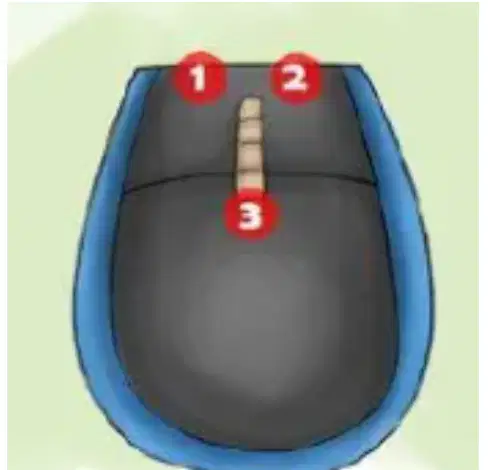
What we call button number 2?
right click
left click
reset button
To resize an image without distorting it (squishing it), click and drag from
the top of the image
the bottom of the image
any corner of the image
center of the image
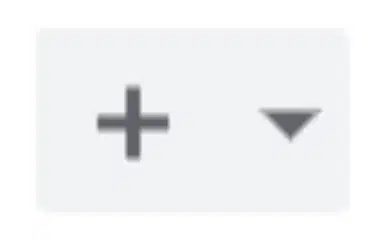
What does this symbol mean in Google Slides?
add a new slide
zoom
undo
change layout
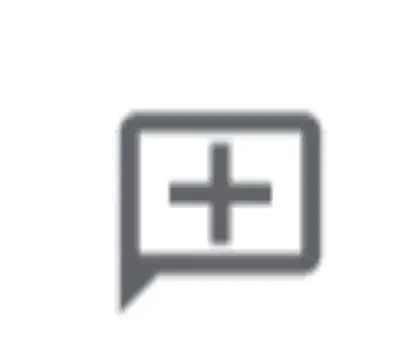
In Google Docs, what does this button do?
add a new page
add a comment
add an effect
add a transition

What does this button do?
add punctuation
add a hyperlink (URL)
add a new page

What does this button do?
save your work
delete your work
refresh the page
check your spelling

What does this button do?
check your spelling
underline selected text
add a page
find of letter "A" in your document
In Google Slides, when you are ready to show your presentation, click the _______________ button.
go
present
show
fire

What does this button do?
undo the last action
go back to the last page
replace the image
change the font
In Google Slides, what tool would make an image spin on the slide?
transition
animation
action
zoom
Google Slides is best used for
writing an essay for ELA
solving math problems
telling a story using visuals (images)
running science equations
TRUE/FALSE: You should include everything you want to say in the text on the slide (Google Slides)
True
False

What does this button do?
find specific words or phrases
underline selected text
add a hyperlink (URL)
Google Sheets is the best choice when you are
writing an essay for ELA
making a presentation for social studies
trying to "tell a story" with data for science class
TRUE/FALSE: Annotations are one of the best ways to provide feedback on a share document.
True
False


If I wanted to create a questionnaire to send to people participating in my science fair project, I should create a
Google Docs
Google Sheets
Google Slides
Google Forms
If I wanted to type an essay, which G Suite App should I use?
Google Docs
Google Slides
Google Form
Google Sheets
If I wanted to create an interactive presentation for Social Studies to present to my class, I should use
Google Docs
Google Slides
Google Sheets
Google Forms

If I wanted to share a document with Mr. Richards and have him type on it and edit it, I would click
Anyone with the link can edit
Anyone with the link can view
Anyone with the link can comment

Name the Google Application
Classroom
Sheets
Docs
Slides

