
Font size
 Worksheets
Y7 Q4 revision: computing theory 1
Total questions: 60
Worksheet time: 32mins

What is this?
CPU
RAM
ROM
Speakers

What is this?
Audio Card
Graphics Card
CPU
Motherboard

What is this?
CPU
Motherboard
Graphics Card
Hard Disc Drive

What is this?
Mouse
Speakers
Keyboard
Monitor
I am a powerful and very portable computer. I have access to bluetooth and WiFi. I have an aerial for connecting to 4G networks. I have a touchscreen and built in camera, microphone and speakers. I have a large battery and a high quality screen. What am I?
Smart Phone
Tablet
Laptop
Desktop
I am a powerful computer. I have a touchscreen and a built in speaker, camera and microphone. I am very portable and can easily fit in a pocket. What am I?
Smart Phone
Tablet
Laptop
Desktop
I have a built in speakers, camera and microphone. I am portable but cannot fit in a pocket. I have a large battery and a touchscreen. My keyboard is normally shown on screen but can be plugged in. What am I?
Smart Phone
Tablet
Laptop
Desktop
I have a built in speakers, camera and microphone. I am portable but cannot fit in a pocket. I have a large battery and usually have a screen larger than 12 inches. What am I?
Smart Phone
Tablet
Laptop
Desktop

Used to cool only the CPU.
Fan
Power Supply
Heat Sink
Computer Processor
A set of instructions that tell the computer what to do.
hardware
software
keyboard
mouse
Software can be placed in which 2 basic groups?
System Hardware, Application Hardware
System Software, Application Software
System Controller, Application Controller
System Console, Application Console
You can touch software
True
False
Microsoft Word is an example of an operating system
False
True

What type of software is it?
Operating system
Application software
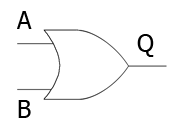
An INPUT device can
send data to another device, but it can not receive data
receive data from another device , but can not send data
can send and receive data
Which of these is NOT a Storage Device?
USB Flash Drive
CD-R
Digital Camera
Floppy Disk

Choose the input devices.
mouse, keyboard, headphones
mouse, printer, headphones
mouse, keyboard, speakers
mouse, keyboard, smartboard

What type of device is a Hard disk?
Output Device
Storage Device
Input and Output Device
Input Device


What type of device is this? (Smartphone screen)
Output Device
Input Device
Input and Output Device
Storage Device

Amazon Alexa is what type of device?
Input
Output
Both
A virus damages the hardware on a computer
True
False
A virus damages the software and data stored on a computer
True
False
Which of the following are signs that your computer has a virus?
Computer freezes
Lots of popups and advertisments
Files are corrupt or missing
Slower internet speeds
Computer viruses are spread by?
Dowloading files such as games, videos, audio
Searching the internet for information
E-mail attachments
Portable devices such as USB sticks or external hardrives
Playing games on your computer

This is an example of?
Trojan
Worm
Phishing
Virus
Which of the following best describes a worm?
Malware that pretends to be legitimate software but actually contains a virus
Malware that multiplies itself and spread between computers
Malware that prevents the user from accessing their computer or files unless they pay a ransom fee
What signs should you look out for to spot phishing scams?
Poor spelling, punctuation and grammar errors
E-mail or text message starts with Dear Customer rather than your name
Attachements are .exe files
Weblinks that don't take you to the official company website
The best ways to protect your devices from malware is?
Avoid using the internet
Install security software such as anti-virus software
Ensure your browser and operating system are always up to date
Disable popups
How can you avoid accidently installing malware?
Be careful when downloading files from the internet
Look out for phishing scams
Be careful when clicking on popups that ask you to install something
Malware that infects your computer to steal personal information such as your login details or internet usage is called?
(a)

This is an example of?
Spware
Ransomware
Trojan
Worm
How do networks save money?
By sharing expensive resources like printers
By lowering the electricity bill
Networking hardware is always very cheap
By making life easier
Ransomware (Pick 3) ....
form of virus
self-replicating
form of worm
prevents the user from being able to access the data
What is Malware?
Programs that can attack only computers.
Programs that can attack computers, tablets, phones and other digital devices.
Programs that can protect computers, tablets, phones and other digital devices.
Programs that can protect only computers.
I restrict the user access to their computer or device, I may require payments as ransom.
What Am I?
(a)
Should you use the same password for all of your online accounts?
No
Yes
How else might you know you have malware?
You have a lot of pop ups when you use the internet
Your computer is fast
Your programs run smoothly
What does a computer virus do?
Spreads to computers to gather private information or cause a nuisance.
Improve computer performance.
Decrease productivity.

