
 Worksheets
New Scratch
Total questions: 50
Worksheet time: 26mins
What group of blocks controls movement of the Sprite?
Control
Sensing
Motion
Look
What is the backdrop area called in Scratch?
Ground
Paint
Area
Stage
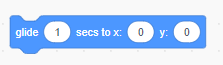
Which group of blocks include the "Glide" block?
Motion
Looks
Control

Which group of blocks include the "Broadcast" block?
Events
Motion
Control

With Scratch we can make... ?
Games
Stories
Animation
All

Where to find these codes?


Where to find these codes?


Where to find these codes?


How to add a sprite?


Can we add backdrops and sprites from the internet or our device?
Yes
No

Which group of blocks include the When Flag Clicked command?
Motion
Control
Looks
Events

In scratch, these characters are called___________________________
Backdrop
Sprites
Blocks
Stage
How do you add a sprite to your Scratch project?
Drag and drop an image file onto the stage.
Click on the "Choose a Sprite" button in the sprite library.
Right-click on the stage and select "Add Sprite."
None of the above
Which of the following explains the difference between a backdrop and a sprite in Scratch?
Backdrops are images, while sprites are blocks of code.
Backdrops are visible to the user, while sprites are hidden.
Backdrops are static while sprites can be animated.
Backdrops represent the stage, while sprites represent characters or objects.
Which of the following explains how to use the "broadcast" feature in Scratch?
Broadcast live video
Transmit wireless signals.
Send and receive messages between different sprites.
All of the above
Which of the following block type can be used to create "Score"?


What is the function of the "if-then" block in Scratch?
Create a backup copy of the project.
Control the timing and speed of sprite movements.
Trigger an event when the user clicks on a sprite.
Execute a specific set of actions based on a condition.
In Scratch, how can you get a sprite to play a sound?
Use the block software to create sounds.
Use the play button.
Use the "Play Sound" block from the Sound category.
None of the above

What block type can you find the "wait" block in Scratch?

Stop the sprite's movement temporarily.

Display a countdown timer on the stage.


How can you detect contact between sprites in Scratch?
Import touching detection algorithms from external libraries.
Attach physical sensors to the sprites.
Use the "Touching [Sprite]" block from the Sensing category.
None of the above
How can the "random" block be used in Scratch?
Activate sound effects.
Create a predictable patterns in sprite movements.
Generate a random number within a specified range.
List the order of items in a list randomly.
The "glide" code can be found in which of the following block type?


What are costumes in Scratch?
Costumes are predefined videos
Costumes are Scratch projects
Costumes are different outfits for a sprite that can be changed.
Costumes are 3D models used in Scratch projects.

The "forever" block is found in which of the following block types?
Control
Data
Sound
Events

The "when the green flag is clicked" code can be found in which of the following block types?
Control
Event
Sound
Variable

What is this icon used for in Scratch?
Choose a backdrop
Choose a Sprite
Choose a Costume
None of the above

What is this icon used for in Scratch?
Choose a backdrop
Choose a Sprite
Choose a Costume
None of the above
The scratch application can be used to create ________ and _______
document and presentation
music and video
games and animations
all of the above
________ is telling the computer what to do using codes
What group of blocks controls movement of the Sprite?
Control
Sensing
Motion
Look
Which group of blocks include the "Broadcast" block?
Events
Motion
Control
Operators
Where can we find these codes?
Which word below describes the use of a repetition block?
Order
Steps
Loop
Decision
What group of blocks controls touching of the Sprite?
Control
Sensing
Motion
Look
The X axis is "Up" and "Down"
What is the name given to all the green blocks?
Variables
Motion
Operators
Sensing
Which block makes the sprite disappear from the stage?
Delete
Remove
Hide
Goto

What does this green flag mean in scratch?
Nothing
Start
STOP
I don't know

You use this block when_____.
you want to give a little pause
you want to give a condition
you want to repeat a set of instructions
you want to execute the instructions

This code is used to ____________
Restart the code
Give a Starting position
Create a loop
Create a conditional statement

