wayground logo

Free Printable Worksheets

Font size

S
M
L
XL
Worksheets

Y7 - End of Year

Total questions: 105

Worksheet time: 1hrs 10mins

Name
Class
Date
1.
Selects entire objects
a)
Pen tool
b)
Selection tool
c)
Direct Selection tool
d)
Magic wand tool
2.
Selects points or path segments within objects. (A) 
a)
Selection tool
b)
Direct Selection tool
c)
Group Selection tool
d)
Magic Wand tool
3.
Selects objects with similar attributes. (Y)
a)
Magic Wand tool
b)
Direct Selection tool
c)
Lasso tool
d)
Artboard tool
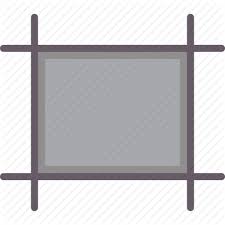
4.
Creates separate artboards for printing or export.
a)
Selection tool
b)
Canvas tool
c)
Artboard tool
d)
Art tool
5.
Draws straight and curved lines to create objects. (P)
a)
Delete Anchor Point tool
b)
Line Segment tool
c)
Add Anchor Point tool
d)
Pen tool
6.
Selects points or path segments within objects. (Q)
a)
Artboard tool
b)
Line Segment tool
c)
Direct Selection tool
d)
 Lasso tool
7.
Draws individual straight line segments.
a)
Straight Line tool
b)
Arc tool
c)
Line Segment tool
d)
Line tool
8.
Draws clockwise and counterclockwise spirals. 
a)
Spiral tool
b)
Arc tool
c)
Rectangular Grid tool
d)
Polar Grid tool
9.
Draws squares and rectangles with ROUNDED corners.
a)
Rectangular tool
b)
Ellipse tool
c)
Polygon tool
d)
Rounded Rectangle tool
10.
Draws circles and ovals. (L)
a)
Polar Grid tool
b)
Ellipse tool
c)
Circular tool
d)
Oval tool
11.
Draws and edits freehand lines. (N)
a)
Pencil tool
b)
Flare tool
c)
Line tool
d)
Freehand tool
12.
Draws regular, multi-sided shapes.
a)
Multi-sided tool
b)
Vertical tool
c)
Hexagonal tool
d)
Polygonal tool
13.
Smooths Bezier paths.
a)
Smooth tool
b)
Pencil tool
c)
Shape tool
d)
Line tool
14.
Draws freehand and calligraphic lines, as well as art, patterns, and bristle brush strokes on paths. (B) 
a)
Mesh tool
b)
Blend tool
c)
Paintbrush tool
d)
Live Paint Bucket tool
15.
Creates and edits meshes and mesh envelopes. (U)
a)
Gradient tool
b)
Eyedropper tool
c)
Mesh tool
d)
Live Paint Selection tool
16.
Adjusts the beginning and ending points and angle of gradients within objects, or applies a gradient to objects. (G)
a)
Eyedropper tool
b)
Mesh tool
c)
Gradient tool
d)
Paintbrush tool
17.
Samples and applies color, type, and appearance attributes, including effects, from objects. (I)
a)
Eyedropper tool
b)
Gradient tool
c)
Mesh tool
d)
Paintbrush tool
18.
Cuts paths at SPECIFIED points. (C)
a)
Eraser tool
b)
Slice tool
c)
Scissors tool
d)
Knife tool
19.
Erases ANY area of the object over which you drag. (Shift-E)
a)
Eraser tool
b)
Scissors tool
c)
Slice tool
d)
Knife tool
20.
Cuts objects along a freehand path you draw with the tool, dividing objects into their component-filled faces. (A face is an area undivided by a line segment.)
a)
Eraser tool
b)
Scissors tool
c)
Knife tool
d)
Slice tool
21.

Bitmap graphics are made up of

a)

dots.

b)

images.

c)

mathematics formulas.

d)

coloured pixels.

22.

Photographs taken with our handphones and digital cameras are

a)

bitmap images.

b)

vector images.

23.

After enlarging a graphic, our screen shows the above. We can confirm that it is a ______ graphic.

a)

bitmap

b)

vector

24.

After enlarging a graphic, our screen shows the above. We can confirm that it is a ______ graphic.

a)

bitmap

b)

vector

25.

Logos, cartoons & simple images are examples of what:

a)

Bitmap

b)

Vector

26.

Digital photos, smart phones and online images are examples of what:

a)

Bitmap

b)

Vector

27.

This shape is called...

a)

Oval

b)

Ellipse

c)

Circle

d)

Egg

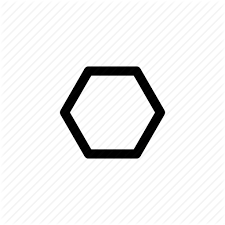
28.

This shape is called...

a)

Hexagon

b)

Polygon

c)

Octagon

d)

Pentagon

29.

What type of language is Scratch?

a)

Procedural

b)

Iterative

c)

Block

d)

Functional

30.

What type of language is Scratch?

a)

Procedural

b)

Iterative

c)

Block

d)

Functional

31.

What is a character in Scratch called?

a)

Bat

b)

Cat

c)

Sprite

d)

Crab

32.

What is the default Sprite when you open Scratch?

a)

Cat

b)

Dog

c)

Bat

d)

Crab

33.

What is the backdrop area called in Scratch?

a)

Ground

b)

Paint

c)

Area

d)

Stage

34.
Which command let the sprites walk ?
a)
Walk
b)
Run
c)
Move
d)
GO!
35.
Programming languages give computers instructions
a)
True
b)
False
36.

A completed program in scratch.

a)

Scratch

b)

volume

c)

project

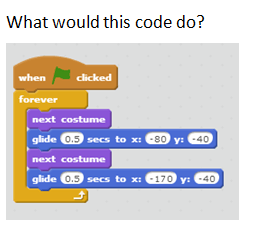
37.
What would this code do?
a)
Make a character dance
b)
Make a sound play
c)
rotate a character
d)
chase the mouse
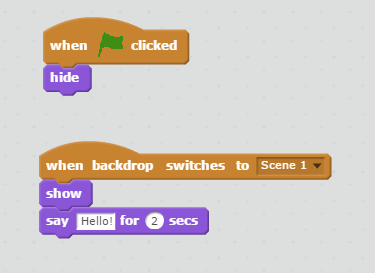
38.
According to the image, when you click on the green flag, this sprite will....
a)
Show and when the backdrop changes, it will hide and say "Hi!"
b)
Hide and when the backdrop changes, it will show and say "Hello!"
c)
Show and when the backdrop changes, it will  change the backdrop again
d)
hide and show the Tittle
39.

What does this green flag mean in scratch?

a)

Nothing

b)

Start

c)

STOP

d)

I don't know

40.

A program is

a)

a red fruit with lots of seeds.

b)

a collection of instructions (blocks) that a computer follows to complete a task.

c)

a language that computers recognize.

41.
What kind of block do I use to make my sprite move around?
a)
Motion
b)
Sound
c)
Sensing
d)
Control
42.

Can you have more than one sprite?

a)

True

b)

False

43.

Which of the following shapes is classed as a Process?

44.

Which of the following shapes is classed as a Start/Stop?

45.

Which of the following shapes is classed as a Decision?

46.

Which of the following shapes is classed as Input/Output?

47.

Which of the following shapes is classed as Flow of Direction?

48.
'Is the button pressed?' is a
a)
Process
b)
Delay
c)
Terminator
d)
Decision
49.
'Switch the light on' is a
a)
Process
b)
Delay
c)
Terminator
d)
Decision
50.
'Make a sound' is a
a)
Process
b)
Delay
c)
Terminator
d)
Decision
51.
What is an Algorithm?
a)
A set of instructions in order
b)
A task for the computer
52.

How many INPUTS are shown on the image?

a)

1

b)

2

c)

5

d)

6

53.

How many OUTPUTS are shown on the image?

a)

1

b)

2

c)

5

d)

6

54.
Which of these best describes sequencing?
a)
The time it takes to think computationally
b)
The order in which steps are carried out
c)
The process of repeating a number of steps
d)
The length of a set of steps
55.
Which of these best describes why sequencing is important?
a)
To ensure that a set of steps only takes a specified amount of time to run
b)
To ensure that certain steps are ignored
c)
To ensure that a set of steps produce the intended result
d)
To ensure that a set of steps doesn't run at all
56.
Which of these is another name for a set of steps that solve a problem?
a)
Iteration
b)
Selection
c)
Subroutine
d)
Algorithm
57.
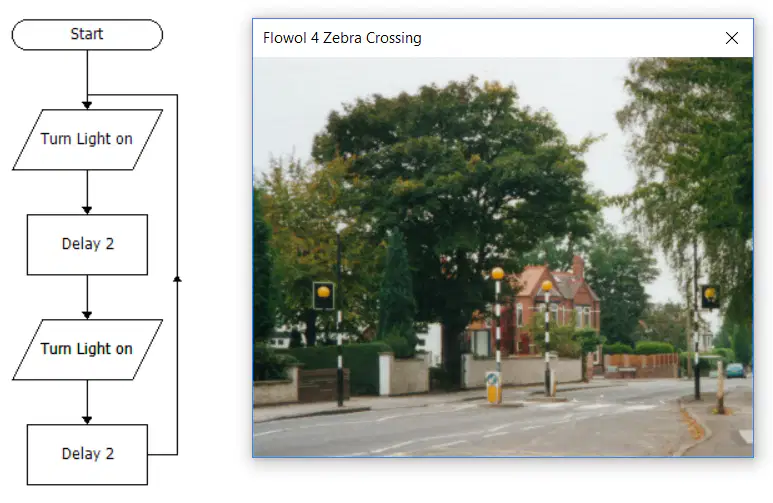
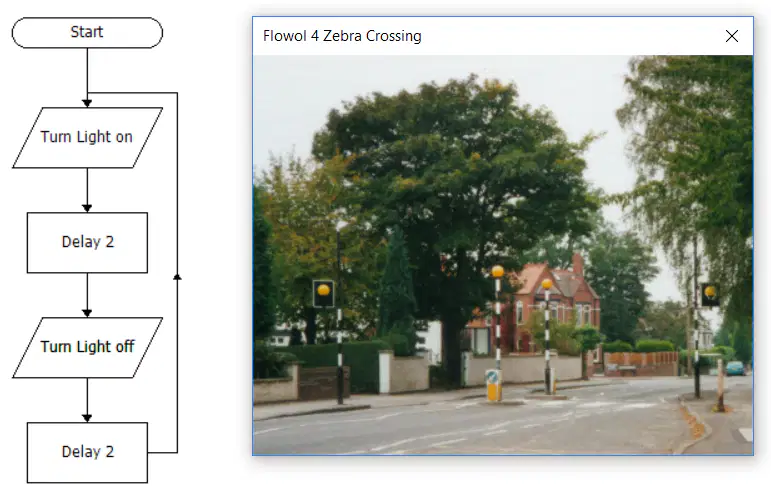
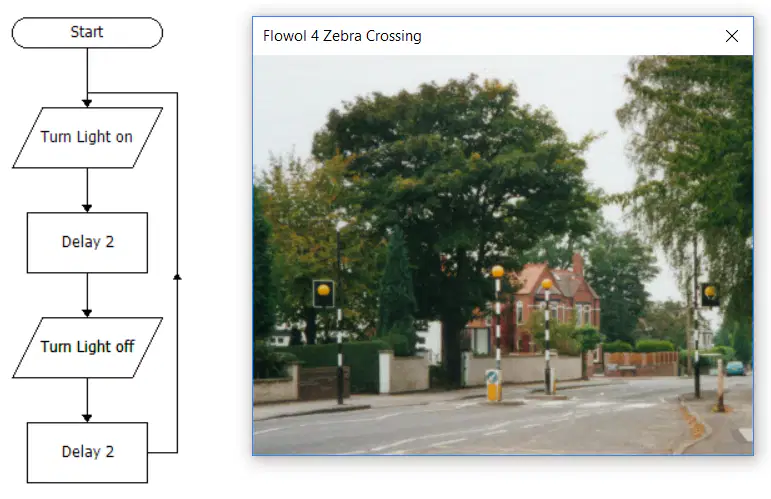
Look at the flowchart shown. The flowchart shows the control system for a zebra crossing. The control system should make the lights flash on and off repeatedly but it is not working. Why is this?
a)
There isn't a stop symbol
b)
It doesn't use iteration
c)
The lights are only ever turned on
d)
The delay is too long
58.
Look at the flowchart shown. The flowchart shows the control system for a zebra crossing. Which symbol are the actions 'Turn Light on' and 'Turn Light off' found in?
a)

Terminator symbol

b)

Process symbol

c)

Input/Output symbol

d)

Decision symbol

59.

Look at the flowchart shown. The flowchart shows the control system for a zebra crossing. In order for the lights to flash continuously what is implemented on the flowchart?

a)

A decision

b)

A termination

c)

A loop

d)

An input

60.
True or False: A flowchart does not need to have a terminator Start symbol.
a)
True
b)
False
61.
True or False: A flowchart does not need to have a termintor Stop symbol.
a)
True
b)
False
62.

Match the definition to the keyword:

a)

Iteration

1.

Repeating steps, or instructions

b)

Sequencing

2.

Specific order of instructions

c)

Selection

3.

a decision or a questions

d)

Algorithm

4.

A step-by-step instructions

63.

Why are loops used in programming?

a)

To make decisions

b)

To terminate the program

c)

To repeat a set of instructions until a condition is met

d)

To define a sequence of steps

64.
What is the Output if the temperature is:
19
a)
Below Freezing
b)
Above Freezing
65.
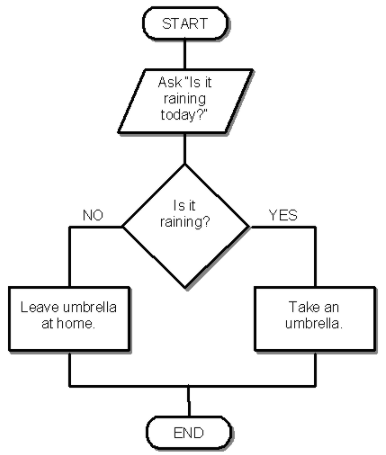
What is the Output if the user enters:
Yes
a)
Leave umbrella at home
b)
Take an umbrella
66.

What does selection mean?

a)

Selection is following instructions in order.

b)

Selection is to repeat something over and over again

c)

Selection is when you have a choice of options

d)

Selection is choosing the best option

67.

What is iteration?

a)

This is choosing what to do next

b)

This means doing something in order

c)

It is repeating something over and over again.

d)

It is writing pseudocode

68.

Click on on of the input devices:

**There are 4!

69.

Click on on of the output devices:

**There are 2!!

70.

Click on on of the input AND output devices:

71.
Look at this code, what shape will it make?
a)
Square
b)
Triangle
c)
Rectangle
d)
Hexagon 
72.

What shape will be the output from this code?

a)

Square

b)

Triangle

c)

Circle

d)

Rectangle

73.

What shape will be the output from this code?

a)

Square

b)

Triangle

c)

Circle

d)

Rectangle

74.
What will be the output from this code?
a)
A star with an orange outline
b)
A solid orange star
c)
A pentagon with an orange outline
d)
A solid orange pentagon
75.

How do you tell that Python that you are going to use the turtle library?

a)

import_turtle

b)

turtle import

c)

import turtle

d)

from turtle import

76.

What is wrong with this piece of code

a)

Must use the American spelling of colour - "color"

b)

Remove the prefix "screen." on Line 3

c)

Don't write the name of the colour in quote marks

d)

Don't add a capital letter to "Screen"

77.
Look at this code, what is the variable? 
a)
0
b)
4
c)
for
d)
i
78.
What is a variable? 
a)
A value that can change
b)
A number
c)
A value that can never change
d)
A letter
79.
Look at this code, how many times will it loop?
a)
50
b)
90
c)
0
d)
4
80.
What is wrong with this code?
a)
Missing Brackets
b)
Missing Comma
c)
Missing Colon
d)
Incorrect spelling 
81.
What is wrong with this code?
a)
Missing Brackets
b)
Missing Comma
c)
Missing Colon
d)
Incorrect spelling 
82.

Choose three properties of a variable below:

a)

Has a name.

b)

Holds a value.

c)

Has a data type.

d)

Has a length.

83.

Num = 90

Num = 20

print(Num)

a)

90

b)

4.5

c)

20

d)

1800

84.

In the following code, what type of variable is being created?

foo = "bar"

a)

Integer

b)

Float

c)

String

85.

What will be the output of

print (a x "c")

a)

c

b)

"1c"

c)

"c"

d)

1 x "c"

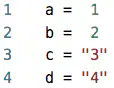
86.

What will be the output of

print (a x c)

a)

"axc"

b)

"1x3"

c)

"3"

d)

3

87.

What will be the output of

print (a x b)

a)

12

b)

1

c)

2

d)

"1x2"

88.

print("Python " * 3); will print out what

a)

Python 3 Python 3 Python 3

b)

Python Python Python

c)

PythonPythonPython

d)

Python*3 Python*3 Python*3

89.

Which of the following is an example of an input device?

a)

Printer

b)

Scanner

c)

Speaker

d)

Monitor

90.

What is the main function of the CPU in a computer?

a)

To store data permanently

b)

To perform calculations and execute instructions

c)

To display graphics

d)

To supply power to the computer

91.

Which of the following is NOT a storage device?

a)

Solid State Drive (SSD)

b)

Hard Disk Drive (HDD)

c)

Random Access Memory (RAM)

d)

USB Flash Drive

92.

What does RAM stand for?

a)

Read Access Memory

b)

Random Access Memory

c)

Rapid Action Memory

d)

Random Allocation Memory

93.

Which component is considered the "brain" of the computer?

a)

The Hard Drive

b)

The Graphics Card

c)

The Central Processing Unit (CPU)

d)

The Power Supply Unit

94.

What is the purpose of a video card in a computer?

a)

To enhance sound quality

b)

To connect to the internet

c)

To process video and graphics

d)

To store video files

95.

The programs of a computer system are called ________.

a)

Software

b)

Hardware

96.

The physical components of a computer system are called ________

a)

Hardware

b)

Software

97.

A keyboard is a type of _______.

a)

Hardware device

b)

Software device

98.

Which of the following is NOT an example of embedded system.

a)

Microwave

b)

Keyboard

c)

DVD Player

d)

Digital watch

99.

What is this hardware component?

a)

motherboard

b)

CPU

c)

power supply

d)

graphics card

100.

Name these ports.

a)

SSD

b)

USB

c)

RAM

d)

VGA

101.
What type of device is this?
a)
Output
b)
Input
c)
Storage
102.

This hardware component is called?

a)

the printer

b)

the monitor

c)

the tv

d)

the CPU

103.
What type of device is this?
a)
Input
b)
Output
c)
Storage
104.
A printer is computer hardware device used for ___________________.
a)
Input
b)
Output
c)
Storage
105.
What type of device is this tablet?
a)
Input
b)
Output