
 Worksheets
DWA Final
Total questions: 129
Worksheet time: 1hrs 10mins
What is the intersection of a column and a row in a table or worksheet called?
Column Heading
Cell
Print Area
Workbook
An equation that calculates a new value from values currently in a worksheet.
Sum Button
Cell
Worksheet
Formula
A computerized spreadsheet.
Worksheet
Row
Column
Workbook
The cells and ranges designated for printing.
Column
Row
Print Area
Sum Button
The column letter.
Row
Column
Sum Button
Column Heading
The file used to store worksheets.
Workbook
Worksheet
Print Area
Formula
The row number.
Cell
Column Heading
Row Heading
Sum Button
A vertical stack of cells in a table or worksheet.
Print Area
Cell
Row
Column
Adds together long columns or rows of numbers.
Column
Sum Button
Column Heading
Row
The horizontal placement of cells in a table or worksheet.
Column
Print Area
Row
Cell
Match the following
This area contains all of the commands you will need to perform common tasks in Excel. It has multiple tabs, each with several groups of commands.
Excel Ribbon Menu
In this box, you can enter or edit data, a formula, or a function.
Formula Bar
This refers to a group of cells that runs from the top of the page to the bottom.
Column
This refers to the rectangle boxes in an Excel workbook which is at the intersection of a row and a column.
Cell
This refers to a group of cells that runs from the left of the page to the right.
Row
Match the following
This feature lets you access common commands no matter which tab is selected.
Quick Access Toolbar
These are the files that are in the Excel workbooks. They also make up the different pages in Excel.
Worksheets
This area displays the location of a selected cell.
Name Box
This feature allows you to drag a slider to control the size of the worksheet in Excel.
Zoom Control
This area controls the different ways that the Excel worksheets are displayed.
Worksheet View Options
In Excel, how would you access the backstage view?
Insert Tab
File Tab
Formula Tab
Help Tab
What is Excel?
A Presentation Program
An Email Program
A word Processing Program
A Spreadsheet Program
Which is NOT one of the worksheet view options in Excel?
Page Layout
Normal
Page Break Preview
Data
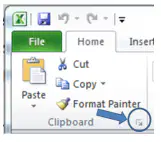
What do dialog box launchers allow us to see? (see picture below)
Nothing
Data of the box
All features and commands of that particular section
Page Layout Features
Once you’ve added all of your choice buttons to the quick access toolbar, you can’t reset it back to its default settings.
True
False
What steps do you need to follow in order to add a button to the QAT?
From the QAT menu, let your mouse rest on the button of your choice and right click.
From the QAT menu, let your mouse rest on the button of your choice and left click.
From the QAT menu, double-click the button of your choice.
From the QAT menu, hover over the button of your choice until it turns yellow.
Almost all buttons of your choice can be added to the QAT.
True
False
Rows are _______ and identified by ___________.
Vertical, Letters
Horizontal, Numbers
Top Down, Vowels
Bottom Up, Numbers
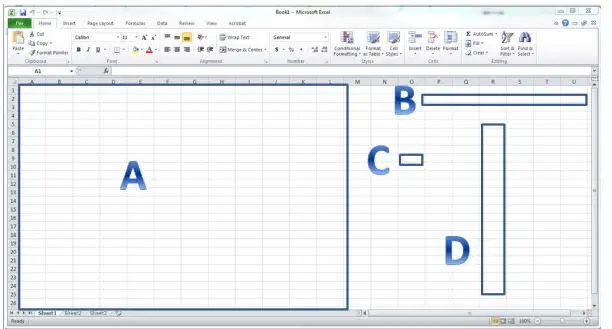
Match the following
A
Worksheet
B
Row
C
Cell
D
Column
Columns are ___________ and identified by __________.
Vertical, Letters
Horizontal, Numbers
Top Down, Vowels
Bottom Up, Numbers
Every workbook has at least ______ worksheet(s).
4
3
2
1
What actions do you need to take to customize the status bar?
Left-click and select what you would like to add.
Right-click and select what you would like to add.
Double-click status tab.
Click status tab once.
The status bar is located where in your Excel workbook?
Bottom
Right
Left
Top
The mini toolbar can be turned off.
True
False
A mini toolbar will allow the display of formatting options.
True
False
Which of the following should you select in order to customize your ribbon after you have right-clicked on a tab?
Customize the Tab
Customize the Ribbon
Customize Formulas
Customize Design
If you choose to remove a tab when customizing your ribbon, you can never put that tab back in place.
True
False
What key is necessary for you to click on your keyboard to access shortcuts?
Alt
Caps Lock
Tab
Shift
Which button should you click, to clear the content of an active cell?
Page Up
Backspace
Escape
Shift
If you ever need to change a named range, go to the formulas tab and click ___.
Text
AutoSum
Calculations Options
Name Manager
Spaces are allowed in named ranges.
True
False
How many different printing options do you have?
1
2
3
4
If you only wanted to print a certain area of your spreadsheet which option should you choose?
Print Active Sheets
Print Entire Workbook
Print Some Workbook
Print Selection
You can tell how many pages there are because they are clearly marked behind your information.
True
False
The page break between the information is indicated by what?
Solid Green Line
Dashed blue line
Greyed out area
Page 1
If you want to adjust the Page Break area, what do you need to do?
Drag the solid red line
Highlight the cells
Adjust the dashed blue line
Drag the green line
What orientation would allow more information to be displayed on the page?
Landscape
Portrait
You can adjust both the page layout as well as margins from the Page Setup Menu.
True
False
You can print both the data and the chart together.
True
False
Select "Print Selected Chart" to print the entire workbook.
True
False
If you would like to clear the print area, what tab do you need to first enter into?
Insert
Page Layout
Formula
Data
The amount of space above and below a paragraph is referring to ____.
Line Spacing
Paragraph Spacing
Paragraph Formatting
Line Formatting
If a green underline appears under a word, what does this mean?
There is a grammatical error.
There is a spelling error.
There is a spacing error.
There is a coloring error.
Located in the upper left-hand corner of Word, this will allow you to easily access the save, undo, and repeat buttons.
Paragraph Toolbar
Ribbon
Quick Access Toolbar
Paragraph Formatting
What kind of document opens each time you open the Word program?
Red document
Pre-filled document
Template
Blank Document
Changing the appearance of the entire paragraph is known as what?
Line Spacing
Paragraph Formatting
Font Group
Paragraph Spacing
The amount of space between the lines of text.
Line Spacing
Paragraph Spacing
Line Formatting
Paragraph formatting
If a red line appears under a word, what does this mean?
There is a grammatical error.
There is a spelling error.
There is a spacing error.
There is a coloring error.
What contains the buttons that can quickly change the appearance of the font?
Quick Access Toolbar
Paragraph Group
Font Group
Ribbon
If a blue line appears under a word, what does this mean?
There is a grammatical error.
There is a spelling error.
There is a spacing error.
There is a word used inappropriately.
This button is used to reverse the last action performed and is located in the Quick Access Toolbar.
Font
Undo
Italics
Center
Match the following
This area contains all of the commands you will need to perform common tasks in Word.
Word Ribbon Menu
This area lets you access common commands no matter which tab is selected. By default, it includes the Save, Undo, and Redo commands.
Quick Access Toolbar
This area allows you to search for commands, which is especially helpful if you don't remember where to find a specific command.
Tell Me
This is located at the top and to the left of your document. It makes it easier to make alignment and spacing adjustments.
The Ruler
This is where you'll type and edit text in the document.
Document Pane
Match the following
This area contains a series of different commands. Simply click any command to apply it.
Command Group
From here, you can quickly see the number of words and pages in your document.
Page and Word Count
This is where you can switch between the Read Mode, Print Layout, and Web Layout.
Document Views
This tool allows you to enlarge the size of the screen.
Zoom Control
This tool allows you to move up and down through the page of your document.
Scroll Bar
If you have already saved a document named "MyEssay" and need to exit to come back to it later, which should you click to save your work?
Save
Save As
File
Home
Which view allows you to see all of the file properties such as the word count, author, date modified and so on?
Front stage view
Home Tab
Font Group
Backstage View
What tab can you find the options to print or save on?
Home
Insert
File
Design
You can view different pre-made templates while in the backstage view.
True
False
What tab houses the Font Group?
Design
Home
Layout
View
Once you have typed a document, you can no longer modify the text, such as making it larger, changing colors, and so on.
True
False
What shortcut keys would you use to copy a set of text?
Ctrl + C
Ctrl + V
Ctrl + P
Ctrl + R
What shortcut keys would you use to paste a set of text?
Ctrl + C
Ctrl + V
Ctrl + P
Ctrl + R
What group under the Home tab houses the symbols or lists?
Styles
Clipboard
Paragraph
Font
Numbered lists keep a document clean and organized.
True
False
By default save, undo, and design appear on the Quick Access Toolbar.
True
False
Where is the Quick Access Toolbar located?
Top right corner
Top left corner
Bottom Right Corner
Bottom Left Corner
Once you’ve decided on the buttons you want to add to the QAT you cannot choose their order.
True
False
To customize the ribbon, what do you need to do first?
Left-click on the ribbon
Double-click the ruler.
Right-click on the ribbon.
Double-click the document
If you don’t see the commands you are looking for, what can you click?
All Commands
Some Commands
Word Commands
Ruler Commands
The mini toolbar is customizable.
True
False
If you need to change something like making the font bold or changing the color, you can do so from the mini toolbar
True
False
Where on the Word document is the status bar located?
Top
Left side
Bottom
Right Side
Everything in the status bar is clickable.
True
False
The ___ allows you to move text and images from other apps.
Clipboard
Home
Page
View
What shortcut method would you use to cut text? Ctrl +___.
C
V
X
Z
Where is the widow and orphan control located?
Home Tab, Paragraph Group
Home Tab, Font Group
Home Tab, Styles Group
Home Tab, Clipboard
In the same place that you can find the widow and orphan control, you can also find the command for “keep lines together." This will allow you to keep both lines and paragraphs together.
True
False
If you wanted to make a comment in the document, where would you locate it?
Home Tab, Styles Group
References Tab, Footnotes Group
Review Tab, Comments Group
View Tab, Zoom Group
When creating a document as a group, it is possible to see what others are doing using the track changes feature.
True
False
What feature allows you to have commonly used words entered without you typing them completely?
Autocorrect
Autochange
Autotyping
Autotexting
If you wanted to compare and combine documents which tab would you need to access?
Layout
References
View
Review
When comparing documents, if you click “View Side by Side" how many documents will appear on your screen?
1
2
3
4
What is the keyboard shortcut to access the "tell me" feature?
Alt + T
Alt + Q
Alt + H
Alt + B
The "tell me" feature helps you find what you are looking for and provides you with shortcut key information if there is any.
True
False
The first slide in a presentation.
Title Slide
Header Slide
Final Slide
Slide View
The combined use of more than one media, text, sound.
Animation
Transition
Clip Art
Multimedia
The Movement of text, graphics, or other objects within a slide.
Effects
Transitions
Animation
Slide Layout
A view that displays a single slide and allows the user to insert clipart, change backgrounds and edit transitions.
Slide Layout
Effects
Transitions
Slide view
A single page of a presentation in a slideshow.
Slide
Slide layout
PowerPoint
Clip Art
What is PowerPoint?
A software program that allows you to create professional tables.
A software program that allows you to create professional clipart graphics.
A software program that allows you to create professional looking multimedia presentations.
A software program that allows you to create professional looking math problems.
What is the definition of effects in PowerPoint?
Formatting feature that allows you to turn background colors on and off.
Formatting features that move the text and graphics on, off, or around the single slide.
Formatting feature that autocorrects spelling.
Formatting feature that allows you to change the slide layout.
A predefined slide format that determines the position of objects on the slide.
Effects
Slide transition
Slide layout
Multimedia
What are transitions in PowerPoint?
Effects that move one slide off the screen and the next slide on during a slide show
Moving objects.
Change in the background color.
Interesting graphics.
This is the main control button. It will control commands such as save, open, close, new, print, save & send, and
exit.
FIle Tab
Home Tab
Insert Tab
Design tab
This tab links to the Cut and Paste features, Font and Paragraph options, and what you need to add and organize
slides.
File Tab
Home Tab
Insert Tab
Design tab
Click this tab to add something to a slide. This includes pictures, shapes, charts, links, text boxes, video and more.
Home Tab
Insert Tab
Design Tab
Animations tab
On this tab, you can add a theme or color scheme, or format the slide background.
Home tab
Insert tab
Design tab
Animations tab
Use this tab to choreograph the movement of things on your slides.
Animations Tab
Home tab
Insert tab
Design tab
This tab sets up how your slides change from one slide to the next slide.
Transitions tab
Review tab
View tab
Tool tabs
This tab lets you add comments, run spell-check, or compare one presentation with another (such as an earlier
version).
Transitions tab
Review tab
View tab
Tool tabs
This allows you to look at your presentation in different ways, depending on where you are in the creation or delivery
process.
Transitions tab
Review tab
View tab
Tool tabs
In this area, you will find Drawing Tools, Picture Tools, SmartArt tools, Chart tools, Table tools, and Video tools. These
applications will help you enhance your presentations.
Transitions tab
view tab
Tool tabs
Slide Show tab
With this tab, you can set up the way that you want to show your presentation to others.
Slide Show Tab
Transitions Tab
Review Tab
View Tab
An easy way to end a presentation without having to go all the way to through to the last slide is to press the _____ key.
F5
Alt + E
Esc
Ctrl + X
Pressing the control key plus the letter "z" will do what?
Insert a picture
Undo the last action
Move to the next slide
Save the presentation
After copying text to the clipboard, what shortcut would paste the text?
Ctrl + V
Ctrl + P
Alt + C
prt sc
What happens if you use the control key plus the letter “c”?
Your content will be deleted.
Your content will turn yellow.
Your content will shift right.
Your content will be copied to the clidboard.
What is the name of the ribbon that will allow you see all of your different viewing options?
Transitions
Design
View
Insert
What view allows you to see a text-only version of your presentation?
Outline
Normal
Slide Sorter
Reading View
What view would allow you to see any speaker notes that may have been added?
Slide Sorter
Normal
Reading View
Notes Page
The ribbon is divided into tabs to make it easier to find what you are looking for.
True
False
How do you access the backstage view from PowerPoint?
Exit PowerPoint
Click File
Slide Sorter
Outline View
What tab do you use to get to the header and footer section?
Insert Ribbon Tab
Design Ribbon Tab
Animations Ribbon Tab
Design Ribbon Tab
You can use the slide master to edit your footer notes.
True
False
How many ways can you access the comment pane once a comment is made?
1
2
3
4
You cannot delete comments once they are made.
True
False
Cut, copy, and paste in the clipboard group can be used to make edits to text you already have in your presentation.
True
False
Text in the text box cannot be copied.
True
False
One way to access pictures is through a saved file on your computer.
True
False
What ribbon toolbar would you use to edit a photo?
Slideshow
Design
Insert
Format
There are lots of different ways to insert an image.
True
False
Working in an office can be dangerous.
True
False
What is one hazard of working with a computer?
Carpal Tunnel Syndrome
Stress
Teamwork
Online Time
Posture is not impacted by using a computer
True
False
What are some things your office chair should have?
Adjustable Arms
Ability to swivel
Supports your back
all of these
What is the most common classroom accident?
Spilled drinks
Banana peels
Falls
Dancing
How many filing cabinet drawers should you have open at a time?
All
None
One
Two
Of the following, what is the most helpful thing you can do to prevent eye strain when using a computer?
Increase the screen brightness as much as possible
Reduce glare
Bend over to look at the screen
make the screen blue

