
 Worksheets
Mid Term Test 4.1
Total questions: 45
Worksheet time: 26mins
Which is the input devices form the following devices
barcode scanner
keyboard
joystick
printer
speaker
An _________ device is any hardware device that sends data to a computer.
Input
Output
Storage
Processing
A _________ device is a hardware device capable of storing information.
Input
Output
Storage
Processing
An Input Device that contains the standard alphanumeric keys.
Keyboard
Joystick
Touch Pad
Microphone
An Output Device that projects an image into a surface.
Printer
Monitor
Speakers
Projector
A Processing Device that handles all the instruction it receives from the hardware.
Graphics Processing Unit
Central Processing Unit
Network Interface Card
None of the above
It transfers information from a piece of paper into a computer.
Printer
Scanner
Xerox Machine
Touch Pad
The two major types of software are the operating system
and the __________________ that you use every day
Applications
Substitutions
If your data is too large, you can use an external data storage drive.
True
False
External hard disk drive has the biggest storage space.
True
False
Memory Cards are very thin and small. You can use them with smartphones, digital cameras, MP3 players and game consoles.
True
False
Binary langauge consists of __________ and __________.
Ones and Twos
Zeros and Twos
Ones and Tens
Zeros and Ones
Bits stand for
Binary Digits
Binary Datas
Bi Datas
Biz Digits
Arrange the following in ascending order
1KB 1PB 1GB 1TB 1ZB 1MB
1KB<1MB<1GB<1TB<1PB<1ZB
1KB<1MB<1GB<1PB<1zB<1TB
1KB<1MB<1PB<1MB<1ZB<1GB
1GB<1KB<1MB<1PB<1TB<1ZB
Choose all the secondary storage devices from the list below


Which of the following is not the characteristics of RAM?
RAM is read/write memory
RAM holds data and instruction on which we are currently working
RAM is Non-Volatile i.e, Permanent
The amount of RAM in computer affects the number of programs a computer can run at the same time.

RAM stands for ...
Read Access Memory
Random Application Memory
Read Application Memory
Random Access Memory
Which of these is a Hard Disk Drive (HDD)?


Identify the picture
Random Access Memory
Read Only Memory
USB Flash Drive
Memory Card
Algorithms exist all around us.
True
False
____________ can be considered an example of an algorithm
answer to a question
name of a person
favorite subjects
a recipe for making pancake
An algorithm should be in the right order.
True
False

How did the squirrel get the acorn? (simple way)


which one is true?


Which one is true?


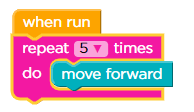
What does this code do?
Moves forward 1 time
Moves forward forever
Moves forward 5 times

Which SOLUTION goes with the code?


How we can move one step forward


Which code does NOT work?


Which code is correct??


Which of these would create a loop?


In coding terms an action or event you want to repeat multiple times is called a
loop
do-over
sequence
What is finding and fixing errors in programs?
Debugging
Program
Bug
Code
The options below contain the instructions for making a smoothie: Which one should come first?
Put the lid on the blender.
Add fruit to the blender.
Switch the blender on.
Add milk to the blender.
Riley rolled over, sleepy eyed, and turn off the alarm clock. Riley got dressed for school and hurried downstairs for breakfast. Later Riley met his friends at the corner to walk to school.
What happened first?
Riley got dressed for school.
Riley hurried downstairs for breakfast.
Riley turned off the alarm.
Riley got dressed for school and hurried downstairs for breakfast. Riley rolled over, sleepy eyed, and turn off the alarm clock. Later Riley met his friends at the corner to walk to school.
What happened last?
Riley got dressed for school.
Riley hurried downstairs for breakfast.
Riley met his friends at the corner.

Jennifer built a toy airplane. Her father helped her. First, they painted the parts. Then, they glued the parts together. They were pleased with their airplane even though it could not fly.
What happened right after they painted the parts?
Jennifer and her father built a toy airplane.
They were pleased with the airplane.
They glued the parts together.
Which is the correct icon of Gmail?


To go to Gmail on the web, go to
www.google.com
docs.google.com
www.gmail.com
slides.google.com
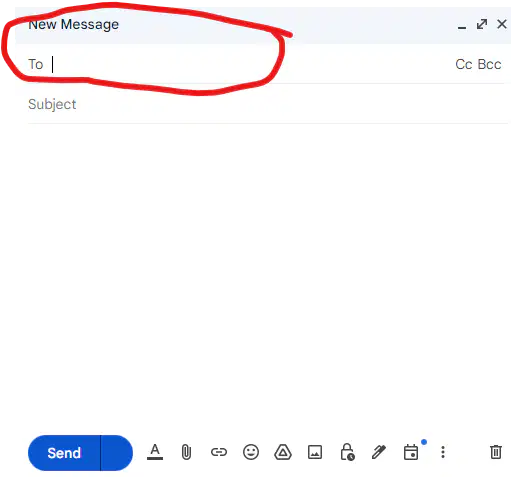
The following picture is pointing of ...
an email sender
an email recipient
a subject line
a message
I want to send an email to my friends, what should I do after I open google chrome?
searching on google email
sign in to my email then press compose
sign in to my email then press inbox
sign in to my email then press send
I want to send an email to my friends, what should I do after I open google chrome?
searching on google email
sign in to my email then press compose
sign in to my email then press inbox
sign in to my email then press send

