
 Worksheets
NBN 101
Total questions: 31
Worksheet time: 10mins
The golden standard of NBN.
FTTP
FTTC
HFC
Fixed Wireless
Fixed Wireless uses (a) to transmit data.
Sync remains stable but session keeps dropping in and out (for FTTN, FTTB, HFC and FTTC services).
Wireless Dropouts
Intermittent Sync
Session Dropouts
Sync Speed
Actual service is stable. Dropout issue is isolated within the customer’s wireless local network.
Dropouts
Wireless Dropouts
Intermittent Sync
Session Dropouts
Google DNS
(a)
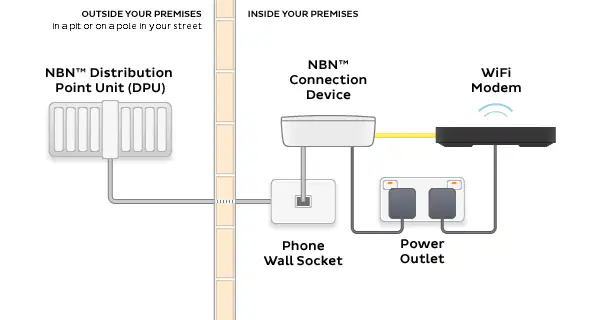
What is this Setup?
FTTP
FTTN
Fixed Wireless
FTTC
Refers to the quickness of the data or content transferred from the internet to your device.
Transfer Rate
Latency
Speed
Dropout
The time delay that a transfer of data takes within the network.
(a)
Service is confirmed online but the customer is unable to access any web pages and/or not able to use any applications (video calling, Wi-Fi calling, video streaming, etc.) on any device or computer within the same network.
Selective Browsing
No Browse
Delay
Slow browsing
A command used to check the the reachability of a website.
traceroute
ping
ipconfig
cmd
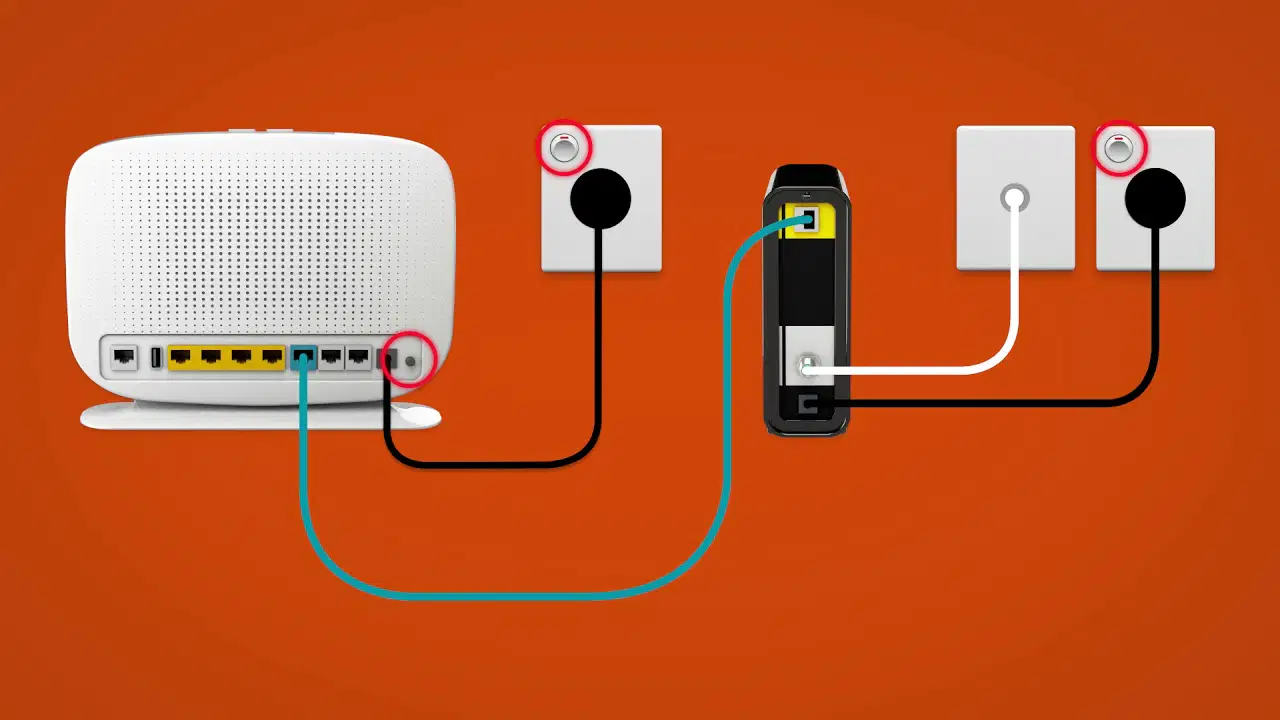
What is this setup?
HFC
FTTP
FTTC
FTTN
First thing you need to check before performing any troubleshooting.
Check account status
Check Outage
Check Physical connection
Check status of lights
When Sync is established for unprovisioned orders, we need to:
Configure modem and tap provisioning team
Configure modem by performing a hard reset
Configure modem by setting it to PPPoE
Configure modem then properly educate customer on the activation timeframe
The most basic troubleshooting step and must be performed in most issues.
(a)
We create a tickets in _______ to escalate an issue.
CRM
Vocus Portal
TW Hub
NBN Portal
This is where we can track NBN updates regarding orders in Vocus Portal.
Vocus Sessions
News
NBN Notifications
RADIUS
The last thing to do if changing DNS did not resolve the issue.
Reset IP
Change IP Type
Set to static IP
Hang up session
Sync is not established when LAN light on NCD is off or flashing.
True
False
Maybe
Depends
What is the article number for Troubleshooting Speed?
(a)
A test used to identify which device is faulty when UNI-D or WAN light is off (No authentication) common in FTTP connections.
Loopback Test
Continuous / Looping test
Continue / Looper Test
Continuity / Loop test
We need to check the ________ first when troubleshooting speed for FTTN.
LOC ID and check Assured Line Rate
LOC ID and check the Available Line
LOC ID and check the Max Available Speed
LOC ID and check the Minimum Throughput
We cannot withdraw COAT Upgrade once ____ is installed.
NCD
PCD
NTD
NDC
We need to get the ticket number in____ then ____ to attach it in the CRM case.
Support > New
Support > Documents
Support > Reports
Support > Tickets
We can perform modem bypass / bridge with a VLAN that is tagged.
Yes
No
Depends
As long as we are using Cat6 cable
It is the timeframe for SC 1 to be activated.
24-48 hours
1-3 weeks
1-3 days
1-3 hours
Is site access required for SC 12?
Yes
No
Maybe
Depends
The difference of NTD mismatch from jumpering issues.
NTD mismatch is for services with NBN box while jumpering is for FTTC.
NTD mismatch is for services with NBN box while jumpering is for FTTN.
NTD mismatch is for services with NBN box while jumpering is for HFC.
NTD mismatch is for unprovisioned services while jumpering is for provisioned orders.
It is a common problem that occurs when multiple telephone lines are connected to a single NBN line. These additional lines act like bridges, creating interference and causing signal disruptions that will result in lower achievable speeds and sync dropouts.
(a)
Setting the modem configuration to PPPoE allows AVCID to be triggered.
True
False
Maybe
Surrender
Once the service is authenticated, internet is already expected to work well.
SYNC
AUTH
ROUTE
APPLICATION
It is our Carrier.
VOCUS
NBN
MORE
TANGERINE

