
 Worksheets
Test on Introduction to Scratch and Block-based programming
Total questions: 25
Worksheet time: 15mins
What is block-based programming?
Block-based programming is a programming language that requires advanced coding skills.
Block-based programming is a type of hardware programming.
Block-based programming is a method that uses text to create code.
Block-based programming is a visual programming method that uses blocks to create code.
How does the user interface in block-based programming differ from text-based programming?
Block-based programming uses only text commands.
Block-based programming features a visual drag-and-drop interface, while text-based programming relies on written code.
Block-based programming requires advanced coding skills.
Text-based programming allows for visual programming elements.
What are the main components of a block-based programming interface?
A text-based coding environment
The main components are visual blocks, a workspace, a toolbox, and a scripting area.
A database management system
A command line interface
Why is drag-and-drop functionality important in block-based programming?
It eliminates the need for any coding knowledge at all.
Drag-and-drop functionality is only useful for advanced programmers.
Drag-and-drop functionality is important in block-based programming because it makes coding more intuitive and accessible, especially for beginners.
It allows for more complex coding techniques to be used.
How can colors in blocks help users understand their functions?
Colors in blocks help users quickly identify and categorize their functions.
Colors in blocks confuse users by mixing different functions together.
Colors in blocks are purely decorative and have no functional significance.
Colors in blocks are only used for aesthetic purposes and do not aid in understanding.
How does visual feedback enhance the user experience in block-based programming?
Visual feedback has no impact on user engagement or understanding.
Visual feedback enhances user experience by providing immediate responses and clarifying interactions, making programming more intuitive.
Visual feedback is only useful for advanced programmers and not for beginners.
Visual feedback slows down the programming process by adding unnecessary steps.
What are some common examples of block-based programming platforms?
Python
Scratch, Blockly, Tynker
JavaScript
HTML
Which of these is an example of a text-based programming language?
Scratch
Python
Blockly
Sprites can be renamed.
True
False
What does 🛑 ( red button ) mean in Scratch?
Start
STOP
Nothing
I don't know
A character which performs different actions in the projects is..........
Object
Cat
Image
Sprite
Extra blocks can be added using..........
Paint
Extensions
Block Palette
Backdrops

What does this green flag mean in scratch?
Nothing
Start
STOP
I don't know

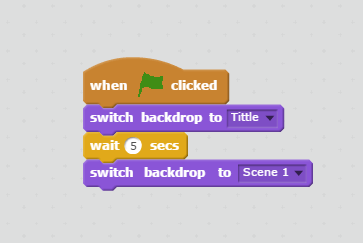
What will happen when the green flag is clicked?
Add a new sprite
Make the character spin
Move the character 15 steps
Nothing

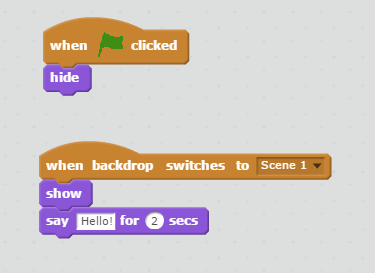
What does this block say when clicked?
Hello!
Don't eat me!
2 seconds
Nothing
Which block can I use to change costume?


None of these
Can you have more than one sprite?
True
False

Which group of blocks include the When Flag Clicked command?
Motion
Control
Looks
Events

Where to find these codes
Events
Sensing
Motion
Sound
Coordinates (x,y)
determine the position of the Sprite on stage.
are near the end of the alphabet.
are a great way to organize your clothes.
Which sprite is facing 90°?



