
 Worksheets
CS Eval
Total questions: 27
Worksheet time: 19mins
Which of the following components is known as the “brain” of the computer?
Monitor
RAM
Central Processing Unit (CPU)
Graphics Card (GPU)
I have no idea
What is the primary function of the Random Access Memory (RAM) in a computer?
Store permanent data
Execute instructions
Provide temporary storage for data in use
Control peripheral devices
I have no idea
What does the term 'booting' refer to in computer terminology?
Shutting down the computer
Starting up the computer
Installing new software
I have no idea
Updating the operating system
Which hardware component stores data long-term, including the operating system and personal files?
RAM
Hard Drive
Graphics Card (GPU)
CPU
I have no idea
What is the main difference between hardware and software?
Software is the part you can see of a computer, while hardware are the computer programs.
Hardware is what surrounds the computer and software are the internal cables.
Software is the inside part of the computer while hardware is the outside part.
Hardware refers to the physical components of a computer, while software refers to the programs that allow specific tasks to be performed.
I have no idea
Which of the following is a method to decode a Caesar cipher message?
Shifting letters forward by a fixed number
Reversing the order of letters
Substituting each letter with a number
I have no idea
Shifting letters backward by a fixed number
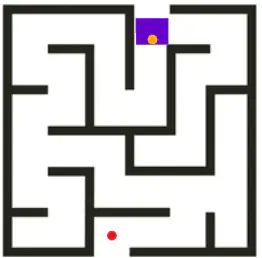
Using only the following instructions
-Forward -Turn Right -Turn Left
Write a series of instructions to get the purple robot to reach the red dot.
Consider that the Forward instruction only advances it 1 space equivalent to its own dimensions.
Which option shows the correct commands to make a robot move in a square pattern:
REPEAT (4)
MOVE_FORWARD, TURN_RIGHT
REPEAT (4)
MOVE_FORWARD, TURN_LEFT
TURN_LEFT
MOVE_FORWARD, TURN_RIGHT, MOVE_FORWARD, TURN_LEFT, MOVE_FORWARD, TURN_RIGHT, MOVE_FORWARD, TURN_LEFT
MOVE_FORWARD, TURN_LEFT, MOVE_FORWARD, TURN_RIGHT, MOVE_FORWARD, TURN_LEFT, MOVE_FORWARD, TURN_RIGHT
I have no idea
Observe the following simple code for the movement of a robot:
Sequence:
MOVE_FORWARD 5 steps, TURN_LEFT, MOVE_FORWARD 5 steps,
Which option shows a sequence that, when added to this code, allows the robot to return along the same path it has already traveled?
MOVE_FORWARD 5 steps, TURN_LEFT, MOVE_FORWARD 5 steps,
TURN_RIGHT,
TURN_RIGHT, MOVE_FORWARD 5
TURN_RIGHT, MOVE_FORWARD 5
TURN_RIGHT, MOVE_FORWARD 5
TURN_RIGHT, MOVE_FORWARD 5
TURN_RIGHT,
TURN_RIGHT, MOVE_FORWARD 5
TURN_LEFT, MOVE_FORWARD 5
I have no idea
Your parents are going to organize a 5-day vacation for your entire family.
Break this situation down into the relevant aspects that must be considered for the vacation to be successful.
Which block is used to start a program in Scratch?
Forever
Green flag
I have no idea
If-then
Green start button
Scratch
Which block would you use to repeat a set of instructions 10 times?
I have no idea
Do 10 times
Repeat 10
Wait 10 seconds
While 10
Which block is used to detect if a sprite is touching a specific color?
Touching color [color]?
I have no idea
Color [color] is touching [color]?
Over color [color]?
Is color [color]?
Which sequence of blocks would you use to make a sprite move in a square pattern?
Move 10 steps, turn 45 degrees, repeat 8 times
Move 20 steps, turn 90 degrees, repeat 2 times
Move 10 steps, turn 180 degrees, repeat 4 times
I have no idea
Move 10 steps, turn 90 degrees, repeat 4 times
Which HTML tag is used to create a hyperlink?
<link>
<a>
<href>
<hyperlink>
I have no idea
What is the correct HTML element for inserting a line break?
<lb>
<break>
<line>
<br>
I have no idea
How do you add a background color in CSS?
background-color: red;
color: red;
bg-color: red;
background: red;
I have no idea
Choose the correct HTML and CSS to create a paragraph with red text:
<p >This is a paragraph.<p>
<p/ >This is a paragraph.</p>
<p >This is a paragraph.</p>
<p/ >This is a paragraph.</p>
I have no idea
What is the correct way to declare a variable in JavaScript?
variable myVariable;
var myVariable;
v myVariable;
let myVariable;
I have no idea
Which of the following is a string variable?
let height = 1.75;
let isStudent = true;
let age = 30;
let name = "John";
I have no idea
What does the following code do?
console.log("Hello, World!");
Displays “Hello, World!” in an alert box
Prints “Hello, World!” to the console
Writes “Hello, World!” to a file
Sends “Hello, World!” as an text box
I have no idea
What is the output of the following code? let x = 5; x += 3; console.log(x);
5
3
8
53
I have no idea
How do you access the second element in an array let arr = [1, 2, 3];?
arr[1]
arr[2]
arr[0]
arr[3]
I have no idea
What is the correct way to write an if statement in JavaScript?
if x == 5 { // code }
if x = 5 { // code }
if (x == 5) { // code }
if (x = 5) { // code }
I have no idea
What does the following JavaScript code do?
let name = "Alice";
let greeting = "Hello, " + name + "!";
console.log(greeting);
Prints “Hello, Alice” to the console
Prints “Hello, Alice!” to the console
Prints “Alice, Hello” to the console
Prints “Hello, name!” to the console
I have no idea
What does the following JavaScript code do?
let isRaining = true;
if (isRaining) {
console.log("Take an umbrella.");
} else {
console.log("No need for an umbrella.");
}
Prints “No need for an umbrella.” to the console
Prints “Take an umbrella.” to the console*
Evaluate if it is raining through a Script
Compare a phrase entered by the user
I have no idea
What does the following JavaScript code do?
for (let i = 0; i < 3; i++) {
console.log(i);
}
Prints 1, 2, 3 to the console
Prints 0, 1, 2, 3 to the console
Prints 0, 1, 2 to the console
Prints 3, 2, 1 to the console
I have no idea

