
 Worksheets
Computer 9 Examination
Total questions: 31
Worksheet time: 20mins
The start or end of something in space. Lines and objects typically converge at points
Point
Line
Shape
Texture
Formed by connecting two points and can show direction and movement.
Value
Shape
Line
Texture
Refers to how close to dark or light an element is.
Texture
Value
Color
Contrast
The area between elements.
Shape
Space
Texture
Point
Refers to the tactile properties of a surface. It can be rough or smooth.
Texture
Value
Line
Shape
The principle of design that shows how well elements go together.
(a)
The principle of design that refers to how the elements are distributed in the image.
(a)
The principle of design that refers to the size of elements relative to each other.
(a)
The principle of design that pertains to which elements stand out or draw attention.
(a)
The principle of design that refers to how similar or different elements are from each other.
(a)
In Computer Graphics this uses points, lines, curves, color fills, and gradients to represent images.
GIF Images
Raster Images
Vector Images
JPEG Images
Computer Graphics that is composed of pixel information.
JPEG Images
Vector Images
Raster Images
PNG Images
The following are Vector Graphics file types (Multiple Answers)
SVG
EPS
AI
BMP
JPG
The following are "Raster Graphics" file types.
BMP
JPG
PNG
GIF
SVG
Contains the following main menus: New, Edit, View, Layer, Object, Path, Text, Filter, Extensions, and Help
Tools Control Bar
Ruler
Menu Bar
Tool Box
Contains colors that users can select quickly to change the fill objects.
Tool Box
Dialog Panel Dock
Canvas
Palette
The work area for the design. This is where the design elements are placed.
GUI
Canvas
White Area
Status Bar
Contains Inkscape's main drawing tools.
Tool Box
Tools Control Bar
Commands Bar
Status Bar
Located at the top and left of the screen. They provide measurement guides to make the placement of design elements easier.
Canvas
Status Bar
Tool Box
Rulers
Inkscape provides TWO WAYS for us to draw lines of the canvas. What are these tools.
Trace Tool
Freehand Tool
Line Tool
Bezier Tool
Pressing this shortcut key will reveal the Fill and Stroke options in the Dialog Panel dock at the right-hand side of the GUI. What is this shortcut key?
Shift + Ctrl + F
Alt + F
Ctrl + F
F
What is the shortcut key for freehand lines or the Freehand Tool.
T
P
F
R
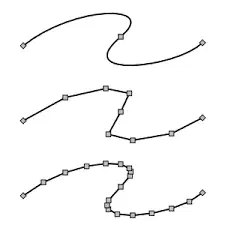
If you select either of the straight lines you have drawn, you will notice that it is simply a connection between to points. What are these points called.
Beginning and End
Nodes
Dot
Point
What is the sequence of nodes in a line called?
Path
Way
Pavements
Stroke
To make rectangles and Squares, What shortcut key should we press to make the following shapes?
8 or F5
R or F4
S or F2
D or F1
In making Circles, Ellipses and arcs this shortcut key is pressed.
P or F4
E or F1
E or F5
C or F6
Colors Opposite each other in the color wheel. This creates a high contrast combination.
Monochromatic
Triadic
Complementary
Analogous
Four colors spaced evenly in the wheel.
Triadic
Analogous
Tetradic
Monochromatic
What does CTRL + G do?
Group Objects
Delete Objects
Drag Objects
Enlarge Objects
In rendering paths and objects give one of the extensions we can use in Inkscape.
(a)
Explain the Importance of Graphics design to the Society. (3-5) Sentences

