
Font size
 Worksheets
Gmail (5th/ 6th)
Total questions: 20
Worksheet time: 19mins

What of the following are ways TGS students use Gmail?
To see returned work and grades
To ask teachers questions or for help
To ask teachers about make up work when sick
To email other students
How often should you check your email?
When your teacher tells you to.
EVERY. SINGLE. DAY.
When you feel like it.
Once a week.
Label the parts of the inbox
Menu
Sender
Subject and message
Number of total emails
Date email was sent
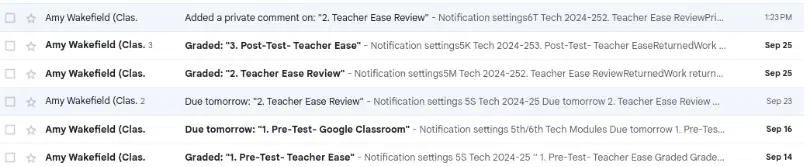
What does a bold email mean?
It HAS NOT been opened
It HAS been opened
You have read it
Is it strong and mighty!
Should you delete emails that are bold?
Yes! This will help keep your inbox clean.
No! They will probably fight back.
Yes! You don't need to read every email.
No! Open and read them first
(unless you can see your grade from the preview in your inbox or it is spam)
Label the parts of your Gmail menu
All emails are here
Important emails/ Need action
Emails already sent
Emails you started but didn't send
Archived emails are here
Deleted emails
What are the correct steps for checking your email?`
1. Open
2. Read
3. Deal with (or star)
if needed
1. Open
2. Deal with (or star)
if needed
3. Delete or archive
1. Open
2. Read
3. Deal with (or star)
if needed
4. Delete or archive
1. Open
2. Read
3. Delete
4. Star
Label the icons that show what can be done with an email from the inbox.
Match the action with each description

Archive it!

Delete it!

Star it!

Deal with it!
What should you do with:
an email that shows graded work with a decent grade and you have no questions about it?

Delete it

READ IT FIRST, then delete it

Star it

Archive it
What should you do...
with an email from a teacher reminding you to turn in an assignment
(but you don't have it done yet)
Delete it
READ IT FIRST, then delete it
Star it to remind you to do assignment
Archive it
What should you do...
with an email or picture from a teacher that you want to keep more than just this year?
Delete it
READ IT FIRST, then delete it
Star it to remind you to do assignment
Archive it
What should you do...
with an email with a lunch menu or dress up day schedule that you want to keep for a week/month?
Delete it
READ IT FIRST, then delete it
READ IT, then star it
Archive it
Where would you go to write a new email?
Label the parts of the email
Where would you click to reply? (choose 2)
When replying to an email, you only need to include include these parts:
subject
body
When replying and talking for the SECOND time in an email conversation, you only need to include the
body/message
subject
greeting
closing
Where would you click to attach a picture, video or screenshot taken on your Chromebook to an email?
What should you ALWAYS do before sending an email?
Say excuse me
Proofread!
Add a closing
Add an emoji

