
 Worksheets
Types and components of Computer Systems
Total questions: 63
Worksheet time: 33mins
What are the main hardware components of a computer?
Network cable, printer, monitor
Webcam, speakers, external hard drive
CPU, motherboard, RAM, storage devices, power supply, input/output devices.
Graphics card, sound card, cooling system
Name three types of software.
Network software
Database software
System software, application software, programming software
Utility software
What is the function of a CPU in a computer system?
To provide a user interface for software applications.
To store data permanently in a computer system.
To manage the computer's power supply and cooling system.
The function of a CPU is to execute instructions and process data in a computer system.
List two examples of operating systems.
Android
Windows, Linux
macOS
iOS
What is the purpose of RAM in a computer?
The purpose of RAM in a computer is to provide temporary storage for data and instructions that the CPU needs for quick access.
To permanently store the operating system files.
To increase the computer's internet speed.
To manage the power supply of the computer.
Define system software and give an example.
Application Software
Operating System
Firmware
Utility Program
What type of storage device uses magnetic disks?
Solid State Drive (SSD)
USB Flash Drive
CD-ROM
Hard Disk Drive (HDD)
What is the difference between SSD and HDD?
The main difference is that SSDs are faster and more durable than HDDs.
HDDs are faster and more durable than SSDs.
SSDs are cheaper and have larger storage capacity than HDDs.
SSDs use magnetic disks while HDDs use flash memory.
Name a type of application software.
Database
Presentation software
Spreadsheet
Word processor
What is an example of utility software?
Disk cleanup software
Web browser
Antivirus software
Text editor
What are input devices? Give two examples.
Two examples of input devices are a keyboard and a mouse.
Monitor and printer
Scanner and projector
Speaker and microphone
What is the purpose of a motherboard?
To store all the data in a computer.
The purpose of a motherboard is to connect and allow communication between all computer components.
To provide power to the CPU only.
To act as a cooling system for the computer.
What is the function of a graphics card?
To store data permanently.
To increase the speed of the CPU.
To manage network connections.
The function of a graphics card is to render images and video.
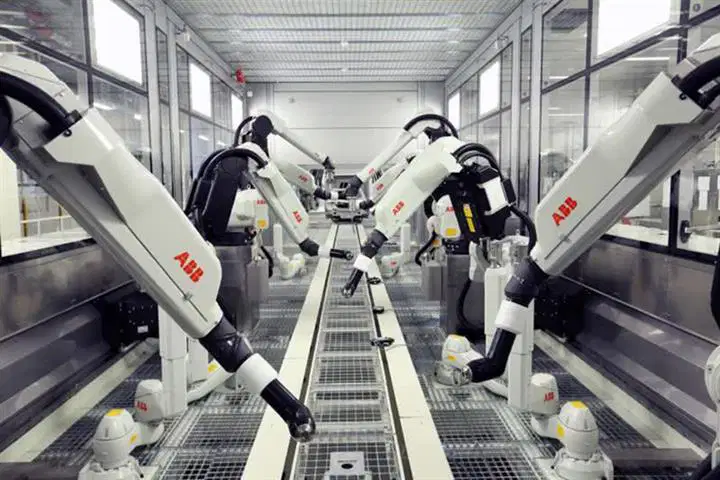
What type of robot does simple, repetitive tasks?
augmenting robot
pre-programmed robot
teleoperated robot
Give an example of how virtual reality is used in education.
Training doctors
Training soldiers
Virtual Meetings
d) all of these options
What is virtual reality (VR)?
a) A type of computer
b) A technology that creates a virtual environment
c) A new type of video game
d) apple product
What is artificial intelligence (AI)?
A) A type of computer virus
B) A field of computer science focused on creating machines that can perform tasks requiring human intelligence
C) A new video game
D) A type of software used for drawing
This device is used in mobile phones, tablets and digital camera
USB drive
Hard disk
Memory card
CD
What type of storage is RAM considered?
Secondary
Permanent
Non-volatile
Volatile
Which of the following is an example of non-volatile storage?
ROM
RAM
HDD
CPU
Why is primary storage necessary in a computer system?
For faster access by the CPU
To directly access the CPU
To increase the storage size
To store data long-term
What does RAM store?
Data that is not used frequently
Only the operating system
Programs that are currently running and parts of the operating system
Permanent data
What is primary storage also known as?
Virtual memory
Secondary memory
Main memory
External storage
What is the purpose of a motherboard?
The purpose of a motherboard is to connect and allow communication between all computer components.
To store all the data in a computer.
To act as a cooling system for the computer.
To provide power to the CPU only.
What does NIC stand for in the context of add-on cards?
Network Interface Card
Network Integration Card
Network Information Controller
Network Interconnect Card
What type of device is a keyboard classified as?
Network device
Storage device
Output device
Input device
List two examples of peripherals.
Mouse Pad
Monitor
Printer, Keyboard
Webcam
Software is...
The stuff you can physically touch
The programs or applications the computer system runs
The stuff that makes up the computer system
What does the CPU do?
it is responsible for processing all the data
it is responsible for storing the data
it is responsible for executing the data
A Hardware is a
Physical component that you can see and touch
Computer component that runs the program
Set of instruction computer use to run
What is the main advantage of using SSDs over HDDs?
SSDs are less expensive than HDDs.
SSDs have faster data access speeds compared to HDDs.
SSDs have larger storage capacities than HDDs.
SSDs are more prone to mechanical failure than HDDs.
What is the purpose of a sound card in a computer?
To enhance the visual output of the computer.
To manage the computer's power supply.
To process audio data and output sound.
To connect the computer to the internet.
What is the role of a heat sink in a computer?
To cool down the CPU and prevent overheating.
To store data permanently.
To enhance the graphics performance.
To connect external devices.
What is the difference between SSD and HDD?
HDDs are faster and more durable than SSDs.
SSDs are cheaper and have larger storage capacity than HDDs.
SSDs use magnetic disks while HDDs use flash memory.
The main difference is that SSDs are faster and more durable than HDDs.
Describe the function of a hard drive.
A hard drive stores and retrieves digital data using magnetic storage.
A hard drive is a type of software that organizes files.
A hard drive primarily manages network connections.
A hard drive is used for processing data in real-time.
What is the role of device drivers in a computer?
Device drivers are responsible for managing the power supply of the computer.
Device drivers are used to enhance the graphics quality of games.
Device drivers facilitate communication between the operating system and hardware devices.
Device drivers are applications that improve internet speed.
Name one function of an operating system.
Manage hardware resources
Run applications
Store user data
Provide internet access
What is an operating system?
An operating system is a programming language.
An operating system is a type of hardware component.
An operating system is software that manages computer hardware and software resources.
An operating system is a type of computer virus.
Explain the difference between RAM and ROM.
RAM and ROM are both non-volatile memory types.
RAM is volatile and used for temporary storage; ROM is non-volatile and used for permanent storage.
RAM is slower than ROM and used for long-term data storage.
RAM is used for permanent storage; ROM is volatile and used for temporary storage.
What are storage devices used for?
To connect devices to the internet
To display graphics on a screen
To enhance the speed of a computer
Storage devices are used for saving and retrieving data.
Give two examples of output devices.
Keyboard
Speaker
Scanner
Printer, Monitor
What is the purpose of input devices?
To connect the computer to the internet.
The purpose of input devices is to allow users to input data and commands into a computer.
To store data permanently.
To display data on the screen.
List three components of computer hardware.
CPU, RAM, HDD
Monitor, Keyboard, Mouse
Router, Switch, Firewall
SSD, GPU, PSU
Name two functions of application software.
Video editing and game development.
Database management and graphic design.
Web browsing and email communication.
Word processing and spreadsheet management.
What are the main types of system software?
Network protocols
Operating systems, device drivers, utility programs, firmware
Application software
Web browsers
What are the main differences between SSDs and HDDs?
SSDs have moving parts, while HDDs do not.
HDDs are faster than SSDs in data access.
SSDs are generally more durable and faster than HDDs, while HDDs offer larger storage capacities at a lower cost.
SSDs are only used in laptops.
What are the key differences between volatile and non-volatile memory?
Volatile memory retains data without power; non-volatile memory loses data when power is off.
Volatile memory is slower than non-volatile memory.
Non-volatile memory is used only for temporary storage.
Volatile memory is used for permanent data storage.
What are the characteristics of solid-state drives (SSDs)?
Larger size compared to traditional drives
Higher data access speeds than HDDs
Characteristics of SSDs include faster data access speeds, durability due to no moving parts, lower power consumption, and compact size.
More prone to physical damage
What is the difference between application software and system software?
System software is designed for user-specific tasks.
Application software is used for system maintenance.
Application software manages hardware resources.
Application software performs specific user tasks, while system software manages hardware and provides a platform for applications.
What are the functions of system software?
System software is only responsible for user applications.
System software is primarily used for web browsing.
The functions of system software include managing hardware resources, providing a user interface, facilitating application execution, and ensuring system security and stability.
System software does not interact with hardware components.
What is the role of RAM in a computer system?
RAM stores data permanently for long-term access.
RAM is responsible for managing the computer's power supply.
RAM provides temporary storage for data and instructions that the CPU uses for processing tasks.
RAM directly executes software applications without CPU involvement.
What is a computer network?
A computer network is a collection of unrelated devices without communication capabilities.
A computer network is a system of interconnected computers and devices that can communicate and share resources.
A computer network is a single computer that operates independently.
A computer network is a type of software application.
How do you differentiate between data and information?
Data is always numerical; information is always textual.
Data is processed information; information is raw data.
Data is raw facts; information is processed data with meaning.
Data and information are the same thing and can be used interchangeably.
What are the different types of data storage devices?
Magnetic storage, Solid-state storage, Optical storage, Flash storage
Network storage
Tape storage
Cloud storage
What is the primary function of an operating system?
To provide internet connectivity to devices.
To enhance the graphical user interface of applications.
To store and retrieve data from the cloud.
The primary function of an operating system is to manage computer hardware and software resources.
What are the main types of computer hardware?
The main types of computer hardware are: input devices, output devices, storage devices, processing units, and networking components.
Software applications and programs
Motherboards and CPUs only
Web browsers and operating systems

