
Font size
 Worksheets
Technology Vocabulary
Total questions: 50
Worksheet time: 29mins

This part of the website helps you move to other pages in the website.
Navigation menu
Refresh button
Footer
Address bar

What does this button do?
Makes your window full screen
Closes your window
Scrolls down to the bottom
Takes you to the homepage

What does this button do?
Takes you back to the webpage you were on before
Reloads the page
Hides the window that you are using in the task bar
Makes the window full screen

What does the refresh button do?
It closes your window.
It hides your window.
It reloads your page.
It takes you back to the page you were on before.

This space at the top of the page contains the URL, or web address, for the website.
Address bar
Header
Navigation menu
Content

What does this button do?
It reloads the page.
It takes you back to the page you were on before.
It makes your window full screen.
It closes your window.
What does the maximize button do?
It closes your window.
It minimizes your window.
It makes your window full screen.
It reloads your page.

What computer device do you see in the picture?
mouse pad
mouse
monitor
cursor

What computer device do you see in the picture?
backspace
printer
flashdrive
speaker

What computer device do you see in the picture?
printers
speakers
keyboards
home keys
What device controls the cursor on the screen of the monitor?
monitor
mouse
speakers
printer

What computer device do you see in the picture?
keyboard
typewriter
alphabet letters
buttons
What is the flat piece of material which provides a surface for the mouse to move across?
mouse pad
mouse
home keys
font

What computer device (the item in blue) do you see in the picture?
mouse pad
font
home keys
monitor

What computer device do you see in the picture?
font
pretty picture
monitor
keyboard


This cable is used to connect a computer to the internet. It is known as a(n) ____ cable.
phone
ethernet
HDMI
USB

What type of port is indicated in the picture?
S-Video
VGA
USB
HDMI
The word ____ refers to the physical parts of the system that you can see and touch.
software
desktop
computer
hardware
The following are techniques when using a mouse except
right click once
left click once
dragging
pushing


Which is LARGEST?
Terabyte
Gigabyte
Megabyte
Kilobyte

What does a right-click usually do?
Brings up a menu
Shows more information
Opens something

Drive
Google search
Chrome
Docs
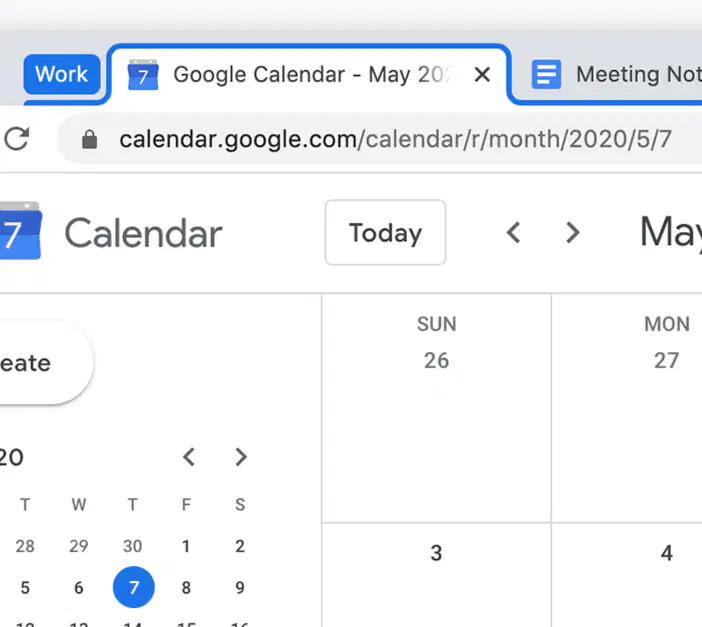
The area at the top of the browser window that displays open tabs. Users can switch between tabs by clicking on them.
Tab Bar
Tool Bar
Hamburger
Waffle

Choose the 2 Correct Answers
Number 1 is Search Bar
Number 2 is Search Bar
Number 1 is Address Bar
Number 2 is Address Bar

What is this icon?
refresh
menu
minimize
tabs

how we can make the game work
Move forward
click RUN
I don't know
Nothing

Solve this puzzle


What is wrong with the code to get Scrat to the acorn?
The first "move forward" is not needed.
The first "turn right" should be a "turn left"
The second "move forward" is extra
The last "turn right" should be a "turn left"

How long are the sides of this shape?
2 pixels
120 pixels
150 pixels
Purple pixels

What is the second level of Typing.com called?
Beginner
Intermediate
Advanced
What is the third and last level of Typing.com called?
Beginner
Intermediate
Advanced

How many levels must you complete to finish typing.com?
1
2
3

Which option should be selected to change the look of Typing.com?
Tests
Achievements
Themes

What does WPM mean?
Words Per Minute
Accuracy
Miles Per Hour

What does accuracy measure?
The percentage of mistakes made.
How fast a person can type.
The number of keys on a keyboard.
What is “hunt and peck” typing.
Typing with just two fingers.
Typing with all ten fingers.
Typing without looking at the keyboard.
What is the minimum typing speed for business?
40 WPM
20 WPM
50 WPM
What is the minimal accuracy rate allowed on a 3 minute typing test?
90%
80%
30 WPM
Typing using all ten fingers and without looking at the keyboard is called _______________.
Touch Typing
Hunt and Peck
Barnyard Typing
What is the best way to get better at typing?
Practice
Video Games
Being lazy and not practicing.

Sit down, sign in, and go to Typing.com

Only go to your assigned computer
False
True



