
 Worksheets
Ulol gago tarantado tanga bastos walang modo siraulo
Total questions: 81
Worksheet time: 41mins
is a programming paradigm that uses objects and their interactions to design applications and computer programs.
Object-Oriented Programming
Visual basic
Public Class
Private Class
provides full support for object-oriented programming including encapsulation, inheritance, and polymorphism.
Object-Oriented Programming
Visual basic
Public Class
Private Class
a group of related properties, methods, and other members are treated as a single unit or object.
Object-Oriented Programming
Visual basic
Encapsulation
Inheritance
a group of related properties, methods, and other members are treated as a single unit or object.
Object-Oriented Programming
Visual basic
Encapsulation
Inheritance
describes the ability to create new classes based on an existing class.
Object-Oriented Programming
Visual basic
Encapsulation
Inheritance
means that you can have multiple classes that can be used interchangeably, even though each class implements the same properties or methods in different ways.
Object-Oriented Programming
Polymorphism
Encapsulation
Inheritance
its simplifying complex reality by modeling classes appropriate to the problem.
Abstraction
Polymorphism
Encapsulation
Inheritance
can be describe the type of objects
Abstraction
Classes
Objects
Inheritance
these are usable instances of classes
Abstraction
Classes
Objects
Inheritance
like classes, define a set of properties, methods, and events.
Interfaces
Classes
Objects
Inheritance
is a set of instructions on how to solve a
problem or perform a task
Computer Programming
Computer Program
Keywords(Reserved Words)
Operators
is the process of developing and
implementing various sets of instructions to enable a computer
to do a certain task.
Computer Programming
Computer Program
Keywords(Reserved Words)
Operators
Popular programming languages for building windows and web applications.
Visual Basic
C#
C
C++
Java
Powerful advanced programming languages that emphasize flexibility and fast running times. C++ is also object-oriented.
Visual Basic
C#
C
C++
Java
Flexible and Powerful programming language that runs on many different computer systems, Often used to teach object-oriented programming.
Visual Basic
C#
C++
Java
Simple, yet powerful programming language used for graphics and small applications
Python
C#
C++
Java
Programming language used for creating interactive Web Sites.
Python
C#
PHP
Java
Words with special meaning that make up a high-level
programming language, cannot be used for any other
purpose
Keywords
Operators
Variables
Syntax
Special symbols that perform various operations on data
Keywords
Operators
Variables
Syntax
Used to store data in memory, named by the programmer
Keywords
Operators
Variables
Syntax
Set of rules
Keywords
Operators
Variables
Syntax
Instructions made up of keywords, variables, and
operators.
Statements
Procedures
Comments
Translator
Set of programming statements that perform a
specific task
Statements
Procedures
Comments
Translator
Ignored when the program runs, help human
reader understand the purpose of programming
statements
Statements
Procedures
Comments
Translator
is a computer program that
performs the translation of a program written
in a given programming language into
a functionally equivalent program in another
computer language
Statements
Procedures
Comments
Translator
is a software
application that provides comprehensive facilities to computer
programmers for software development.
Statements
Procedures
Integrated Development Environment
Translator

appears at the top of the Visual
Studio window
Menu Bar
Standard Tool Bar
Toolbox
Solution Explorer Window
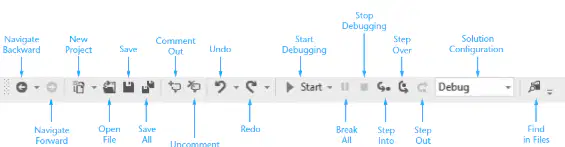
contains buttons that execute frequently
used commands. Provides quick access to commands that would otherwise be
executed from a menu
Menu Bar
Standard Tool Bar
Toolbox
Solution Explorer Window
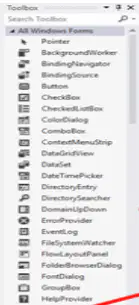
is a window for selecting controls to use in an
application’s user interface
Menu Bar
Standard Tool Bar
Toolbox
Solution Explorer Window
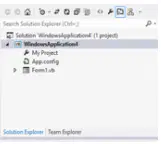
This is a section that is used to view and modify
the contents of the project.
Menu Bar
Standard Tool Bar
Toolbox
Solution Explorer Window
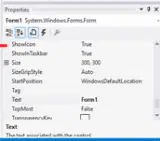
shows all the control (like TextBox)
properties to be changed at design time.
Properties Window
Form Designer Window
Output
Error List

it allows you to design your application's
user interface visually by dragging controls onto a design-time
representation of your application.
Properties Window
Form Designer Window
Output
Error List

its a window that can display status
messages for various features in the
integrated development environment (IDE).
Properties Window
Form Designer Window
Output
Error List
displays information about a
specific error message.
Properties Window
Command Window
Output
Error List
is used to execute
commands or aliases directly in the Visual
Studio integrated development environment
(IDE).
Properties Window
Command Window
Output
Error List
is a small rectangular box that pops up when you hover the
mouse pointer over a button on the toolbar or Toolbox for a few seconds
ToolTips
Docked Window
Floating Window
Console Application
It is attached to one of the edges of the Visual Studio environment
ToolTips
Docked Window
Floating Window
Console Application
You can resize the window as well as click and drag it by its title bar
ToolTips
Docked Window
Floating Window
Console Application
allow us to write data to the
console read data from the console, and run
in within a DOS Shell.
ToolTips
Docked Window
Floating Window
Console Application
is a type of user interface element you create on a Visual
Basic form by using a toolbox control.
Objects
Properties
Methods
Events
which describe the object
Objects
Properties
Methods
Events
cause an object to do something
Objects
Properties
Methods
Events
are what happens when an object does something
Objects
Properties
Methods
Events
All the Visual Basic Objects can be moved,
resized or customized by setting their properties.
Control Properties
Control Methods
Control Events
Basic Controls
is a procedure created as a member of a
class and they cause an object to do something.
Control Properties
Control Methods
Control Events
Basic Controls
is a signal that informs an application that something
important has occurred.
Control Properties
Control Methods
Control Events
Basic Controls
VB.Net provides a huge variety of controls that help
you to create rich user interface.
Control Properties
Control Methods
Control Events
Basic Controls
Forms
TextBox
Label
Button
Forms
TextBox
Label
Button
Forms
TextBox
Label
Button
Forms
TextBox
Label
Button
ListBox
ComboBox
RadioButton
CheckBox
ListBox
ComboBox
RadioButton
CheckBox
ListBox
ComboBox
RadioButton
CheckBox
ListBox
ComboBox
RadioButton
CheckBox
PictureBox
ProgressBar
ScrollBar
DateTimePicker
PictureBox
ProgressBar
ScrollBar
DateTimePicker
PictureBox
ProgressBar
ScrollBar
DateTimePicker
PictureBox
ProgressBar
ScrollBar
DateTimePicker
Anchor
Docking
Alphanumeric data such as letters of the alphabet, digits that are not treated as numbers, and another special characters
String
Char
Decimal
Double
Stores single unicode characters (supports any international language).
String
Char
Decimal
Double
Decimal numeric values - often used to store dollars/cents.
String
Char
Decimal
Double
Double-precision numeric values with 14 digits of accuracy
String
Char
Decimal
Double
Whole numeric values in the range -32,768 to 32,767
Boolean
Short
Integer
Long
Single Precision Numeric Values with 6 digits of accuracy
Single
Short
Integer
Long
Whole numeric values in the range -2,147,483,648 to +2,147,483,647.
Boolean
Short
Integer
Long
Whole numeric values that are very, very large
Boolean
Short
Integer
Long
True or False
Boolean
Byte
Date
Object
Stores binary data of values 0 to 255, - can be used to store ASCII character code values
Boolean
Byte
Date
Object
Stores dates in the form 1/1/0001 to 12/31/9999.
Boolean
Byte
Date
Object
Stores any data type
Boolean
Byte
Date
Object
use this to declare variables and constants inside a procedure these are local variables.
Dim
Byte
Date
Object
are values that are stored to memory locations; however, it cannot have its value change during program execution
Dim
Const
Date
Object
this is conversion by VB from a narrower to wider data type (less memory to more memory) – this is done automatically as there is no danger of losing any precision.
Implicit Conversion
Explicit Conversion
Date
Object
statement implements branching logic based on a testable condition
If Statements
Explicit Conversion
Date
Object
Combine two expressions into one. Both expression must be true for the overall expressions to be true.
And
Or
Xor
Not
Combines two expressions into one. One or both expressions must
be true for the overall expression to be true. It is only necessary for
one to be true, and it does not matter which.
And
Or
Xor
Not
Combines two expressions into one. One expression (not both) must
be true for the overall expression to be true. If both expressions are
true, or both expressions are false, the overall expression is false.
And
Or
Xor
Not
Reverses the logical value of an expression: makes a true expression
false and a false expression true.
And
Or
Xor
Not

