
 Worksheets
17. Morning Wake Up Alarm - RoboticSchools
Total questions: 10
Worksheet time: 10mins
🕵️♂️ Let's be detectives! Can you find the input components from the list below?


Let’s be inventors! Which option shows the right connections for the light sensor with the Arduino? 🔌💡


How many times will this code run? 🤔
1 time 🔁
Forever (infinite loop) ♾️
0 times 🚫
10 times 🔟

What is the correct data type to fill in the blank for the following code? 👩🏻💻
int 🔢
string 🧵
float 🌊
void 🚫
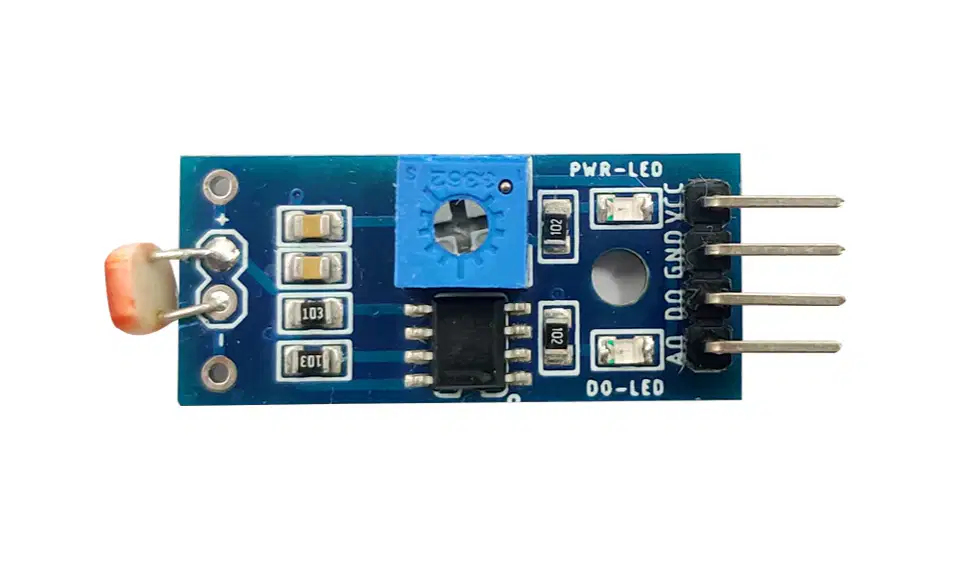
The resistor that is placed in front of the LDR (Light) sensor is __________. 💡🔌
Photoresistor 🌞
Potentiometer 🎚️
Thermistor 🌡️
Current Sensing Resistor ⚡

Magic Button Press! What happens when you press the push button?🔔
The LED is turned off ⬇️ and the buzzer stops ❌
The LED is turned on 💡 and the buzzer sounds 🎶
The program resets 🔄🔄
The program continues to loop without changes 🔄

Morning Alarm with Light Sensor: After pressing the button, the LED turns off, and the buzzer stops. The Arduino enters a loop and won’t run the code again. How can you make it run the code again? 🔄
Press the reset button on the Arduino 🔘
Take a break and come back later! 💤
Unplug the Arduino cable and plug it back in 🔌
Give the Arduino a little shake! 🤗
What is the MAIN purpose of using a while loop in this alarm project? 🔄⏰💻
To make the LED brighter ✨
To increase Arduino memory 💾
To keep the alarm system running continuously ♾️
To speed up code uploading 🚀

What is the MOST likely reason this line is used in the program? 🔘🧠💻
To reset the LDR sensor automatically 🌞
To increase Arduino memory 💾
To pause the program until the button is pressed ⏸️🔘
To make the buzzer louder 🔔
Which line of code is MOST important for stopping the buzzer after the system ends? 🔔🛑💻



