
 Worksheets
Cricut Sticker Certification Test
Total questions: 11
Worksheet time: 6mins

Where should you click to access the option to search for "print then cut" images? (Choose all that apply)
A: Templates
B: Filter icon
C: Monogram
D: Advanced Search

Which filter option should you select to find images that are already set up as stickers?
Purchased
Cut
Draw
Print Then Cut

What can you do if you see an "Image Too Large" warning? (Choose all that apply)
Ignore the warning and proceed
Resize the image manually
Select "Auto-Resize Image"
Restart Cricut Design Space

How can you create multiple copies of the same sticker?
A: Increase the number in "Project Copies" and click "Apply"
B: Change the "Material Size" to a larger size
C: Toggle "Mirror" to make extra copies
D: Click "Continue"

How many sticker sheets would be required to make 12 copies of this sticker?
1
2
3
4
What could you do to fit more stickers on one sheet?
Reduce the material size
Cancel the cut and resize the image to make it smaller
Increase the number of project copies
Nothing can be done

What is the first thing you must do to start your Print Then Cut project?
A: Edit the material size
B: Click "Send to Printer"
C: Connect the Maker 3
D: Click "I've Already Printed"

If you see "Basic Cut," is this design ready to be printed as a sticker?
Yes, it’s ready to print as a sticker.
Yes, but only if you adjust the cut settings.
No, you need to change it to "Print then Cut" to make it a sticker.
No, it must be resized first.

Which option should you click to make any image into a sticker?
A
B
C
D
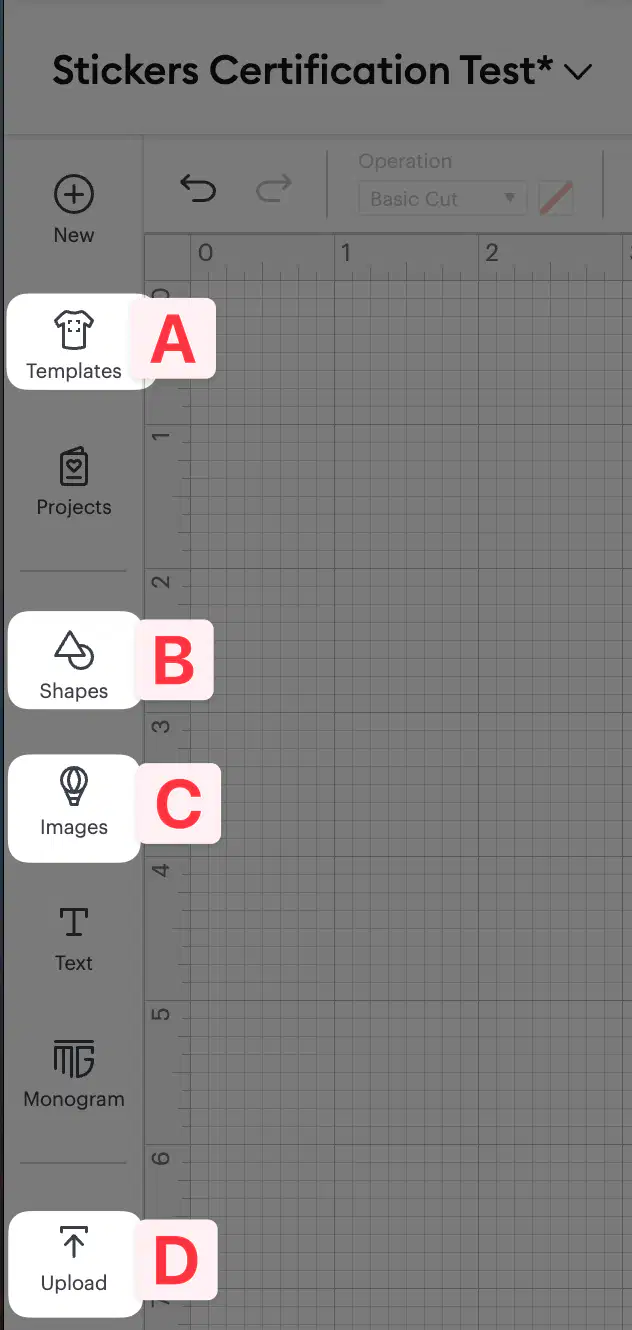
Which option should you click if you want to add your own images to Design Space?
A
B
C
D

Why is it a good idea to remove the background from an image if you’re making it into a sticker? (Choose all that apply)
To make the sticker look cleaner and more professional.
To ensure only the main subject is printed as the sticker.
To reduce printing time.
To increase the durability of the sticker.

