
 Worksheets
UTS CAD-CAE
Total questions: 100
Worksheet time: 50mins
Name
Class
Date
1.
Fitur Utama yang dimiliki oleh program Solidworks adalah, kecuali...
a)
2D Part
b)
3D Part
c)
Assembly
d)
2D Drawing
2.
Units and Dimension Standard yang disediakan pada Solidworks adalah, kecuali...
a)
Milimeter, gram, second
b)
Meter, kilogram, second
c)
Kilometer, kilogram, second
d)
Centimeter, gram, second
3.
Bidang gambar yang disediakan dalam FeatureManager Design Tree adalah...
a)
Front, Top, Right
b)
Front, Top, Left
c)
Front, Top, Side
d)
Front, Top, Edge
4.
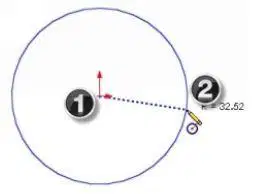
Untuk men-sketch lingkaran pada gambar digunakan perintah...
a)
Circle
b)
2P Circle
c)
Parametric Circle
d)
2D Circle
5.
Untuk mengubah atau memodifikasi ukuran digunakan perintah...
a)
Modify Dimension
b)
Edit Dimension
c)
Smart Dimension
d)
Sketch Dimension
6.
Untuk mengubah tepi objek 3D menjadi garis, pada CommandManager, klik Sketch kemudian tekan ikon perintah...
a)
Convert Entities
b)
Add Entities
c)
Convert Relations
d)
Add Relations
7.
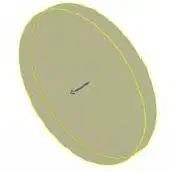
Untuk membuat gambar tersebut, pada CommandManager, klik Features kemuadian klik ikon...
a)
Extruded Boss/Base
b)
Cut Extruded Boss/Base
c)
Draft Extruded Boss/Base
d)
Circle Extruded Boss/Base
8.
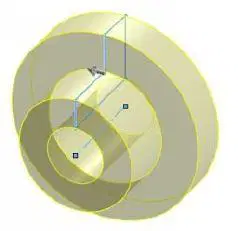
Untuk membuat gambar tersebut, pada CommandManager, klik Features kemuadian klik ikon...
a)
Revolved Boss/Base
b)
Cut Revolved Boss/Base
c)
Rotated Boss/Base
d)
Draft Revolved Boss/Base
9.
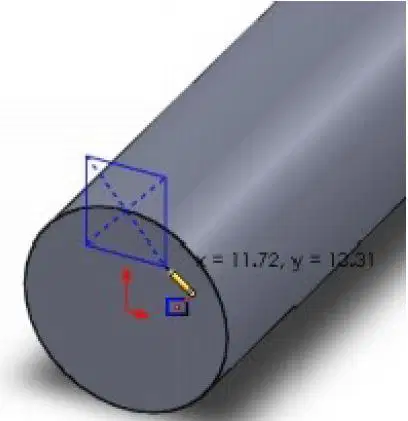
Untuk membuat gambar persegi (warna biru) seperti gambar, pada CommandManager, klik Sketch kemuadian klik ikon...
a)
Center Rectangle
b)
Corner Rectangle
c)
2P Rectangle
d)
2D Rectangle
10.
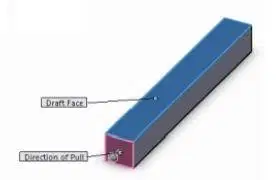
Untuk membuat salah satu permukaan memiliki kemiringan derajat tertentu seperti gambar, klik Features kemuadian klik ikon...
a)
Draft
b)
Shell
c)
Wrap
d)
Countur
11.
Setelah menambahkan komponen ke jendela perakitan, Anda harus menerapkan pasangan di antara mereka. Dengan menerapkan pasangan, Anda membangun kontak dan gerakan nyata antar komponen. Untuk dapat menerapkan pasangan antar bagian menggunakan alat...
a)
Mate
b)
Contact
c)
Connection
d)
Boundary
12.
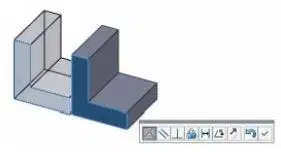
Untuk dapat menyelaraskan dua permukaan sedemikian rupa sehingga mereka akan menunjuk ke arah yang sama menggukana ikon...
a)
Coincident
b)
Parallel
c)
Perpendicular
d)
Lock
13.
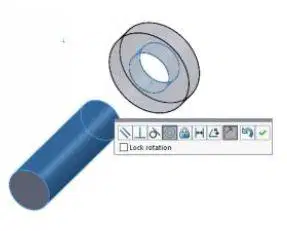
Untuk dapat menyelaraskan garis tengah permukaan silinder menggunakan ikon...
a)
Coincident
b)
Concentric
c)
Centric
d)
Center
14.
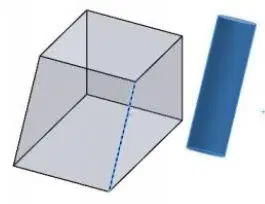
Untuk dapat membuat sumbu, bidang, atau tepi satu bagian sejajar dengan bagian lain menggukan ikon...
a)
Parallel
b)
Perpendicular
c)
Distance
d)
Tangent
15.

Untuk dapat menerapkan pasangan sudut antara dua komponen menggunakan tool...
a)
Angle
b)
Distance
c)
Tangent
d)
Corner
16.
Untuk memudahkan dalam memasangkan komponen di FeatureManager Design Tree dapat menyembunyikan sementara komponen dengan klik kanan dan pilih alat...
a)
Hide Components
b)
Transparency Components
c)
Suppres Components
d)
Replace Components
17.
Secara umum, sebuah komponen membutuhkan berapa mates (pasangan) untuk menguncinya di ruang sepenuhnya?
a)
Satu
b)
Dua
c)
Tiga
d)
Empat
18.
Entitas bagian yang dapat digunakan untuk memasangkan komponen adalah, kecuali...
a)
Vertex
b)
Edge
c)
Face
d)
Space
19.
Untuk mengevaluasi gangguan interferensi statis antara komponen perakitan menggunakan tool?
a)
Interference Detection
b)
Correcting interferences
c)
Collision Detection
d)
Interference Analyzes
20.
Tampilan di mana komponen rakitan dipindahkan di sepanjang sumbu ruang pemodelan rakitan adalah...
a)
Exploded Assembly View
b)
Partialy Assembly View
c)
Motion Assembly View
d)
Collapsed Assembly View
21.
Dalam membuat Drawing (gambar) akan disyaratkan untuk menentukan ukuran kertas gambar, salah satu ukuran kertas gambar adalah A3 yang memiliki ukuran...
a)
841 x 1189 mm
b)
594 X 841 mm
c)
420 x 594 mm
d)
297 x 420 mm
22.
Pada Model View PropertyManager, di bawah bagian Orientation, maka dapat memilih pandangan, kecuali...
a)
Depan
b)
Atas
c)
Kanan
d)
Samping
23.
Untuk membuat gambar potongan dari suatu komponen dapat dilakukan dengan memilih tool...
a)
Section View
b)
Break View
c)
Crop View
d)
Projected View
24.
Pada Section View dapat ditentukan garis potong atau Cutting Line yang digunakan, Cutting Line yang tersedia adalah, kecuali
a)
Aligned
b)
Auxiliary
c)
Vertical
d)
Diagonal
25.
Untuk memberikan gambaran yang lebih jelas dan detil bagian dari kompenen dan dapat dilakukan pemebesaran ukuran gambar dapat memanfaatkan tool...
a)
Detail View
b)
Zoom View
c)
Enlarge View
d)
Window View
26.
Pada hasil gambar proyeksi dapat ditambahkan garis sumbu secara manual, yaitu pada CommandManager, kemudian klik...
a)
Annotation > Centerline
b)
Annotation > Centermark
c)
Annotation > Area Hatch
d)
Annotation > Dashline
27.
Untuk memperbesar hasil gambar pada Detai View lebih besar 2 kali lipat maka perbandingan atau skala yang digunakan adalah...
a)
1:2
b)
2:1
c)
1:0,5
d)
Benar semua
28.
Dalam drawing apakah kita dapat memodifikasi dimensi?
a)
Ya
b)
Tidak
29.
Apakah dalam drawing dapat dilakukan perubahan terhadap etiket gambar?
a)
Ya
b)
Tidak
30.
Untuk memasukan daftar komponen dalam drawing dapat dilakukan dengan cara memilih...
a)
General Table
b)
Bill of Materials
c)
Revision Table
d)
Component List
31.
Semua sketsa harus direferensikan ke ... gambar agar dapat didefinisikan sepenuhnya atau fully defined
a)
Origin
b)
Pusat
c)
Tengah
d)
Titik
32.
Sebuah lingkaran dibuat sketsa menggunakan alat Lingkaran dan kemudian ukurannya, yaitu, diberi nilai diameter, menggunakan alat Smart Dimension. Ada dua alat lingkaran, yaitu...
a)
Circle and Perimeter Circle
b)
Circle and 3P Circle
c)
3P Circle and Perimeter Circle
d)
2P Circle and 3P Circle
33.
Untuk membuat gambar jajaran genjang digunakan tool...
a)
3Point Center Rectangle
b)
3Point Corner Rectangle
c)
Corner Rectangle
d)
Pararellogram
34.
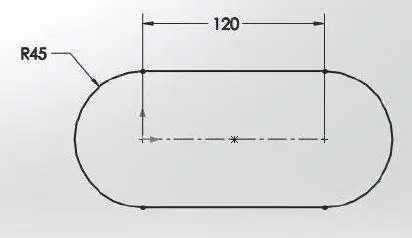
Untuk membuat bentuk seperti gambar, alat yang sesuai adalah...
a)
Slot
b)
Ellips
c)
Circle
d)
Rectangle
35.
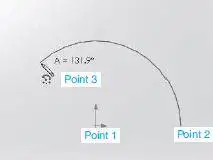
Untuk membuat bentuk seperti gambar, alat yang sesuai adalah...
a)
Centerpoint Arc
b)
3 Point Arc
c)
Tangent Arc
d)
2 Point Arc
36.
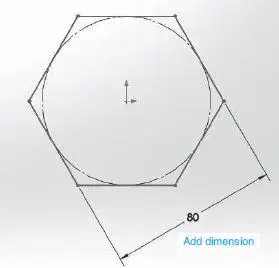
Untuk membuat bentuk seperti gambar, alat yang sesuai adalah...
a)
Inscribed-Polygon
b)
Circumscribed-Polygon
c)
Inscribed-Pentagon
d)
Circumscribed-Pentagon
37.
Garis lengkung yang memotong beberapa titik tertentu disebut...
a)
S-line
b)
Spline
c)
Continueline
d)
Curveline
38.
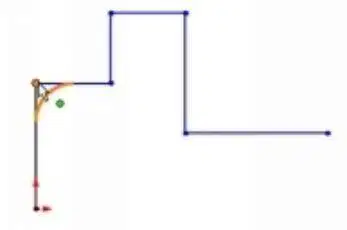
Garis lengkung (kuning) dibuat dengan tool...
a)
Fillet
b)
Arc
c)
Circle
d)
Tangent Arc
39.
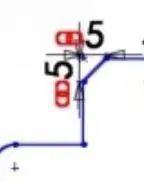
Garis miring dengan dimensi 5 dan 5 dapat dibuat dengan alat...
a)
Chamfer
b)
Trim
c)
Line
d)
Fillet
40.
Bentuk dari potongan kerucut adalah, kecuali...
a)
Lingkaran
b)
Ellips
c)
Bola
d)
Parabola
41.
Alat digunakan untuk menambah ketebalan atau tinggi pada sketsa 2D yang ada adalah...
a)
Extrude Boss/ Base
b)
Revolved Boss/ Base
c)
Boundary Boss/ Base
d)
Swept Boss/ Base
42.
Dalam membuat lubang kita dapat memanfaatkan Hole Wizard, ketika mendefinisikan End Condition dengan nilai tertentu (misal: 20 mm) maka dipilih...
a)
Through All
b)
Blind
c)
Mid Plane
d)
Up to Vertex
43.
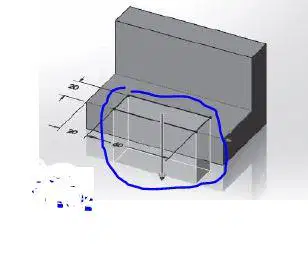
Tahap dimana menghilangkan bagian dari komponen seperti gambar menggunakan perintah...
a)
Extrude Cut
b)
Revolved Cut
c)
Boundary Cut
d)
Loft Cut
44.
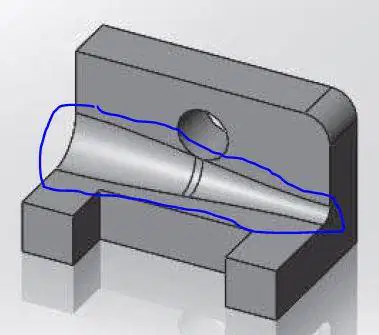
Untuk membuat profil seperti gambar dapat digunakan fitur...
a)
Constant size fillet
b)
Variable size fillet
c)
Face fillet
d)
Full round fillet
45.
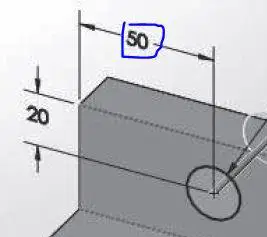
Untuk merubah besaran ukuran yang dilingkari digunakan tools...
a)
Smart Dimension
b)
Modify Dimension
c)
Change Dimension
d)
Sketch Dimension
46.
Untuk membuat lubang dengan bentuk yang beragam dalam Feature memberikan fasilitas yaitu...
a)
Extruded Cut
b)
Hole Wizard
c)
Revolved Cut
d)
Swept Cut
47.
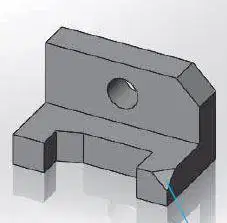
Untuk memuat profil yang ditunjukkan garis biru dapat menggunakan alat...
a)
Fillet
b)
Chamfer
c)
Lofted Cut
d)
Swept Cut
48.
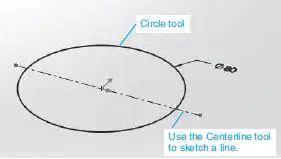
Bentuk gambar lingkaran seperti gambar jika di revolved sebesar 90 derajat terhadap centerline maka akan membentuk...
a)
Bola
b)
Setengah bola
c)
Seperempat bola
d)
Tigaperempat bola
49.
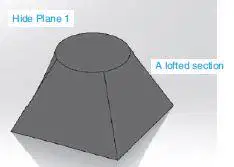
Untuk membuat profil seperti gambar menggunakan alat...
a)
Lofted Boss/Base
b)
Lofted Cut
c)
Swept Boss/Base
d)
Swept Cut
50.
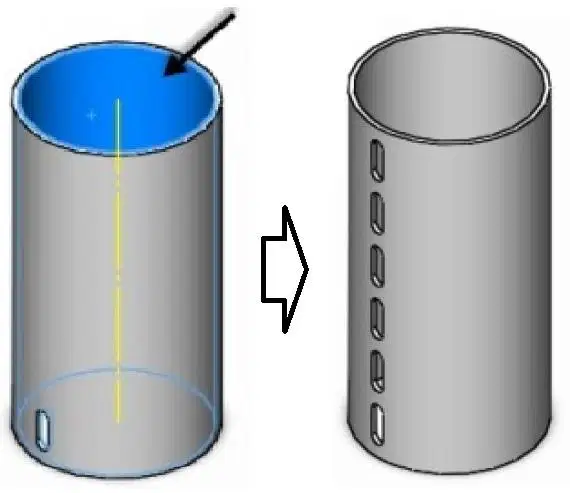
Untuk membuat bentuk proses seperti gambar digunakan alat...
a)
Linear Pattern
b)
Circullar Pattern
c)
Curve Driven Pattern
d)
Sketch Driven Pattern
51.

Untuk membuat bentuk seperti gambar dibutuhkan perintah atau alat...
a)
Centerline, Slot, Plane, Circle, Extrude Boss, Extrude Cut, Linear Patern, Circullar Patern
b)
Centerline, Slot, Circle, Extrude Boss, Extrude Cut, Linear Patern, Circullar Patern
c)
Rectangel, Revolved Boss, Slot, Plane, Extrude Cut, Linear Patern, Circullar Patern
d)
Semua Benar
52.
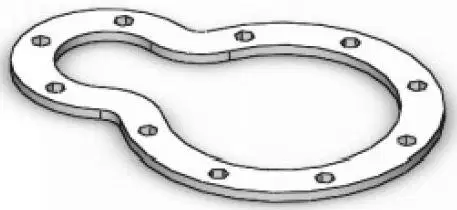
Untuk membuat 10 lubang seperti gambar dapat menggunakan alat...
a)
Linear Pattern
b)
Circular Pattern
c)
Curved Driven Pattern
d)
Variable Patern
53.
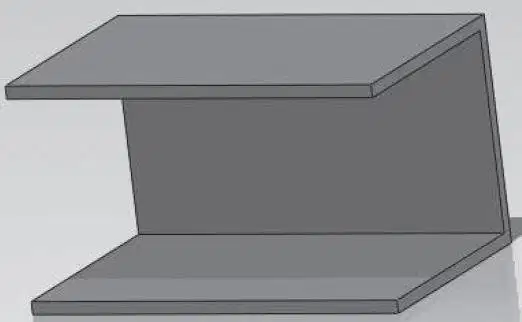
Bentuk balok solid dapat dibuat seperti gambar dengan alat...
a)
Shell
b)
Draft
c)
Rib
d)
Swept Cut
54.
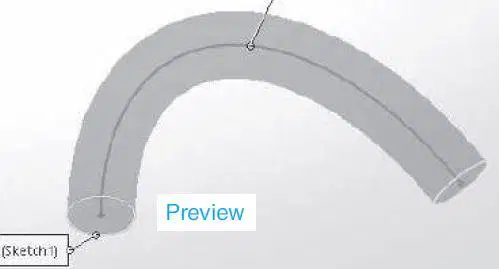
Untuk membentuk bentuk seperti gambar dalam fitur dapat dipilih...
a)
Swept Boss
b)
Swept Cut
c)
Plane
d)
Pipe
55.
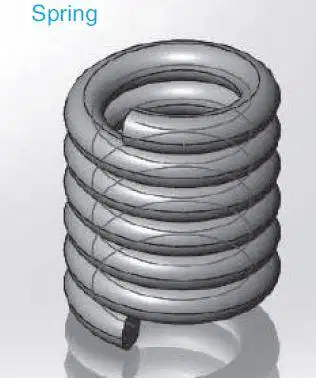
Untuk membentuk bentuk seperti gambar dalam Feature > Curves dapat dipilih...
a)
Helix
b)
Plane
c)
References
d)
Project Curve
56.
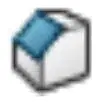
Identify the following Feature icon
a)
Chamfer
b)
Circular Pattern
c)
Draft
d)
Extrude Boss/Base
57.
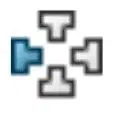
Identify the following Feature icon
a)
Chamfer
b)
Circular Pattern
c)
Draft
d)
Extrude Boss/Base
58.
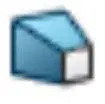
Identify the following Feature icon
a)
Chamfer
b)
Circular Pattern
c)
Draft
d)
Extrude Boss/Base
59.
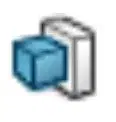
Identify the following Feature icon
a)
Chamfer
b)
Circular Pattern
c)
Draft
d)
Extrude Boss/Base
60.
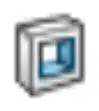
Identify the following Feature icon
a)
Extrude Cut Feature
b)
Fillet
c)
Linear Pattern
d)
Loft Boss
61.
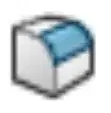
Identify the following Feature icon
a)
Extrude Cut Feature
b)
Fillet
c)
Linear Pattern
d)
Loft Boss
62.
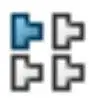
Identify the following Feature icon
a)
Extrude Cut Feature
b)
Fillet
c)
Linear Pattern
d)
Loft Boss
63.
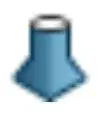
Identify the following Feature icon
a)
Extrude Cut Feature
b)
Fillet
c)
Linear Pattern
d)
Loft Boss
64.
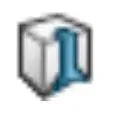
Identify the following Feature icon
a)
Loft Cut
b)
Mirror Feature
c)
Revolved Base
d)
Revolved Cut
65.
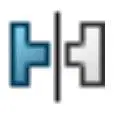
Identify the following Feature icon
a)
Loft Cut
b)
Mirror Feature
c)
Revolved Base
d)
Revolved Cut
66.
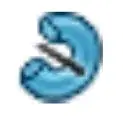
Identify the following Feature icon
a)
Loft Cut
b)
Mirror Feature
c)
Revolved Base
d)
Revolved Cut
67.
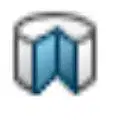
Identify the following Feature icon
a)
Loft Cut
b)
Mirror Feature
c)
Revolved Base
d)
Revolved Cut
68.
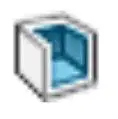
Identify the following Feature icon
a)
Shell
b)
Swept Boss
c)
Swept Cut
d)
Loft Boss
69.
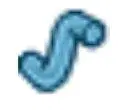
Identify the following Feature icon
a)
Shell
b)
Swept Boss
c)
Swept Cut
d)
Loft Boss
70.
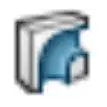
Identify the following Feature icon
a)
Shell
b)
Swept Boss
c)
Swept Cut
d)
Loft Boss
71.

The color of a fully defined sketch
is ...
a)
Black
b)
Blue
c)
Red
d)
Yellow
72.
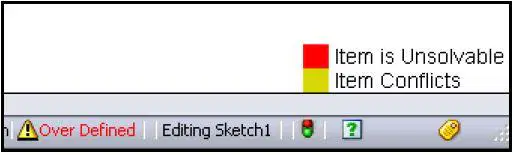
The color of an under defined sketch
is ...
a)
Black
b)
Blue
c)
Red
d)
Yellow
73.
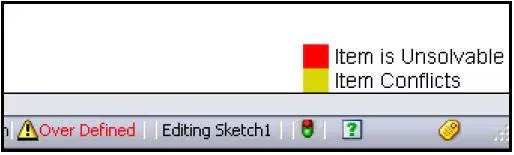
What symbol does the FeatureManager display before the Sketch name in an over defined sketch?
a)
-
b)
?
c)
+
d)
No symbol
74.
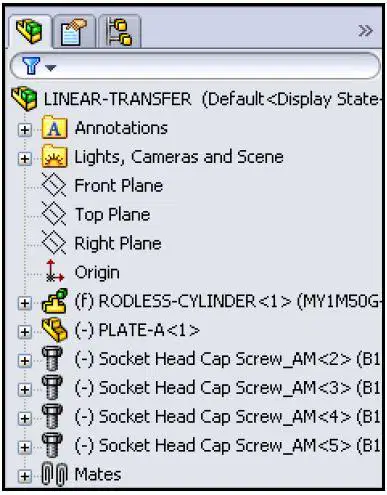
In an assembly, the (f) symbol means?
a)
A floating component
b)
The first component
c)
A broken component
d)
A fixed component
75.
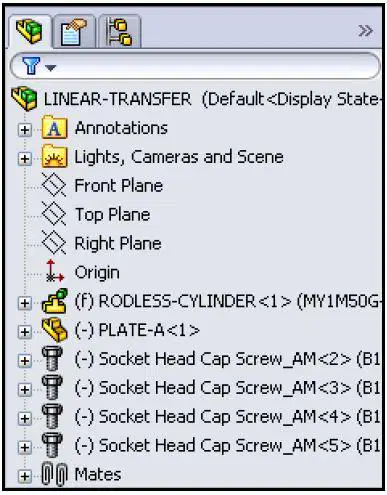
In an assembly, the (-) symbol means?
a)
A floating component
b)
The first component
c)
A broken component
d)
A fixed component
76.
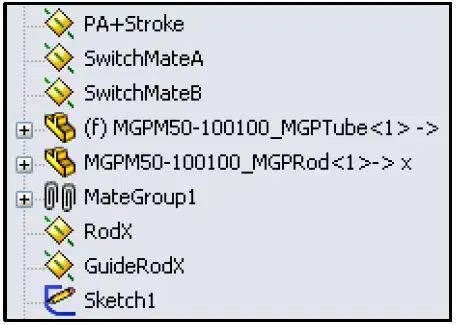
In an assembly, the Non symbol means?
a)
The Base component is mated to three assembly reference planes.
b)
The first component
c)
A broken component
d)
A fixed component
77.
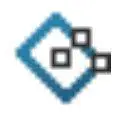
Identify the following Sketch Entities icon
a)
3 Point Corner Rectangle
b)
3 Point Center Rectangle
c)
Corner Rectangle
d)
Center Rectangle
78.
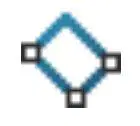
Identify the following Sketch Entities icon
a)
3 Point Corner Rectangle
b)
3 Point Center Rectangle
c)
Corner Rectangle
d)
Center Rectangle
79.
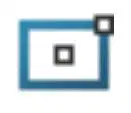
Identify the following Sketch Entities icon
a)
3 Point Corner Rectangle
b)
3 Point Center Rectangle
c)
Corner Rectangle
d)
Center Rectangle
80.
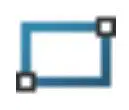
Identify the following Sketch Entities icon
a)
3 Point Corner Rectangle
b)
3 Point Center Rectangle
c)
Corner Rectangle
d)
Center Rectangle
81.
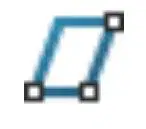
Identify the following Sketch Entities icon
a)
3 Point Corner Rectangle
b)
3 Point Center Rectangle
c)
Corner Rectangle
d)
Parallelogram
82.
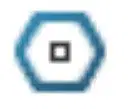
Identify the following Sketch Entities icon
a)
3 Point Corner Rectangle
b)
Polygon
c)
Corner Rectangle
d)
Parallelogram
83.
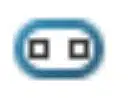
Identify the following Sketch Entities icon
a)
Straight Slot
b)
Centerpoint Straight Slot
c)
Centerpoint Arc Slot
d)
3 Point Arc Slot
84.
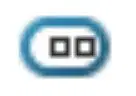
Identify the following Sketch Entities icon
a)
Straight Slot
b)
Centerpoint Straight Slot
c)
Centerpoint Arc Slot
d)
3 Point Arc Slot
85.
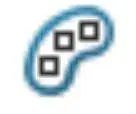
Identify the following Sketch Entities icon
a)
Straight Slot
b)
Centerpoint Straight Slot
c)
Centerpoint Arc Slot
d)
3 Point Arc Slot
86.
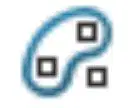
Identify the following Sketch Entities icon
a)
Straight Slot
b)
Centerpoint Straight Slot
c)
Centerpoint Arc Slot
d)
3 Point Arc Slot
87.
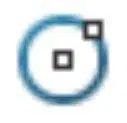
Identify the following Sketch Entities icon
a)
Circle
b)
Perimeter Circle
c)
Ellipse
d)
Partial Ellipse
88.
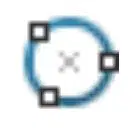
Identify the following Sketch Entities icon
a)
Circle
b)
Perimeter Circle
c)
Ellipse
d)
Partial Ellipse
89.
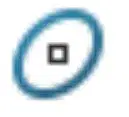
Identify the following Sketch Entities icon
a)
Circle
b)
Perimeter Circle
c)
Ellipse
d)
Partial Ellipse
90.
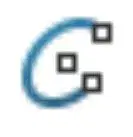
Identify the following Sketch Entities icon
a)
Circle
b)
Perimeter Circle
c)
Ellipse
d)
Partial Ellipse
91.
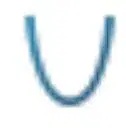
Identify the following Sketch Entities icon
a)
Parabola
b)
Conic
c)
Spline
d)
Fillet
92.
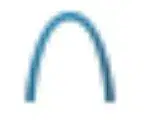
Identify the following Sketch Entities icon
a)
Parabola
b)
Conic
c)
Spline
d)
Fillet
93.
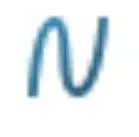
Identify the following Sketch Entities icon
a)
Parabola
b)
Conic
c)
Spline
d)
Fillet
94.
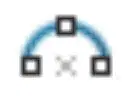
Identify the following Sketch Entities icon
a)
3 Point Arc
b)
Tangent Arc
c)
Centerpoint Arc
d)
Fillet
95.
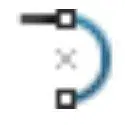
Identify the following Sketch Entities icon
a)
3 Point Arc
b)
Tangent Arc
c)
Centerpoint Arc
d)
Fillet
96.
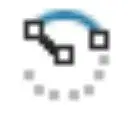
Identify the following Sketch Entities icon
a)
3 Point Arc
b)
Tangent Arc
c)
Centerpoint Arc
d)
Fillet
97.
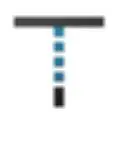
Identify the following Sketch Entities icon
a)
Line
b)
Trim
c)
Extend
d)
Offset
98.

Identify the following Sketch Entities icon
a)
Line
b)
Trim
c)
Extend
d)
Offset
99.
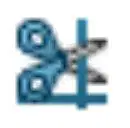
Identify the following Sketch Entities icon
a)
Line
b)
Trim
c)
Extend
d)
Offset
100.
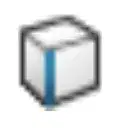
Identify the following Sketch Entities icon
a)
Line
b)
Trim
c)
Extend
d)
Convert
100 %