
 Worksheets
MS WORD BASIC TEST
Total questions: 55
Worksheet time: 27mins
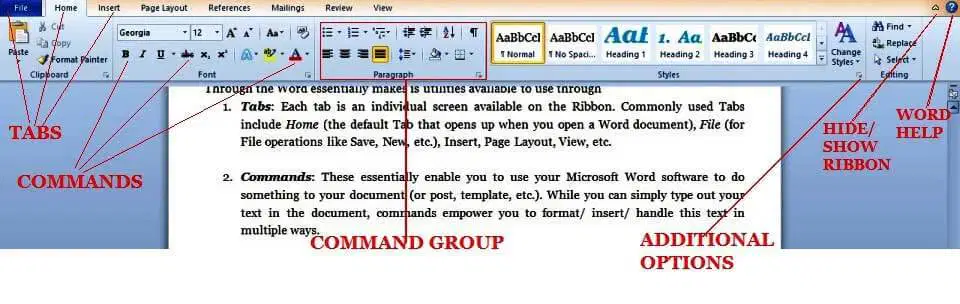
What does Command mean
multiple commands that are similar and near each other are contained in one tab
All commands and groups at the top of the document
A button that does an action when pressed on Word
Each tab on the ribbon surrounds a collection

True or false
Ribbon--------> This tab has commands to add footnotes, bibliographies, and table of context
True
False
Home Tab is also called
Primary Tab
Preliminary Tab

What does the Insert Tab do
allows you to add various items into a document; such as pages, tables,
illustrations, links to Internet sites or other documents, headers, footers,
text and symbols
shows all of the options to change the theme, setup, background,
paragraph and arrangement of a page
This tab has commands to add footnotes, bibliographies, and table of context
Where you create labels and envelopes

What does Undo do?
Redo your previous action.
Undo your previous action.

What is a Margin
The edge of your computer
The edge of your paper
The edge of the words on your paper
True or False
Tab Names-------->Home, Insert, Page Layout, Reference, Mailing, Review, View
True
False

What is a Tab
called the primary tab, contains the more frequently used commands
Each tab on the Ribbon surrounds a collection of groups
llows you to add various items into a document; such as pages, tables,
illustrations, links to Internet sites or other documents, headers, footers,
text and symbols
What is the name of the buttons in a group
Command Buttons
Committed Button
Commission Button
what does Microsoft Word create ?
Documents
Spreadsheets
Publications
Presentations
This contains all of the commands you'll need in order to perform common tasks.
Header
Save
Ribbon
Red Line
To save a document, which tab would you click on?
Insert
Page Layout
File
View

To change the color of the text, you would ____________.
Click on the B
Click on the Paint Brush that's not even in the font box
Click on the A with a red line under it.
Click on the ab with a yellow line under it.

The black blinking line that shows where you will type is called a(n) __________.
Arrow
Beam
Tab
Cursor

11 is the __________.
Font Size
Type Face
Font Type
Text Size
When you are editing a document you are __________.
creating new content
correcting or modifying a document
copying someone else's content
none of the above
This is located above the ribbon and offers shortcuts to commonly used tasks
Backstage
Status Bar
Ribbon
Quick Access Toolbar

A horizontal bar, typically at the bottom of the screen or window, showing information about a document being edited or a program running.
Spelling and Grammar
Status
Undo
Ribbon
The Spelling and Grammar feature is located on which tab?
File
Review
Insert
References
Which keyboard shortcut can you use to save a file?
CTRL + S
CTRL + X
CTRL + V
CTRL + Z
Which is a tab common to Word, Excel and Powerpoint?
Animations
Slides
File
Formulas
What button reverses the most previous action?
Review
Undo
Redo
Delete or Backspace
Most Microsoft Office Programs have this in common.
They have presentation tabs.
They all have the exact same tab names
They have cloud based storage
They have the Ribbon.

What does it means to cut a text?
"cut out" a selection of text or other data and save it to the clipboard.
changing the colour and size of the text
deleting
it is the same thing as copying
By pasting copied text, you duplicate it, making it faster to reuse the same word at another location.
True
False
What does the word 'edit' means?
copying an image or text to another page
saving a document
to make changes, correct mistakes, etc.,
none of the above
What does it means to type?
Writing
Inputting text by pressing keys on keyboard, cell phone, or calculator
to record your voice and other audio using a microphone
To save a document means to put sound or image onto something.
True
False
Which is NOT in microsoft word?
bold
underline
change text size
magic tool
What does it means to scroll?
To copy and paste text and graphics
to move text or graphics up or down or across a display screen
to read text and graphics
to save a document
If you need to print a document you should first press on the home button or file.
True
False
Microsoft word has tools to check your spellings and grammar.
True
False
Microsoft word allows users to:
save text
edit text
print text
All of the above


While working on a document, Rahman noticed a black blinking line located on the document. What is it called?
font color
cursor
clipboard
slide
What key are you going to use to change small letter to capital letter?
Enter Key
Delete Key
Shift Key
Backspace Key


Refers to the design or style of character.
Bold
Font name
Font size
Italics
What are the standard margin in a paper
1.5"
1"
0.5"
2"
What is the shortcut key for "Save"
CTRL + S
CTRL + P
CTRL + X
CTRL + V
This is one of the most common word processors available in the market.
MS Powerpoint
MS Word
MS Excel
MS Notebook

