
 Worksheets
STEM PRELIMINARY ROUND YEAR 2
Total questions: 45
Worksheet time: 23mins

Which of the following function can produce the following output?
Sprite and Background
Sound
Events
Control
How can we make the Sprites to be bigger or smaller?


What does these blocks represent?
When space key is pressed, the Sprite will turn to the left
When space key is pressed, the Sprite will turn to the right
When left key is pressed, the Sprite will turn to the left
When space key is pressed, the Sprite will move 10 steps

Which of the following will be performed by this algorithm?
The Sprite will move 10 steps, say "Hello" for 2 seconds and make a "meow" sound after the space key is pressed
The Sprite will move 10 steps, say "Hello" for 5 seconds and make a "meow" sound after the space key is pressed
The Sprite will move 10 steps, say "Hello" for 2 seconds and make a "meow" sound after the up key is pressed
The Sprite will move 10 steps, say "Hello" for 2 seconds and make a "meow" sound after the down key is pressed

Will this algorithm repeats itself?
Yes
No

How many times will the Sprite moves, say "Hello" and play the "meow" sound?
5 times
Forever
Once
10 times

Will the Sprite stops after you press the space key with this algorithm?
Yes
No
To make your Sprite move in a natural way (for example, moving the legs), what should you do?
Use change x by ... block
Use the move 10 steps block
Change the costume after setting the Sprite to move
Use the turn 90 degrees block

What will happen when you press the space key?
The Sprite will make the "meow" sound
The Sprite will stay still then make the "meow" sound
The Sprite will move 10 steps
The Sprite will make the "meow" sound only when it touches the mouse-pointer

What happen when you press the space key?
The Sprite will move back and forth
The Sprite will move to the edge and stop
The Sprite will move to the edge then back to its initial position
The Sprite will bounce around

To which position will the Sprite move?
To the left only
To the right only
At an angle
Upwards

This is an example of which output?
Visual
Sound

This is an example of which output?
Visual
Sound

What is the function of mBlock?
Create videos and books.
Create words and phrases.
Create characters, background, and give algorithms to the characters.
Create computers and robots.

What is the name of this section of mBlock?
Communication
Construction
mBlock
Animation

What is the name of this section of mBlock?
Animation
Communication
mBlock
Construction

What is the name of this section of mBlock?
mBclock
Construction
Communication
Animation

What is the option to create a character?
Background
Sound
Sprites
Event

What is the option to create a background?
Background
Sound
Sprites
Event

What is the function of communication section?
Create characters
Create toys
Create algorithms
Create mBclok

What is the animal of mBlock platform?
(a)

What is the section where you can see the character?
Ok
Animation
Communication
Background
mBlock is a block-based and code-based programming hardware.
Correct (O)
Incorrect (X)
What is the default sprite in mBlock?
Panda
Bee
Cat
Bear
You can program your sprite to make sounds by recording your own voice.
Correct (O)
Incorrect (X)
You can find out the other sprites in the Sprite Library.
Correct (O)
Incorrect (X)
You can make the sprite move by simply dragging one Motion block "move ( ) steps" to the Scripts area.
Correct (O)
Incorrect (X)

This picture shows .....
Panda
Sprite
Background
Devices
What is the use of Motion function in Mblock?
Calculation
Movement
What is the benefit of programming?
To show off to your friends
Hacking other people
To enhance problem solving skills

What is the purpose of this function?
Click to stop
Click to delete
Click to reset
Click to start

What is the coding for?
To calculate the price of orange
To find the total number of orange
To find the total price of apple
If you can master the skill of programming, What would you do?
Create a mobile app
Design a website
Develop your own robot
Create your own game
Your select the icon correct for the Mblock


What is the block to start the program?


¿Which of the following blocks allows movement to be programmed?


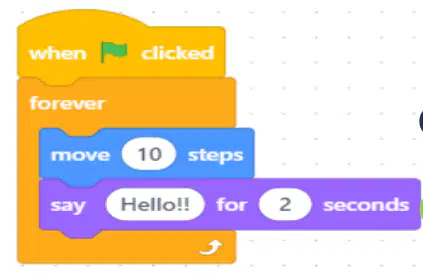
¿Answer True or False: The next block allows the object to move 10 steps.?
TRUE
FALSE

Answer True or False: When you press the green flag it will move forward 10 steps and say hello!! for 2 seconds.
TRUE
FALSE
To insert an object on the stage I must click:


What is the name of each line?
Programming
Blocks
What is the icon correct for add the character?


What is the icon to change the stage background?
Which block can only be used in Upload Mode?


What is the value of X and Y to put a sprite exactly at the center of the stage?
X: -180 , Y: 240
X: 100 , Y: 100
X: 1 , Y: 1
X: 0 , Y: 0
How can we make the Sprites to be bigger or smaller?

