
 Worksheets
Scratch Programming
Total questions: 50
Worksheet time: 28mins
What is a sprite in Scratch?
A sprite in Scratch is a character or object that can be programmed to perform actions.
A sprite is a sound effect used in Scratch.
A sprite is a programming language used in Scratch.
A sprite is a type of background in Scratch.
What block would you use to repeat an action in Scratch?
forever block
repeat block
if block
wait block
What is the purpose of the 'if' block in Scratch?
To define variables in Scratch.
To display messages on the screen.
To execute instructions based on a condition being true.
To create loops for repeated actions.
How do you create a variable in Scratch?
Click on 'Variables', then 'Make a Variable', enter a name, and click 'OK'.
Go to 'Looks', then 'Change Appearance', enter a name, and click 'Confirm'.
Click on 'Events', then 'Create a New Event', enter a name, and click 'Save'.
Select 'Control', then 'Add a Control Block', enter a name, and click 'Apply'.
What event block starts a script when the green flag is clicked?
when green flag clicked
when red flag clicked
when space key pressed
when sprite is clicked
What block would you use to play a sound in Scratch?
stop sound [sound name]
change pitch by [number]
set volume to [number]
play sound [sound name]
How can you add background music to your Scratch project?
Use the 'Costumes' tab to add images instead of sounds.
Click on the 'Sounds' tab, choose or upload a sound, and use the 'play sound' block in your script.
Select the 'Events' tab to trigger music playback.
Drag and drop music files directly onto the stage.
What is the purpose of the 'broadcast' block in Scratch?
To create new sprites for the project.
To control the size of the sprites.
To change the background of the stage.
To send messages to all sprites for coordinated actions.
What are the key elements of game design in Scratch?
Key elements of game design in Scratch include sprites, backdrops, scripts, user controls, and sound effects.
Storyline, objectives, and multiplayer features
Game mechanics, player feedback, and graphics
Levels, characters, animations, and power-ups
What is the role of the 'forever' block in Scratch?
The 'forever' block stops actions after a set time.
The 'forever' block allows actions to be repeated indefinitely.
The 'forever' block is used to pause the program.
The 'forever' block only runs once when triggered.
How can you make a sprite animate in Scratch?
Change the sprite's size to create an animation effect.
Use the 'play sound' block to animate a sprite.
Use the 'move' block in a straight line to animate a sprite.
Use the 'next costume' block in a loop to animate a sprite.
What is the difference between a costume and a backdrop in Scratch?
A costume is a background; a backdrop is a sprite's appearance.
A costume is a sprite's appearance; a backdrop is the stage's background.
A costume is used for sound effects; a backdrop is for animations.
A costume is a type of backdrop; a backdrop is a type of costume.
How do you use the 'wait' block in your scripts?
The 'wait' block allows for user input before proceeding.
The 'wait' block pauses the script for a specified duration before continuing.
The 'wait' block speeds up the script execution.
The 'wait' block is used to repeat a section of the script.
What is a good way to test your Scratch game for bugs?
Ask a friend to play without any instructions.
Ignore any error messages that appear during gameplay.
Playtest the game thoroughly and gather feedback from others.
Only test the game once to save time.
How can you share your Scratch project with others?
Post the project on social media without sharing the link.
Email the project file to friends.
Print the project and distribute physical copies.
Click the 'Share' button on your project page and copy the link to share.
What block would you use to stop a sound in Scratch?
stop sound [sound name]
play sound [sound name]
set volume to [number]
change pitch by [number]
What is the function of the 'hide' block in Scratch?
The 'hide' block makes the sprite invisible on the stage.
The 'hide' block stops all scripts from running.
The 'hide' block removes the sprite from the project.
The 'hide' block changes the sprite's costume.
How can you change a sprite's color effect in Scratch?
Use the 'change color effect by [number]' block.
Change the sprite's costume to a different color.
Use the 'set color effect to [number]' block.
Color effects cannot be applied to sprites.
What does the 'stop all' block do in Scratch?
It stops all sounds from playing.
It stops all scripts from running in the project.
It pauses the game for a specified time.
It resets all variables to their initial values.
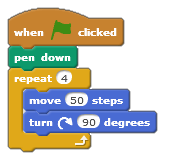
What shape will this code draw?
Circle
Square
Triangle
Rectangle
Which block allows you to make decisions (choices)?


Which of the following symbols means "greater than"?
<
**
/
>

If Jenny is 13, which message will be broadcast?
Message 1
Message 2
Message 3
Message 4

If Josh is 11 years old, what will this program print out?
It won't print out anything
You are old enough for Year 8
You are still in year 7
It will print out his age

What happens to sprite?
Goes Up
Goes Down
Goes Right
Goes Left

This shows the script for a character in a game.
What happens to the score when the character touches the edge?
Score will remain the same
Score will increase by 1
Score will decrease by 1
Score will increase by 2
What is the definition of an Algorithm?
A set of instructions to perform a process.
The answer to a question.
A question to be answered
A list of instructions.
Which of the following statements best describes the term 'programming'?
A set of instructions
A group of words
Building blocks
Entertainment on the TV
In the programming language Scratch, what is the purpose of the "script"?
It is a character in a game or program.
It is the background in a game or program.
It is the instructions for the program.
It is used to keep the score or add a timer.
Which block allow movement/motion in Scratch?


What will happen when the green flag is clicked?
Make the character spin
Add a sprite
Make the ball bounce

Which categories does this command blocks belong to?
Motion
Events
Looks
Control
Which block of code is used to make the character change costume?
Control
Looks
Motion
Sensing
What is another name for your background in Scratch?
Back
Background 1
Sprite
Backdrop
Which command use to let the sprite walk?
Go
Walk
Run
Move

In scratch, these characters are called?
Backdrop
Block
Stage
Sprite
Which block allows you to make decisions (choices)?

How many categories of block do we have in Scratch?
12
10
9
2

Which category of block contains this block?
Sensing
Motion
Operators
Events
Sound
What colour is the default cat in Scratch?
Brown
Black
Orange
White
It is possible to add maths into scratch, what colour blocks are these?
Blue
Green
Orange
Yellow

What is the variable in this script?
forever
if
age
say
Which block is used to change the background in Scratch?
Modify backdrop with
Set backdrop to
Alter backdrop using
Change background to
What are blocks in Scratch programming?
Text-based commands for advanced users in Scratch programming.
Musical notes used to create melodies in Scratch programming.
Puzzle-piece-shaped visual elements representing code commands or actions in Scratch programming.
Visual representations of physical objects in Scratch programming.
What is the 'Costumes' feature used for in Scratch?
It is used to play sounds in Scratch.
It is used to change the appearance of sprites.
It is used to create new variables in Scratch.
It is used to draw shapes in Scratch.
What is Scratch?
Scratch is a term used in sports.
Scratch is a block-based programming language and online community.
Scratch is a popular dance move.
Scratch is a type of cleaning product.
What are the basic programming concepts in Scratch?
Loops
Events, Control, Motion, Looks, Sound, Pen, Data, Operators
Variables
Functions
Explain the purpose of the 'Stage' and 'Sprites' in Scratch.
The 'Stage' is where the characters are programmed, and the 'Sprites' are the background images.
The 'Stage' is used for creating animations, while the 'Sprites' are used for sound effects.
The purpose of the 'Stage' is to provide the backdrop and scripts for the main action, while the 'Sprites' are the characters or objects that perform actions with their own scripts and costumes.
The 'Stage' is for storing variables, and the 'Sprites' are for controlling the flow of the program.
How can you make a sprite move in Scratch?
Use the 'go to x: y:' block or 'change x by' and 'change y by' blocks to move the sprite in Scratch.
Change the background color to move the sprite
Use the 'hide' block to move the sprite
Click on the sprite to make it move
How can you create animations in Scratch?
Import animations from other software into Scratch
Use Scratch to write code in Python for animations
Use Scratch's built-in blocks to move sprites, change costumes, and play sounds in sequences, loops, and conditional statements.
Create animations by drawing directly on the screen with a stylus

