
Font size
 Worksheets
Chromebook Keyboard Level 2
Total questions: 24
Worksheet time: 15mins
Ctrl + Z
Undo the last action
Copy to clipboard
Cut to the clipboard
Close the current tab
Ctrl + Switch Window (the button above the 6)
Find (Search the current page)
Full Screenshot
Screenshot Menu
See list of available keyboard shortcuts
Ctrl + Shift + Switch Window (the button above the 6)
Takes a Partial Screenshot
Takes a Full Screenshot
Opens the Screenshot Menu
Shows a list of available Keyboard Shortcuts
What does the keyboard shortcut Ctrl + C do?
Copy to clipboard
Close the current tab
Undo the last action
Cut to the clipboard
What does the keyboard shortcut "Ctrl + minus" do?
Undo the last action
Close the current tab
Zoom out on the page
Zoom in on the page
What does the keyboard shortcut "Ctrl + Plus" do?
Copy to clipboard
Zoom out on the page
Zoom in on the page
Cut to the clipboard
What does the keyboard shortcut Ctrl + Shift +T do?
Undo the last action
Open a new tab
Select All
Open the last closed Tab
What does the keyboard shortcut Ctrl + P do?
Prints the current page
Undo the last action
Paste from clipboard
Close the current tab
What does the keyboard shortcut Ctrl + 0 do?
Cut to the clipboard
Reset to normal zoom level
Bookmark the current page
Close the current tab
What does the keyboard shortcut Ctrl + F do?
Bookmark the current page
Reset to normal zoom level
Find (Search the current page)
Undo the last action
What does the keyboard shortcut Ctrl + V do?
Copy to clipboard
Undo the last action
Paste from clipboard
Close the current tab
What does the keyboard shortcut Ctrl + X do?
Close the current tab
Paste from clipboard
Copy to clipboard
Cut to the clipboard
What does the shortcut ctrl + ] do?
Nothing
Docks to the right side of the screen
Zooms out of the page
Zooms your whole computer screen out
Match the correct keyboard shortcut to its function:
CTRL + v
Paste the clipboard content
CTRL + z
Undo the last action
CTRL + y
Redo the last undone action
CTRL + x
Cut the selected text
Select All
Ctrl + a
Ctrl + b
Ctrl + c
Ctrl + d
What does the keyboard shortcut Ctrl + T do?
Zoom in on the page
Close the current tab
Undo the last action
Open a new tab
What does the keyboard shortcut Ctrl + A do?
Undo the last action
Close the current tab
Open a new tab
Select All
Help! I accidentally closed a tab that I really need. What keyboard shortcut can help me?
(a)
I added a circle to my slide. I need to make it bigger, but I keep accidentally turning it into an oval! What key can I press to prevent this?
CRTL
SHIFT
ALT
TAB
What is the keyboard shortcut to PASTE from your clipboard? Ctrl + _
(a)
What is the keyboard shortcut to copy an item? Ctrl + _
(a)
What is the keyboard shortcut to undo an action? Ctrl + _
(a)
What is the keyboard shortcut to open a new tab?
(a)
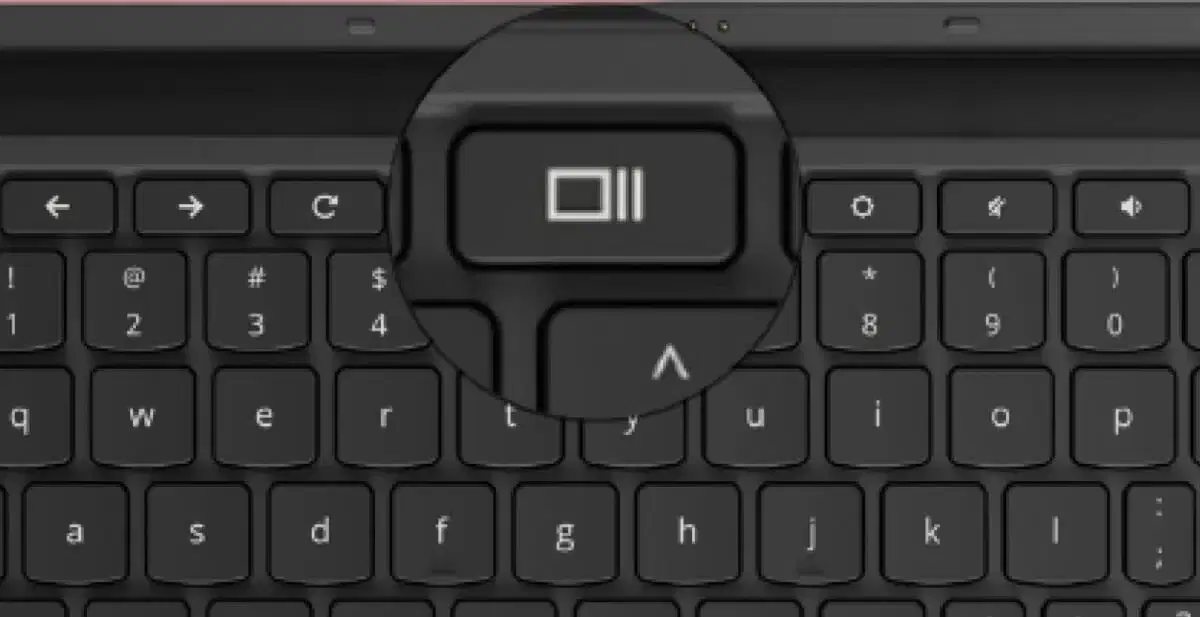
What is the proper name for this key?
Button above the 6
Screenshot Key
Switch Window Key
Camera Key

